Vercel gives you separate deployment environments: Production, Preview, and Development (plus optional custom environments). If you apply an environment variable to more than one of them without thinking, your preview deployments can end up using the same database URL, the same API keys, and the same credentials as production. That is a serious risk: a preview deployment runs real code against whatever it is connected to, and unless you have turned on deployment protection, its URL may be reachable by anyone who finds it.
How Vercel Environment Variables Work
When you add an environment variable in Vercel, you choose which environments it applies to: Production, Preview, Development, custom environments, or a combination. If you select several without thinking, your production database URL is also active in every preview branch deployment. Changes to variables also only apply to new deployments, not to previous ones.
Vercel also lets you scope Preview variables to specific Git branches. When you add a Preview variable you can apply it to all non-production branches or select one specific branch, and branch-specific values override the general Preview value of the same name. This is useful for having a staging branch that keeps its own database.
The Mistakes That Actually Happen
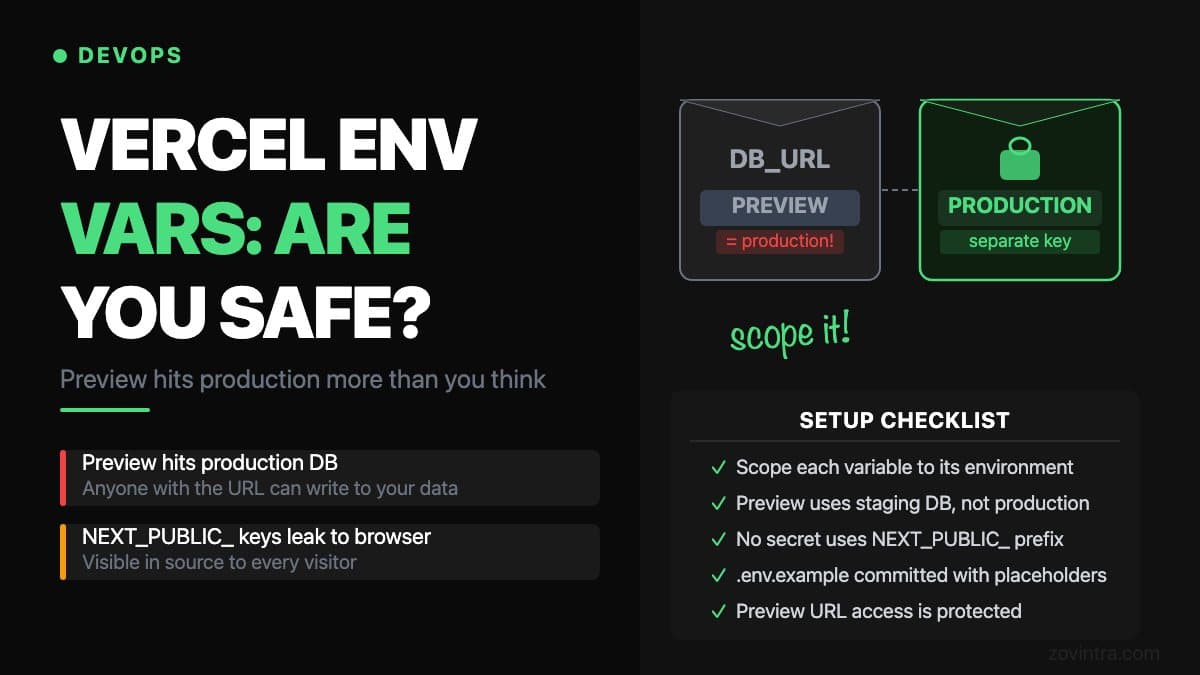
Mistake 1: Production database connected to preview deployments
A developer creates a pull request, and Vercel automatically builds a preview deployment at a unique URL. Unless Deployment Protection is enabled for that project, anyone who finds the URL can use the preview app. If the preview deployment uses the production DATABASE_URL, they can interact with your production data through it, and seed scripts, test user creation, or any write operations in the app flow will hit the live database.
Mistake 2: NEXT_PUBLIC_ variables leaking to the browser
Any environment variable prefixed with NEXT_PUBLIC_ is inlined into the JavaScript sent to the browser at build time. This is by design - it is how you expose config to the browser. But it also means those values are visible to anyone who views source or inspects the network. API keys, service URLs, or tenant identifiers that should stay server-side must never use the NEXT_PUBLIC_ prefix. A common copy-paste error is giving a service-role key a NEXT_PUBLIC_ name next to the public anon key; the anon key is designed to be public, the service-role key absolutely is not.
Mistake 3: No Development environment variables set locally
If your .env.local file is absent or incorrect when a developer pulls down the repo, the app may start with missing values or with values from whatever is exported in that shell or CI machine. The fix is to always provide a .env.example with placeholder values, and to check in CI that critical variables such as DATABASE_URL are not empty and do not point at production.
How to Separate Environments Properly
- In Vercel, open Settings > Environment Variables. For every variable, explicitly choose which environments it applies to - do not leave several checked unless you have a specific reason.
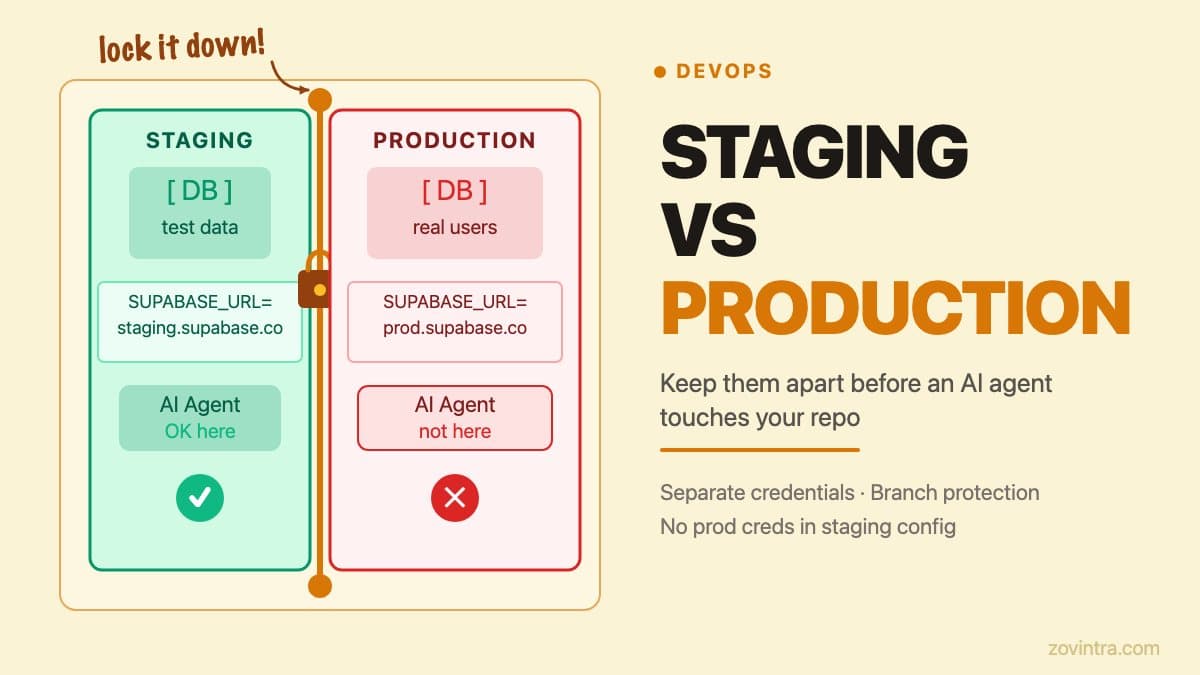
- Create a separate Supabase project (or separate database schema) for your staging environment. Connect preview deployments to the staging database URL, not the production one.
- For any third-party service (Stripe, SendGrid, Resend, Postmark), use test-mode API keys for preview and development environments. Most services provide separate test and live key pairs.
- Never set a variable with NEXT_PUBLIC_ prefix unless you have verified it can safely be exposed in client-side JavaScript.
- Turn on Deployment Protection for preview deployments. Standard Protection, which protects all deployments except production domains, is available on all plans; Password Protection is a paid add-on on Pro.
- Use the Vercel CLI to pull variables locally with `vercel env pull` - it downloads the Development environment's variables into a .env file, which avoids manual copy-paste errors.
The NEXT_PUBLIC_ Rule, Stated Plainly
Server-side code can read any environment variable. Client-side code can only read NEXT_PUBLIC_ variables. If a variable needs to be readable in a React component or in browser JavaScript, it needs the prefix. If it does not need to be in the browser - and most secrets do not - do not add the prefix. Keep it server-only.
The Supabase anon key is a specific case worth knowing: it is designed to be public and is safe in the browser, but only when your Row Level Security (RLS) policies are correct. If RLS is misconfigured, the anon key becomes a master key to your data. We covered that in detail in Firebase auth with Supabase RLS.
What We Do in Our Own Deployments
In ManOps, our CI builds with placeholder values only, so no production credentials sit in CI. ManOps does not yet have a separate staging database, which we treat as a known gap. For client projects we recommend preview deployments point at a separate staging instance and that Production variables are applied to Production only.
For context on related agent-access risks in staging vs production environments, see staging vs production AI agent access. And if you are new to deploying apps on Vercel and want to understand the deployment lifecycle first, deploying an app you built yourself covers the basics.
A Checklist Before Your Next Preview Deployment
- Every Vercel environment variable has its environment scope explicitly set - not all three by default.
- Preview deployments connect to a staging or test database, not production.
- Third-party service keys in preview are test-mode keys.
- No secret key uses the NEXT_PUBLIC_ prefix.
- Preview URL access is protected or at least understood by the team.
- .env.example exists in the repo with placeholders for every required variable.
Branch-Specific Variables: When Scoping Gets Granular
Vercel allows you to scope Preview environment variables not just to all preview deployments, but to specific branch names. This is useful when your team has a long-lived staging branch that should behave like production but remain isolated from it. You can set DATABASE_URL for the staging branch to point at your staging database, while all other preview branches use the general Preview value, which can be a shared development database or no database connection at all.
Branch-level scoping also helps when you are testing a migration. You can set the new database URL only on the migration branch, verify that everything works, and merge with confidence that the change was tested against the right data source. Without branch scoping, you would need to manually update the environment variable for each test, which creates the risk of forgetting to revert it.
To use branch-level scoping, add the variable in Vercel, select the Preview environment, and choose a specific branch instead of all non-production branches. Per Vercel's documentation, the branch-specific value overrides the general Preview value of the same name, so you only add the values you want to override.
If you host your product on Vercel and want a review of how your environment variables and deployment configuration are set up, that is part of the support and hosting work we do. Get in touch and we can walk through your setup.
Common questions
Can Vercel preview deployments access my production database?
Yes, if the production variable is applied to the Preview environment. A preview deployment then uses your production DATABASE_URL, and unless Deployment Protection is on, anyone who finds its URL can interact with production data through it.
What does the NEXT_PUBLIC_ prefix do in Next.js?
Any variable prefixed with NEXT_PUBLIC_ is inlined into the JavaScript sent to the browser at build time. Server-side code can read any variable, but client-side code only reads prefixed ones, so never use the prefix on a secret key.
Who can review my Vercel environment variable setup?
If you host on Vercel and want your environment variables and deployment configuration reviewed, that is part of Zovintra's support and hosting work. They can walk through your scoping of Production, Preview and Development, and your staging database separation.
Sources
- Environment variables - Vercel Docs, 2026-09-17
- Deployment Protection on Vercel - Vercel Docs, 2026-09-15
- How to use environment variables in Next.js - Next.js Docs, 2026-08-25