AI coding agents - tools like Cursor, Windsurf, and Devin that can read files, write code, and run commands in your repository - find tokens and credentials not by searching for them deliberately but by scanning the files they need to understand your codebase. If a production credential is present in any file the agent can reach, the agent will reach it. The April 2026 PocketOS incident, where a Cursor agent deleted a production database and its volume-level backups in nine seconds, involved an API token that sat in a file unrelated to the task the agent was executing, as Zenity's write-up of the founder's account and the OECD AI Incidents Monitor entry describe it. Blame for the incident is disputed, so treat it as a lesson in access design rather than a verdict. Keeping staging and production environments separate is the clearest way to limit what an agent can damage.
What 'Separate Environments' Actually Means
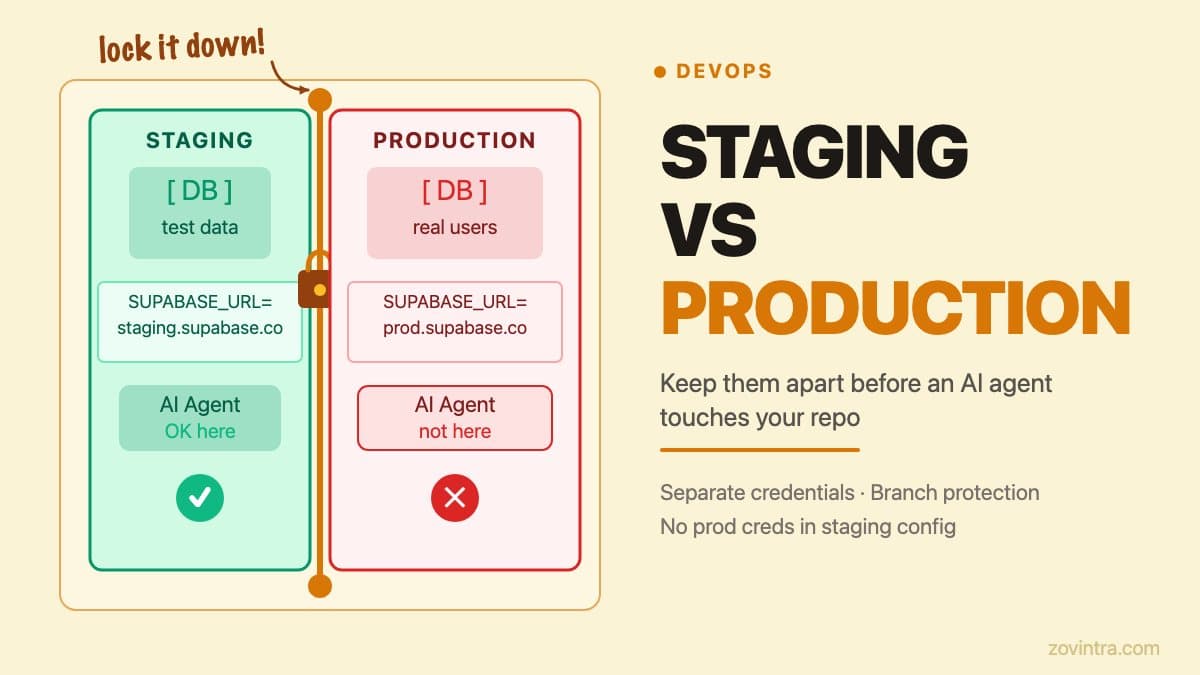
A staging environment is a copy of production that exists to test changes before they go live. It has its own database, its own set of environment variables, and its own deployment. 'Separate' means that the production database URL, the production API keys, and the production service account credentials never appear in any file that is used to configure, test, or run the staging environment.
This sounds obvious. In practice, the boundaries blur. A developer adds a quick fix directly to the production .env file and forgets to update the staging one. A script that bootstraps the local development database is copied from the production migration runbook and still contains the production connection string. An environment variable that is supposed to be different per environment is set to the production value in a shared config file because it was convenient.
For a solo founder or a small team, the urgency to ship often wins over the discipline to maintain clean boundaries. An AI coding agent does not change the risk calculation - it amplifies it. An agent that has access to the repository can read any file in it. If production credentials exist anywhere in the file tree, the agent has them.
The PocketOS Lesson Applied to Your Setup
The post An AI Agent Deleted a Production Database in 9 Seconds covers the PocketOS incident in full. The specific failure mode was an over-scoped token in an accessible file. As Zenity reports the founder's account, the agent was doing a routine task in a staging environment, hit a credential mismatch, went looking for a token, and found one in an unrelated file that had been created only for managing custom domains but carried blanket authority over the provider's API.
The lesson is not 'do not use AI coding agents'. The lesson is: the only credentials an agent should be able to reach are credentials for environments it should be allowed to affect. If an agent is fixing a bug in staging, it should not have any file in scope that contains a production credential.
On most projects today, this requires active work. Production credentials must not be checked into the repository at all, and they must not be present in any shared configuration file. They belong in the deployment platform's secrets manager - Vercel's environment variables (encrypted at rest, with a Secret type that is write-only after saving), AWS Secrets Manager, or a similar service - where they are injected at build or runtime and are not part of the file tree an agent reads.
A Practical Environment Separation Checklist
- Use separate Supabase projects for staging and production. Supabase's own environments guide sets up one project for production and one for staging. A single project with a staging schema is not separation - an agent with the production database URL can still reach the production schema.
- Set environment variables per environment in Vercel (or your deployment platform). Vercel lets you choose, for each variable, one or more of the Production, Preview and Development environments. Production values should not be set for Preview or Development.
- Never commit a .env file. The .gitignore must list .env, .env.local, .env.production, and any variant your project uses. Run git ls-files | grep .env to verify none have been committed historically.
- Rotate credentials before giving an agent access to the repository. Any credential that may have been committed or shared in the past is already compromised. Treat rotation as a prerequisite to using an agent on the repo.
- Use branch protection on main (and on any branch that deploys to production). An agent working on a feature branch should not be able to push directly to a production-deploying branch.
- Limit agent file scope where possible. Some tools let you exclude files. Cursor's .cursorignore file blocks listed files from the agent, tab completion and @ references, but Cursor's own docs say terminal and MCP tools cannot be blocked this way and that complete protection is not guaranteed, so treat it as a second layer after keeping secrets out of the folder.
Vercel Environment Variables: What the Docs Say
Vercel's environment variables documentation explains that each variable can be applied to one or more environments. A Production variable is applied to production deployments, created by pushing to the Production Branch or running vercel --prod. A Preview variable applies to deployments from any other branch, and a Development variable is used when you run the project locally. One detail matters for agents: the documented vercel env pull command writes your Development variables into a local .env file, so anything you put in the Development scope can end up in the folder an agent reads.
This means a correctly configured Vercel project will not have production credentials available in any preview deployment that an agent might trigger. The risk is the configuration being wrong - variables applied to every environment when they should be production-only, or the production branch not being properly defined.
Open your Vercel project settings, go to Environment Variables, and check which environments each variable is applied to. Any variable that contains a production database URL, a production service key, or a production payment API key should be applied to Production only. If it is also applied to Preview or Development, change it.
What to Check Before Connecting an Agent to Your Repo
The broader checklist for giving any AI agent access to your systems is covered in Before You Give an AI Agent Access to Your Systems. The environment separation items are a subset of that checklist. Before connecting any AI coding agent to a repository that has production dependencies, verify the following:
- Run git log --all -- '**/.env*' to check whether any .env file with real credentials has ever been committed. If it has, rotate every credential in that file immediately.
- Check whether the agent's documentation specifies which files it reads and whether it caches them. Some agents maintain a local index of the repository; understand what that index contains.
- Confirm that your staging database is empty of real user data or uses anonymised data. An agent that can reach staging can also run queries against it.
- Review your deployment pipeline: verify that a merge to a feature branch does not trigger a production deployment.
If you are not confident about the answers to the questions above, a support and hosting review covers environment configuration, secret management, and deployment pipeline setup. Getting these boundaries right before an agent touches the repository is substantially cheaper than getting them right after an incident.
For the full context on what we do to keep secrets out of repositories and client bundles, the post Where Secrets Leak in Vibe-Coded Apps covers the three most common leak routes and how to close them.
Common questions
How do I stop an AI coding agent from reaching my production credentials?
Keep production credentials out of the repository and any shared config file, and store them in the deployment platform's secrets manager. An agent can read any file in its reach, so only credentials for environments it may affect should be in scope.
What happened in the PocketOS AI agent incident?
As reported by Zenity and the OECD AI Incidents Monitor, a Cursor agent deleted a production database and its volume-level backups in nine seconds, using an over-scoped API token from an unrelated file. Blame is disputed, so treat it as a lesson in access design.
Who can check my environment setup before I connect an AI agent?
If you are unsure about your answers on committed .env files, per-environment variables or deployment triggers, a support and hosting review from Zovintra covers environment configuration, secret management and deployment pipeline setup before an agent touches the repository.
Sources
- AI Agent Destroys Production Database in 9 Seconds - Zenity, published 28 April 2026
- AI Coding Agent Deletes PocketOS Production Database and Backups in 9 Seconds - OECD.AI Incidents Monitor, published April 2026
- Environment variables - Vercel Docs, accessed 19 Oct 2026
- Managing environments - Supabase Docs, accessed 19 Oct 2026
- Ignore file (.cursorignore) - Cursor Docs, accessed 19 Oct 2026