Firebase Auth and Supabase are a common combination - Firebase for authentication (especially Google sign-in and phone auth) and Supabase for the PostgreSQL database with row-level security. Getting them to work together is not complicated, but there are three places where the identity chain silently breaks. Every one of those breakages looks like either an empty dashboard or a 401 that gives no useful message. This post explains how the chain works, where it fails, and what we learned building it on a real product.
How the Identity Chain Is Supposed to Work
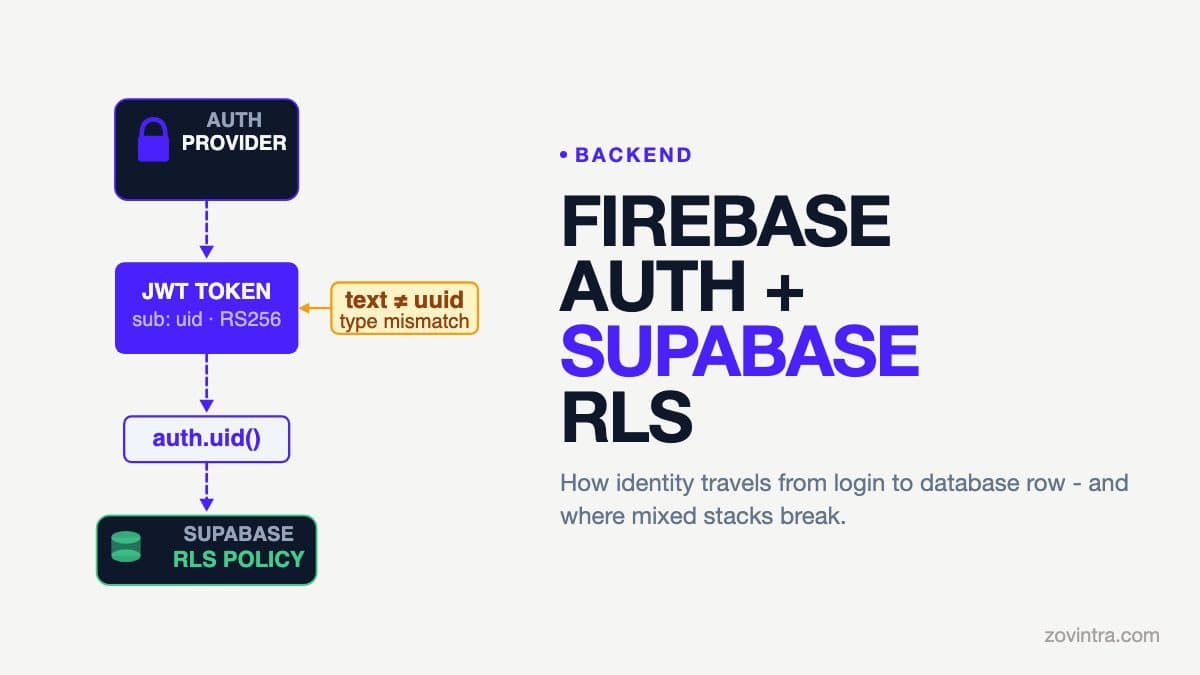
Firebase Auth issues ID tokens that are signed with RS256, and the sub claim is the user's uid. That uid is a text string, not a UUID: in our own project it was a 28-character alphanumeric string, and Firebase lets you supply custom uids of 1 to 128 characters. When your frontend makes a request to Supabase, it passes this JWT in the Authorization header. Supabase verifies the JWT signature and uses its claims for the request. In our experience the sub claim then needs to be read as text inside your RLS policies (see below).
For this to work, Supabase must know Firebase's public keys so it can verify the RS256 signature. This is configured under Third-Party Auth in the Supabase dashboard - you add Firebase as a provider with your Firebase project ID, following the Supabase Firebase Auth guide. Without this configuration, Supabase has no way to trust Firebase tokens and requests with them are rejected.
Step 1: Configure Third-Party Auth in Supabase
In the Supabase dashboard, navigate to Authentication > Third-Party Auth and add a new provider. Select Firebase. You will need your Firebase project ID - it appears in the Firebase console under Project Settings. Firebase's tokens carry an issuer of https://securetoken.google.com/YOUR_PROJECT_ID. Once saved, Supabase accepts Firebase tokens, but there is one more step the docs call out: Firebase tokens lack the `role` claim by default, so requests fall back to the anon role until each user has a custom claim of `authenticated` (set with an onCreate Cloud Function or blocking function, plus a one-time backfill for existing users). In our migration, auth.uid() failed on Firebase UIDs because the database expected a uuid. Read the claim as text instead - for example with a helper function that returns auth.jwt() ->> 'sub' - and use that helper in your RLS policies.
You can verify this is working by making a request to your Supabase endpoint with a real Firebase ID token and checking whether you get a 200 or a 401. If you get a 200 with an empty result set, the JWT is verified but your RLS policies may be returning no rows - which is a different problem and the one to check next. Supabase's docs note that a SELECT that RLS filters down to nothing returns an empty result with no error, whereas a failed INSERT check raises an error.
Step 2: The Type Mismatch - UUID vs Text
This is the failure mode that causes the most confusion, and we encountered it directly during a real production migration. When a Supabase project is created with Supabase Auth, the default user ID type is UUID - a 128-bit identifier with a specific format (xxxxxxxx-xxxx-xxxx-xxxx-xxxxxxxxxxxx). When you migrate to Firebase Auth, the user IDs change to 28-character alphanumeric strings, which are text, not UUID.
If your database schema still defines user_id columns as UUID type, every query that uses auth.uid() to filter will fail. In PostgreSQL, comparing a UUID column to a text value produces error code 42804 ("column is of type uuid but expression is of type text") or 22P02 ("invalid input syntax for type uuid"). These errors appear in Supabase's response as 400 Bad Request with the PostgreSQL error detail in the body. They are not logged as obvious auth failures - they look like query errors.
The fix is to change the column type from UUID to TEXT in all tables that store user IDs, and to update the primary key of your profiles table accordingly. This requires a database migration. On a Supabase project, a migration looks like this:
- Add a new column (firebase_uid TEXT) to the profiles table
- For existing users, populate firebase_uid by looking up their email in auth.users and matching it to the Firebase UID from the Firebase Admin SDK user list
- Update all foreign key references (invoices.user_id, clients.user_id, etc.) to use the text UID
- Update RLS policies to compare against the text column
- Once verified, drop the old UUID columns
On a client project we hit this exact type mismatch during an auth-provider migration. The symptom was that existing users could not see their data after logging in - their historical records had UUIDs as user_id values, and their new Firebase UID was text that did not match. The data was intact; the ownership link was broken. We documented the hotfix SQL.
Step 3: Writing RLS Policies That Use Firebase UIDs
Once Third-Party Auth is configured and your schema uses TEXT for user IDs, use a helper function that reads auth.jwt() ->> 'sub' as text (not auth.uid(), which casts to uuid and will crash on Firebase tokens). Your RLS policies use the helper:
- SELECT policy: USING (user_id = firebase_uid()) - allows users to see only their own rows (where firebase_uid() is your helper returning auth.jwt() ->> 'sub')
- INSERT policy: WITH CHECK (user_id = firebase_uid()) - ensures new rows are always attributed to the authenticated user
- UPDATE policy: USING (user_id = firebase_uid()) - prevents users from modifying rows they do not own
- DELETE policy: USING (user_id = firebase_uid()) - prevents deletion of other users' records
A common mistake at this stage is enabling RLS on the table but not writing all four policies. If you have SELECT enabled but no INSERT check, users can query only their own rows but insert rows attributed to any user_id they supply in the payload. The WITH CHECK on INSERT is what closes this gap. This is one of the patterns described in detail in our post on Supabase RLS that looks on but lets data through.
The Account-Linking Pattern
If your product has users who existed before you introduced Firebase Auth - for example, users who signed up via email/password through Supabase Auth - you need an account-linking step. This is an RPC (Remote Procedure Call) function that runs on the database server with elevated permissions to find the existing account by email and associate the Firebase UID with it.
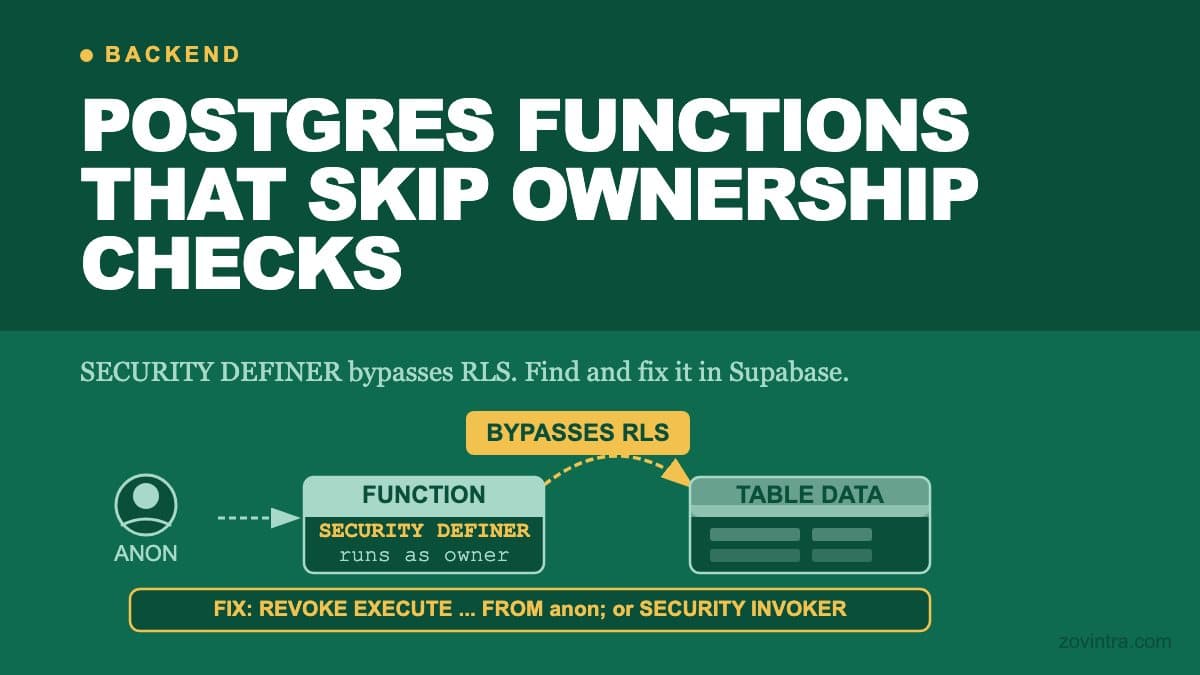
The function runs as SECURITY DEFINER so it can access auth.users (which is in the auth schema, not accessible to regular RLS policies). Supabase's docs warn that such a function runs with its owner's privileges, can skip RLS, should set `search_path = ''`, and should never sit in an exposed schema. It looks up the existing user by email, creates a profiles record linked to the Firebase UID, and copies the ownership references from the old UUID-based records. This function must be idempotent - safe to call multiple times - and must be gated so that only an authenticated Firebase user can call it for their own account. Never allow an unauthenticated call to this RPC.
What to Test Before You Ship
- New user signup: creates a profiles row with the Firebase UID as the primary key; RLS policies allow the user to see only their own data immediately after signup
- Existing user login: account-linking RPC runs, finds the existing records by email, the user sees their historical data
- Cross-user attempt: authenticated as User A, send a direct API request with User B's record ID; confirm that RLS returns no rows (not a 403 - Supabase PostgREST returns empty results, not an error, when RLS filters out all rows)
- JWT expiry: Firebase ID tokens last for an hour; confirm your frontend refreshes the token before it expires and that expired tokens return 401 rather than empty data
- Service role key not in client: confirm the service_role key (which bypasses all RLS) is only in server-side code and environment variables, never in the frontend bundle
The cross-user test is the most important and the one most often skipped. If you have only tested with a single user account, you have not tested RLS at all - you have tested that the happy path returns data, which it will even with RLS disabled. Create a second test account and verify that its requests cannot reach the first account's records.
Common Errors and What They Mean
- 401 on every Firebase-authenticated request: Third-Party Auth is probably not configured for your Firebase project in the Supabase dashboard
- 400 with error code 42804: a column expected UUID but received a text Firebase UID - schema migration required
- 400 with error code 22P02 'invalid input syntax for type uuid': a database function or RPC expects a UUID parameter; update function signatures to TEXT
- 200 with empty array when data exists: RLS is filtering all rows, usually because auth.jwt() ->> 'sub' is null (JWT not being sent), the user_id column type does not match the Firebase UID text format, or your policies still call auth.uid() which casts to uuid and fails on Firebase tokens
- RPC returns 0 rows after account linking: the email lookup in the linking function is checking a column that is null for pre-existing users; check which table holds the authoritative email record
Where to Get It Checked
The Firebase Auth and Supabase RLS combination works reliably when the three configuration steps - Third-Party Auth registered, schema using TEXT IDs, RLS policies covering all operations - are all in place. The failure modes are predictable, and each one produces a specific error code. If you are seeing unexplained 401s or empty dashboards after setting up this stack, the errors are telling you exactly which step is missing.
If you want a second set of eyes on the configuration before you launch - the RLS policies, the column types, the account-linking logic - run the free code review and then reach out for a technical review. The review checks the patterns described above and flags the gaps before they become production incidents.
Common questions
Why does auth.uid() fail with Firebase Auth in Supabase?
Firebase UIDs are text strings, not UUIDs, and auth.uid() casts to uuid, so it breaks on Firebase tokens. Read the sub claim as text with a helper returning auth.jwt() ->> 'sub', change user ID columns from UUID to TEXT, and use the helper in RLS policies.
Why does my Supabase query return an empty array with Firebase Auth?
A 200 with an empty array usually means RLS is filtering every row. Causes include a null auth.jwt() ->> 'sub' because the JWT is not sent, a user_id column type that does not match the text UID, or policies still calling auth.uid().
When should I get my Firebase and Supabase RLS setup reviewed?
Before launch, if you want a second set of eyes on RLS policies, column types and account-linking logic. Run the free code review, then request a technical review. Zovintra's review checks these patterns and flags gaps before they become production incidents.
Sources
- Third-party auth: Firebase Auth - Supabase docs, accessed 19 Oct 2026
- Verify ID tokens - Firebase docs, accessed 19 Oct 2026
- Manage users - Firebase docs, accessed 19 Oct 2026
- Manage user sessions - Firebase docs, accessed 19 Oct 2026
- Row Level Security - Supabase docs, accessed 19 Oct 2026