Next.js and Vite both run React. For a team picking a web framework, the similarity at the surface level makes the decision feel arbitrary. It is not. The choice determines whether Googlebot can index your pages without JavaScript execution, whether your authentication callbacks need a server or can run entirely in the browser, and whether your hosting bill is measured in seconds of serverless compute or in static file storage. We use both in production - Next.js for ManOps and Vite for Mandizo - and the reasons follow the use case, not personal preference.
The Core Difference: Where the HTML Is Generated
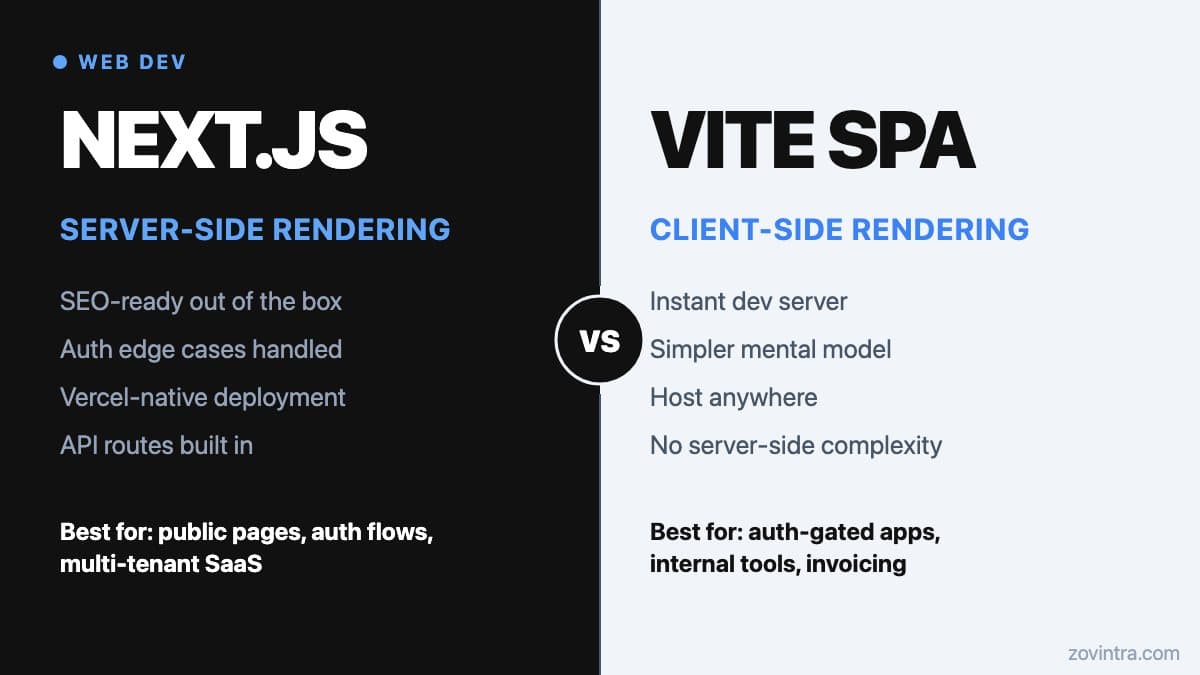
Next.js generates HTML on the server - either at request time (server-side rendering) or at build time (static site generation). The Next.js documentation explains that layouts and pages are Server Components by default, and that Client Components and the server-rendered payload are used to prerender HTML. The browser receives a complete HTML document that crawlers can read without needing to run JavaScript first.
Vite builds a React single-page application (SPA). The Vite documentation describes it as a build tool whose build command is pre-configured to output static assets for production. The browser downloads a minimal HTML shell and a JavaScript bundle, then React renders the UI client-side. For a crawler that does not execute JavaScript, the initial HTML is almost empty. Google's crawler does execute JavaScript, but rendering happens in a separate queue and can take longer than a few seconds, and Google says server-side or pre-rendering is still a great idea because not all bots can run JavaScript. For pages you need to rank, relying on client-side rendering alone is a risk.
When Next.js Is the Right Choice
Next.js makes sense when any of these conditions apply to your project.
- You need public pages to rank in search results. Landing pages, blog posts, product pages and documentation all benefit from server-rendered HTML. If Googlebot needs to see your content, use Next.js.
- Your authentication flow involves server-side callbacks. OAuth providers redirect to a callback URL after login. Next.js handles these in API routes or server actions without exposing secrets to the browser. A Vite SPA requires a separate backend or a serverless function for the same task.
- You are building a multi-tenant SaaS where different subdomains or paths serve different customers. Next.js proxy (the new name for middleware) runs code on the server before a request is completed, so it can rewrite or redirect by hostname or path before routes are rendered.
- You are already deploying on Vercel. Next.js and Vercel work closely together, and features like incremental static regeneration are supported there and on a self-hosted Node.js server or Docker container.
- Your app needs an API layer alongside the UI. Next.js API routes let you colocate the backend with the frontend in the same repo and deploy them together.
We built ManOps on Next.js 15 with the App Router. The product is a project management and communications platform with authenticated routes, a versioned REST API (135 paths), real-time push notifications and server-side session handling. Server-side rendering is not the most important reason Next.js was the right choice here - the API routes, middleware and Vercel integration were. But all of those only come with a server-side framework.
When Vite Is the Right Choice
Vite makes sense when the application is entirely behind a login screen, the team needs the fastest possible local development experience, or the product is being hosted somewhere that does not support server-side compute.
- Your entire app is auth-gated. If every page requires a logged-in user, search crawlers cannot access them anyway. The SEO advantage of server rendering is irrelevant. A Vite SPA is simpler and faster to develop.
- Your team has strong web development experience but no backend experience. A Vite SPA with a separate API (Supabase, Firebase or any hosted backend) keeps the frontend entirely in familiar territory. There are no server concepts, no middleware, no server components.
- You are deploying static files to a CDN or an object storage bucket. Vite outputs files. Vite's build output is static files you can deploy to a CDN or static host, so there is no server to run.
- You want the fastest hot module reload in development. Vite highlights extremely fast Hot Module Replacement in its dev server; we have not benchmarked it against Next.js, so treat any speed gap as something to test on your own codebase.
We built Mandizo - an invoice editor for small Indian businesses - on Vite with React 19, TypeScript and Tailwind 4. The product has a guest-first editor (anyone can create an invoice without signing in) and an account area for saved clients and history. The public editor is the core feature, but we are not trying to rank individual invoice URLs in search. Vite was the right call: a simpler mental model for the team and easy static deployment on Vercel alongside Supabase for the auth-required account features.
The Questions That Decide It
When we evaluate a new web build, these four questions determine the framework before we write a line of code.
- Does any part of the app need to rank in Google? If yes, Next.js. If everything is behind a login, Vite is fine.
- Does the auth flow require a server callback or server-side session? If yes, Next.js. If you can use a hosted auth service entirely from the browser, Vite can handle it.
- Does the team need to build API endpoints alongside the UI, in the same repo? If yes, Next.js API routes simplify this. If the API is already separate or hosted, Vite is simpler.
- What is the primary deployment target? If Vercel, Next.js maximises the integration. If a CDN or object storage, Vite outputs exactly what you need.
The Mistakes We See Teams Make
The most common mistake is reaching for Next.js because it is more well-known, for an internal tool that is entirely auth-gated and does not need SEO. The result is a team that is now managing server components, server actions and hydration concepts for an app that could have been a plain Vite SPA with half the complexity. The second most common mistake is the reverse: building a product with public content as a client-rendered Vite app and then trying to retrofit server rendering later, which is not straightforward.
A third mistake is treating the choice as permanent. Migrating between the two gets harder as a codebase grows, though it is possible, and Next.js publishes guidance on running SPAs and migrating from Vite. The more meaningful lock-in comes from the patterns you adopt - server components, server actions and Next.js API routes have no direct equivalent in Vite, and Vite's flat client-side router is meaningfully different from Next.js's file-system-based App Router. Understanding what you are committing to before you start saves significant rework.
Understanding what a tech stack decision means for the long-term maintainability of your product is worth doing before the first commit, not after you are two sprints in. If you want to talk through the right architecture for a web product you are starting or inheriting, we can help you choose the right stack for your use case.
Common questions
Should I use Next.js or Vite for a React app?
It depends on four questions: do any pages need to rank in Google, does auth need a server callback or session, do you need API endpoints in the same repo, and where will you deploy. Yes answers point to Next.js. A fully login-gated app can use Vite.
Can Google index a Vite React SPA?
Google's crawler does execute JavaScript, but rendering happens in a separate queue and can take longer, and Google says server-side or pre-rendering is still a great idea because not all bots can run JavaScript. For pages you need to rank, relying on client-side rendering alone is a risk.
Is it hard to migrate between Vite and Next.js later?
It gets harder as a codebase grows, though it is possible, and Next.js publishes guidance on migrating from Vite. The bigger lock-in is patterns like server components and server actions. Zovintra can help you choose the right stack before you start.
Sources
- Server and Client Components - Next.js Docs, updated 5 Oct 2026
- Getting Started - Vite Docs, accessed 19 Oct 2026
- Deploying a Static Site - Vite Docs, accessed 19 Oct 2026
- JavaScript SEO basics - Google Search Central, accessed 19 Oct 2026
- How to build single-page applications with Next.js - Next.js Docs, updated 15 Oct 2026
- proxy.js - Next.js Docs, updated 4 Sep 2026
- Incremental Static Regeneration - Next.js Docs, updated 15 Oct 2026