Next.js API routes and Server Actions that do not validate incoming data before processing it can pass malformed, oversized or malicious input directly to a database query, an LLM prompt or a third-party API call. Zod is a widely used validation library in the Next.js ecosystem - it lets you define the exact shape you expect and either throw immediately on a mismatch or return a structured error that your route handler can forward to the client. Without this layer, the route handler accepts whatever the caller sends.
Why API route validation matters
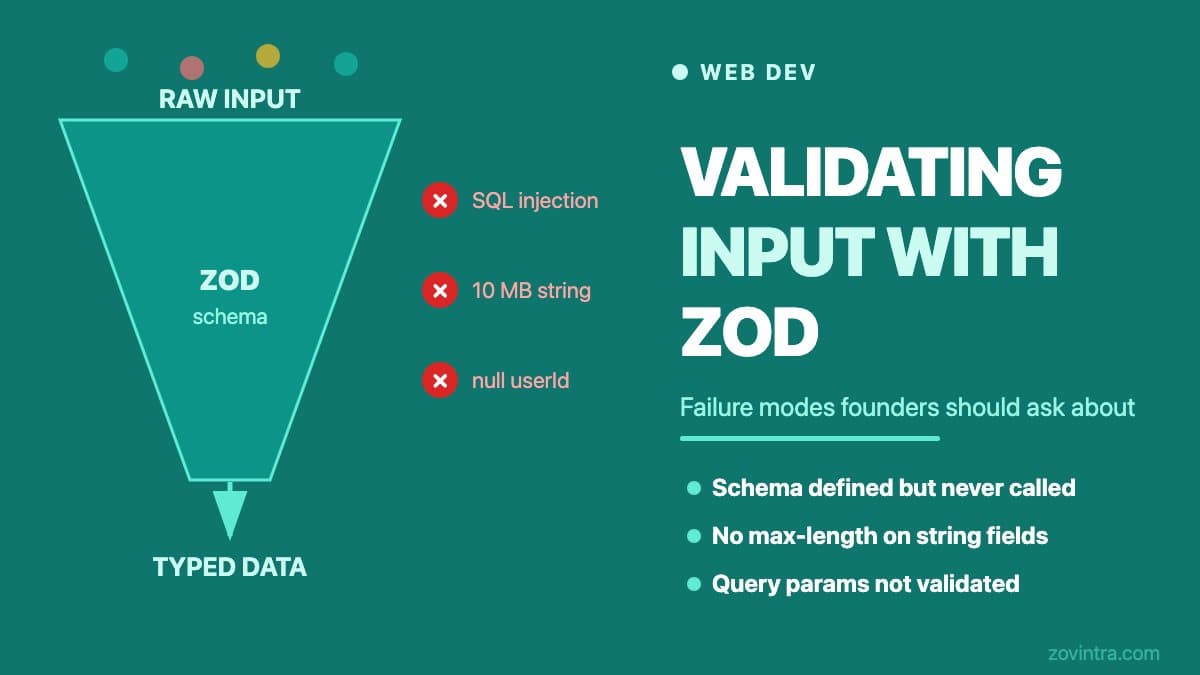
TypeScript type annotations give you compile-time safety: they catch type mismatches in your own code. They do not validate what arrives over the network. A TypeScript interface that says a request body should have a `userId: string` field will not stop a caller from sending `userId: null`, `userId: { $ne: '' }` (a NoSQL injection pattern) or a 10 MB string where you expected 20 characters.
At the API boundary, the request body is untrusted data. Anyone with access to the endpoint - a user, an attacker, a misconfigured third-party integration - can send any shape they like. Your route handler must assume the input is hostile until it has been validated.
OWASP's Injection category (A03:2021) describes an application as vulnerable when user-supplied data is not validated, filtered or sanitized, and lists positive server-side input validation among its preventions (though not as a complete defence). A missing validation layer is not a theoretical concern - it is a typical thing for a security reviewer to check.
How Zod works in a route handler
A Zod schema describes the exact shape of the input you expect. At runtime, calling `.parse(data)` validates the incoming value against the schema. If validation fails, it throws a `ZodError` with a structured list of exactly which fields failed and why. If it succeeds, it returns a typed object that TypeScript understands correctly.
A minimal example in a Next.js Route Handler:
- Define the schema: z.object({ email: z.email().max(255), role: z.enum(['admin', 'member']) }) (in Zod 4 the top-level z.email() replaces the deprecated z.string().email(); in Zod 3 use z.string().email())
- Call safeParse on the request body: const result = schema.safeParse(await req.json())
- Check result.success - if false, return a 400 with the field errors (`result.error.flatten()` in Zod 3; Zod 4 deprecates it in favour of `z.flattenError(result.error)`)
- If true, use result.data - now fully typed and validated
The difference between `.parse()` and `.safeParse()` is that `.parse()` throws on failure (requiring a try/catch), while `.safeParse()` returns a discriminated union that you check without a try/catch. In a route handler, `.safeParse()` is usually cleaner because you want to return a 400 response, not an unhandled exception.
Zod also handles type coercion, default values and transformations. For example, `z.string().trim().toLowerCase()` normalises an email address at the schema level before it ever reaches your database query.
What breaks without validation
The failure modes vary by what happens to the unvalidated input downstream:
- Database queries. An unvalidated field used directly in a query can cause unexpected results, expose data in error messages, or in a raw-query context, create injection opportunities.
- LLM prompts. Unvalidated user input concatenated into an LLM prompt is a prompt injection surface. An attacker who can control the prompt can attempt to override your system instructions, extract context or trigger unexpected behaviour.
- Third-party API calls. Passing an oversized or malformed field to a Stripe charge, a SendGrid email send or a Twilio SMS will produce an API error. The difference is whether that error is caught gracefully or causes an unhandled exception that leaks a stack trace to the caller.
- Downstream services. An unvalidated numeric field used as a loop count or a pagination limit (page size of 1,000,000) can cause a server to become unresponsive while it attempts to fetch or process the requested data.
For a broader view of how AI-generated code handles access control and data boundaries, see broken access control in AI-generated apps.
Failure modes AI-generated code introduces
AI coding tools produce functional-looking route handlers quickly. The code often includes a Zod schema but the implementation has common gaps:
- Schema is defined but never called. The schema appears in the file, but the handler calls `await req.json()` and uses the raw result without going through `.parse()` or `.safeParse()`. This is a false sense of security - the schema exists as documentation but provides no runtime protection.
- Partial validation. Only some fields are in the schema. Fields that look optional - metadata, tags, sort order - are read from the request body and used directly without appearing in the schema.
- No max-length constraints. Strings are validated as strings but have no `.max()` calls. An email field that accepts a 50 MB string will consume memory and may cause timeouts.
- Error handling drops the ZodError detail. The catch block returns a generic 500 instead of forwarding the 400 with field-level errors. This prevents your frontend from showing helpful validation messages and makes debugging harder.
- Schema defined for the body, not for query parameters. Route handlers often receive filtering or sorting parameters as query strings. If these are not validated, they can contain unexpected values that reach the database.
Treat validation at every API boundary as a standard, not an afterthought. For how this fits into the broader picture of scalable API design, see building scalable APIs. For the specific case of production pitfalls in Next.js App Router, see Next.js App Router production pitfalls.
Server Actions and validation
Next.js Server Actions run server-side code called from client components, bypassing the traditional Route Handler pattern. They are still exposed over the network: Next.js documents that an exported Server Action is reachable via a direct POST request, not just through your UI, and that you should always validate input from the client. The validation requirement is identical, and authentication and authorization must be re-checked inside each action.
A common gap in AI-generated Server Actions is that the developer trusts the TypeScript argument types. A Server Action typed as `async function updateUser(id: string, data: UserInput)` receives its arguments from an HTML form or a `useTransition` call - both of which are attacker-controllable. The types are erased at runtime. Validate the action's arguments, for example with Zod, just as you would in a Route Handler.
Questions to ask your developer
If you are a founder reviewing a Next.js build, these questions will surface the most common validation gaps without requiring you to read the code:
- Is every API route and Server Action that accepts user input validated with Zod or an equivalent library?
- Where is the validation called - before or after the data is used?
- What happens when validation fails - what does the client receive?
- Do the schemas include max-length constraints for string fields?
- Are query parameters (filtering, sorting, pagination) also validated?
- Is there a test that sends a malformed request to a key endpoint and confirms a 400 is returned?
A team that takes validation seriously will have immediate answers to these questions and, ideally, a test that proves it. If the answer is "Zod is installed" without a clear description of where and how it is used, that is worth investigating before launch.
If you want a review of your API layer before you go live, talk to us about your web build. A focused API review takes less time than debugging a validation gap after launch.
Common questions
Is TypeScript enough to validate API request data in Next.js?
No. TypeScript types catch mismatches in your own code, but they are erased at runtime and do not validate what arrives over the network. A caller can still send null, an unexpected object or a 10 MB string, so the request body must be validated at the API boundary.
What is the difference between Zod parse and safeParse?
The parse method throws a ZodError on failure, so it needs a try/catch, while safeParse returns a result you check with result.success. In a route handler safeParse is usually cleaner, because you want to return a 400 response rather than an unhandled exception.
How can I tell if my developer is validating API input properly?
Ask whether every route and Server Action that accepts input is validated, where validation runs relative to use, what the client receives on failure, and whether string fields have max lengths. A serious team has immediate answers and a test. Zovintra offers an API review before launch.
Sources
- A03:2021 Injection - OWASP Top 10, 2021
- Zod: Defining schemas (API) - Zod documentation, accessed 19 Oct 2026
- Zod 4 changelog - Zod documentation, accessed 19 Oct 2026
- Formatting errors - Zod documentation, accessed 19 Oct 2026
- How to think about data security in Next.js - Next.js documentation, updated 6 Oct 2026