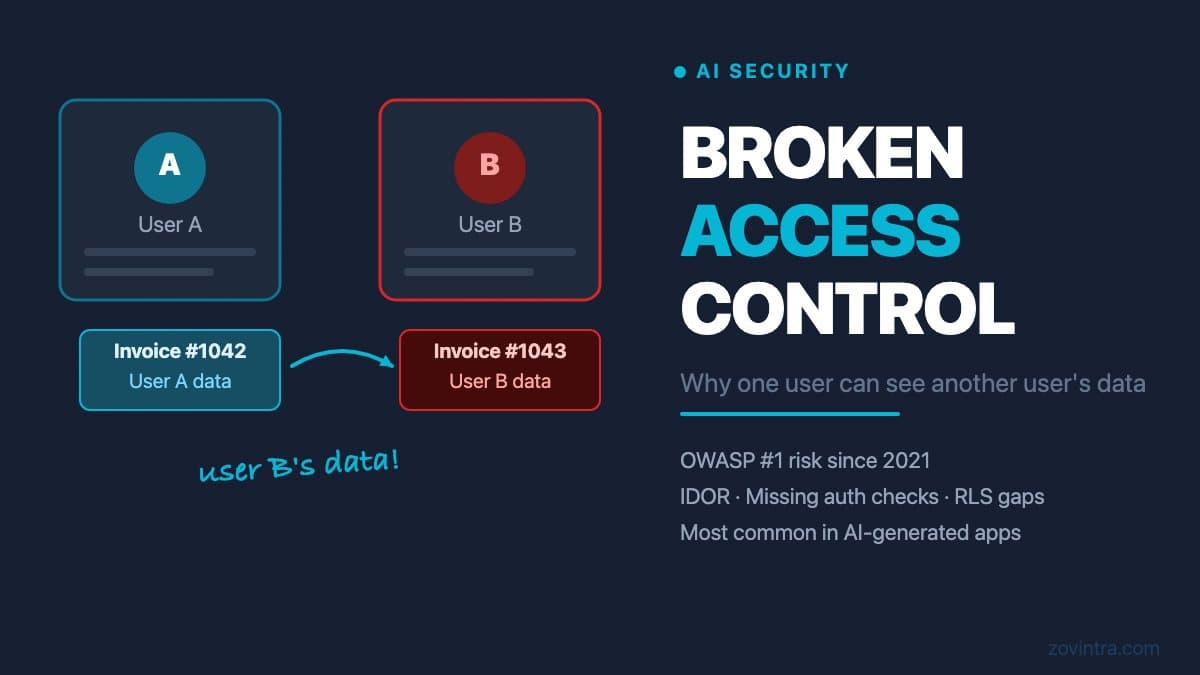
Broken access control means that a logged-in user can access resources that belong to a different user - by changing an ID in the URL, modifying a request body, or making a direct API call the app's interface never shows. It is A01 in the OWASP Top 10:2021 and, according to The Register's coverage, still ranked first in the 2025 edition. In AI-generated apps it is a category to check first, because AI coding tools write for the happy path and rarely generate the negative test cases that would catch it.
What Broken Access Control Looks Like in Practice
Imagine your app is a project management tool. User A logs in and sees their project at /app/projects/1042. The URL contains the project ID. If user A edits the URL to /app/projects/1043 - a project that belongs to user B - and the app returns user B's project data without error, you have broken access control.
This specific pattern is called an Insecure Direct Object Reference (IDOR). The OWASP Web Security Testing Guide describes it as an application using user-supplied input to fetch an object directly without enough authorisation checks. The 'object' is the database record. The 'reference' is the ID in the URL or the request body. The reference is 'insecure' because the server does not check whether the requesting user is authorised to access the object.
It is not limited to GET requests. The same issue applies to updates and deletes. User A may be able to delete user B's record by sending a DELETE request to /api/invoices/1043, if the server does not verify ownership before executing the deletion. In an app with sequential numeric IDs - a common default in database-generated schemas - guessing other users' record IDs requires no special knowledge.
Why AI-Generated Apps Are Particularly Exposed
AI coding tools generate route handlers that handle the provided use case. A prompt like 'build a route that returns a project by its ID' produces code that fetches the project by the given ID. It does not automatically add: 'and verify that the authenticated user owns this project before returning it.' That check is an additional concern that the model must be explicitly prompted to include.
In practice, the generated code often looks something like this (in pseudocode):
GET /api/projects/:id > find project where id = :id > return project
A secure version would look like: GET /api/projects/:id > find project where id = :id AND owner_id = current_user.id > return project or 403. The difference is one condition. But that condition is the difference between an app that protects its users and one that exposes them.
For apps built on Supabase, the same gap appears at the database layer. Supabase's documentation says a table in an exposed schema without RLS is readable and writable by any role with a grant on it, and a policy that does not check ownership has the same effect for every signed-in user. The post Supabase Tables Created by an AI Agent Often Have No Row-Level Security covers this database-level pattern in full.
Vertical Privilege Escalation: A Related but Different Problem
Broken access control includes two patterns. Horizontal escalation (IDOR) is when user A accesses user B's data at the same permission level. Vertical escalation is when a regular user accesses functionality that should be restricted to an admin.
In an AI-generated app, vertical escalation often appears as an admin panel route that is protected only at the UI level - the link is not shown to regular users - but the underlying API route has no authorisation check. A regular user who knows the URL of the admin endpoint can call it directly and perform admin actions.
AI tools that generate an admin panel alongside a user-facing app often protect the admin panel with a frontend route guard but do not add a server-side role check to every admin API route. The result is a visible admin interface that is not accessible, but an accessible admin API that is not visible.
How to Test for This Without a Security Background
You do not need security expertise to test for broken access control. You need two test accounts and a willingness to try things the app does not intend.
- Create two accounts: user A and user B. Log in as user A and create a record (project, invoice, order, message).
- Note the ID of that record - it is usually in the URL or in the API response.
- Log out of user A. Log in as user B.
- In your browser's developer tools (or using a tool like Postman), make a GET request to the API endpoint for user A's record, using user B's authentication token. For example: GET /api/projects/1042 with user B's token.
- If the response contains user A's data, you have broken access control. The server should return a 403 (forbidden) or an empty result.
- Repeat for UPDATE and DELETE: try to modify or delete user A's record while authenticated as user B.
This test is quick to run and covers the most common form of the vulnerability. If it finds an issue, do not attempt to fix it while the app has real users without first understanding the scope. A patch that only fixes the specific endpoint you tested may leave dozens of similar endpoints unchanged.
What a Code Review Checks That This Test Does Not
The manual test above checks one or two specific routes. A code review checks all routes, systematically, for the presence or absence of ownership checks. It also catches patterns that manual testing is unlikely to find: batch operations that accept arrays of IDs without checking each one, file download endpoints where the filename contains a path that can be manipulated, or background jobs that act on a user-provided ID without validation.
The broader context of what a code review covers - and does not cover - is explained in What a Code Review of a Vibe-Coded App Covers and What It Does Not. Access control is always in scope; database-level security and secret scanning are checked separately.
The OWASP IDOR testing guide walks through the manual technique in more depth: map every place user input points at an object, change those values, and use at least two test accounts. The OWASP Top 10 A01 page lists the wider set of broken access control patterns.
What to Do If You Find It
If your manual test reveals broken access control, the fix depends on where the problem sits. For a Next.js API route: add an ownership check before returning data. For a Supabase table: enable RLS and add a policy that restricts SELECT, UPDATE, and DELETE to rows owned by the authenticated user. For a Supabase function: prefer SECURITY INVOKER, which is the default and the option Supabase recommends, or keep SECURITY DEFINER only with an explicit ownership check inside the function body.
None of these fixes are complicated in isolation. The risk comes from fixing one endpoint while similar patterns remain on ten others. That is why a systematic review of every route and every table is more reliable than point fixes after manual testing.
Start with the free code review to get a map of where the issue appears in your codebase, then contact us if you want a technical review that covers the fix plan and the risk of each change.
Common questions
What is broken access control and why is it a risk in AI-built apps?
Broken access control means a logged-in user can reach resources belonging to another user, for example by changing an ID in the URL. It is A01 in the OWASP Top 10:2021, and AI coding tools write for the happy path and rarely generate the negative tests that would catch it.
How do I test my app for broken access control?
Use two test accounts. Create a record as user A, note its ID, then log in as user B and request user A's record by that ID. If the app returns it, you have broken access control. Do not patch only that one endpoint, since similar patterns may remain elsewhere.
Can someone systematically review every route for access control problems?
A code review checks all routes and tables systematically for ownership checks, which is more reliable than point fixes after manual testing. Start with the free code review for a map of where the issue appears, then contact Zovintra for a technical review covering the fix plan.
Sources
- A01:2021 Broken Access Control - OWASP Top 10 - OWASP, 2021
- OWASP Top 10: Broken access control still tops app security list - The Register, 11 Nov 2025
- Testing for Insecure Direct Object References (WSTG-ATHZ-04) - OWASP Web Security Testing Guide v4.2, accessed 19 Oct 2026
- Row Level Security - Supabase Docs - Supabase, accessed 19 Oct 2026
- Database Functions - Supabase Docs - Supabase, accessed 19 Oct 2026