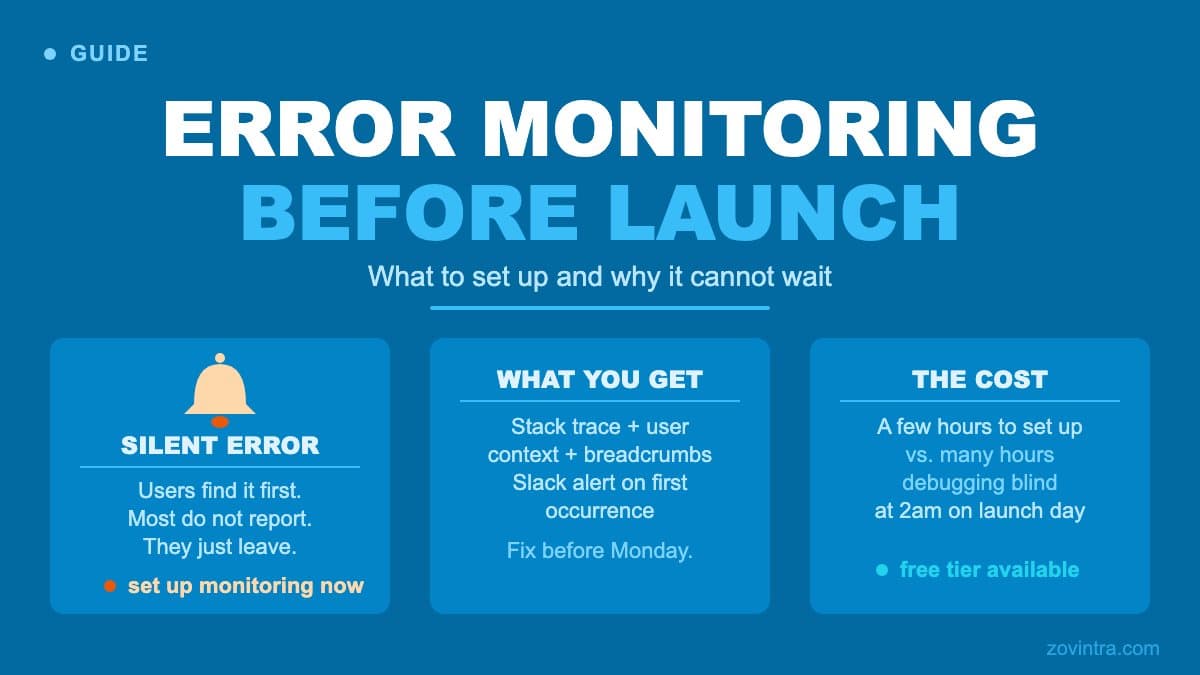
Error monitoring gives you a notification when your production app throws an exception or returns an unexpected response - before a user files a support ticket, leaves a one-star review, or just stops using the app.
Why Logs Are Not Enough
Most frameworks and hosting platforms produce logs. Vercel, AWS, and similar platforms stream console output you can inspect after the fact. The problem with relying on logs alone is that you need to know to look. An unhandled exception at 2am on a Saturday goes into a log stream that nobody reads until Monday, by which point several hundred users have hit the same issue.
Error monitoring tools - Sentry is a widely used example - work differently. They sit in your application and intercept errors as they happen, enriching them with context: the user's browser, the URL they were on, the sequence of actions that led to the crash, and the full stack trace. They then group identical errors together, alert you through Slack or email, and track whether errors are resolved.
The enriched context is what saves time. A raw log entry saying `TypeError: Cannot read properties of undefined (reading 'id')` tells you nothing about which user, which flow, or how to reproduce it. An error event with the user's session replay, the request payload and a breadcrumb trail of their last five actions tells you exactly where to look.
What to Set Up Before Launch
Frontend Error Monitoring
For a React or Next.js frontend, Sentry's Next.js SDK captures errors on both the client and the server, including React rendering errors in the App Router. The key configuration choices:
- Source maps: upload your source maps to your error monitoring tool during deployment (Sentry's build plugin does this with an auth token set in your build system) so that minified production stack traces resolve back to your original source lines. Without this, stack traces are nearly unreadable.
- User context: attach a user ID (not PII like email unless your privacy policy and DPA permit it) to each error event so you can identify whether one user is repeatedly hitting an issue or it is widespread.
- Sample rate: tracing every request adds load and cost, so sample transactions. Sentry's own Next.js example uses a `tracesSampleRate` of 0.1 in production, and `sampleRate` for errors defaults to 1, so every error is sent until you change it.
- Ignore known noise: some errors come from browser extensions, ad blockers, or network conditions outside your control. Add ignore patterns for known noise early so your alert inbox stays signal-heavy.
Backend Error Monitoring
For Next.js API routes or a Node.js backend, the Sentry Node SDK provides the same enriched context on the server side. For API routes, the most valuable additions are:
- Capture unhandled promise rejections: many Node.js apps silently swallow unhandled rejections. Configure the SDK to capture these explicitly.
- Add request context: record which endpoint was called, which method, and - with appropriate care for privacy - the shape of the request payload (not the values if they contain PII).
- Capture database errors: if you are using Supabase, Prisma or another ORM, add error handling around database calls that surfaces the query context alongside the error.
Alerting Configuration
An error monitoring tool that sends alerts for every single error event is one that gets muted within a week. Configure alerts based on frequency and severity: alert on new issues; alert when an existing error crosses a volume threshold you choose; alert on errors in checkout or authentication flows regardless of volume.
Most teams benefit from a Slack channel dedicated to production alerts. A dedicated channel is easier to monitor than email and makes it visible to the whole team when something breaks.
Structured Logging as a Complement
Error monitoring captures exceptions. Structured logging captures the events that do not throw an error but still indicate something is wrong: a payment that was initiated but never completed, an API call that returned a 200 but with an empty results set, a user who reached the final step of onboarding and then dropped off.
Structured logging means writing log events in a machine-readable format (JSON) rather than plain strings, so they can be queried and aggregated. A log line like `{level: 'warn', event: 'payment_incomplete', user_id: '...', reason: 'provider_timeout'}` is queryable. A line like `WARNING: payment failed for user 12345` is not.
Log aggregation services such as Axiom and Datadog provide querying and alerting over structured logs. For a small SaaS at launch, even exporting structured logs to Supabase or a simple log table gives you queryable audit history that error monitoring alone does not provide.
What Error Monitoring Does Not Catch
Sentry captures errors that your code throws. It does not catch silent data corruption (a database write that succeeds but saves the wrong value), business logic errors (a discount that applies when it should not), or security incidents (an attacker making valid API requests with a stolen token).
It also does not catch errors in code paths that are not covered by the SDK, such as Supabase edge functions or serverless functions you have not instrumented, or third-party integrations that fail silently.
The prototype-to-production checklist includes error monitoring as one layer in a broader observability stack that also covers uptime monitoring, performance monitoring and security logging. Each layer catches different classes of problems.
Before Launch Versus After Launch
The mistake is treating error monitoring as something to add after launch once there are real errors to monitor. The reason to set it up before launch is that your first production traffic will surface issues your staging environment did not. Real users take paths your testing did not cover, on browsers and network conditions you did not test, with data configurations you did not anticipate.
Without monitoring in place from day one, those first-week errors disappear into log streams. With monitoring in place, you can see the error within minutes and fix it before it affects more users.
Setting up error monitoring is a few hours of work. Diagnosing a production issue without it, at 2am, with users waiting, is many hours of work. If you are deploying an app soon and monitoring is not yet in place, ask about support and hosting - we can advise on setting up the observability layer that fits your stack.
A Note on Cost
Sentry's free Developer plan lists 5k errors, 1 user and 50 session replays, which is enough to start with at launch; check the pricing page for the current limits. If your app generates more errors than that, you have a different problem to solve first. Paid plans scale with event volume.
Check the free tier of any logging service you pick; for a small launch, there is rarely a cost-based reason to skip either layer. The deploy your app checklist includes monitoring setup as a required step before marking a deployment done.
Common questions
Why isn't checking my server logs enough to catch app errors?
Logs only help if you know to look. An unhandled exception at 2am on a Saturday can sit unread until Monday while hundreds of users hit it. Error monitoring tools like Sentry intercept errors as they happen, add context, group duplicates and alert you.
Should I set up error monitoring before or after launch?
Before. Your first production traffic will surface issues staging did not, because real users take untested paths on untested browsers and networks. With monitoring in place you see errors within minutes, instead of losing them in log streams.
When should I ask for help setting up monitoring?
If you are deploying soon and monitoring is not in place, get advice on the observability layer that fits your stack. Setup takes a few hours, while diagnosing a production issue without it can take many. Zovintra offers support and hosting advice for this.
Sources
- Sentry pricing - Sentry, accessed 19 Oct 2026
- Sentry for Next.js - Sentry Docs, accessed 19 Oct 2026
- Sampling configuration - Sentry Docs, accessed 19 Oct 2026
- Alerts - Sentry Docs, accessed 19 Oct 2026