Flutter can build most of a calling feature in Dart. The lock-screen incoming call UI on iOS is not one of those parts. Apple's CallKit and PushKit APIs are native iOS frameworks. Flutter has no built-in bridge to them. To show the system calling UI when a VoIP push arrives, you need a small but critical piece of Swift code in your app's AppDelegate. Without it, pushes either arrive silently or wake the app but show no incoming call screen. This article explains what that native layer must do, where the boundary with Dart sits, and what you cannot verify until you test on a real device.
Why VoIP Push Is Different
Standard APNs (Apple Push Notification service) wakes the app to show a notification banner. VoIP pushes via PushKit are different: they can launch or wake the app in the background and give it a short window to execute code before the user sees anything. For apps built with the iOS 13 SDK or later, PushKit requires you to use CallKit when handling VoIP calls, and if you cannot support CallKit you cannot use PushKit for these pushes. In practice that means reporting the incoming call to CallKit's CXProvider as soon as each push arrives; the ManOps code below follows that rule.
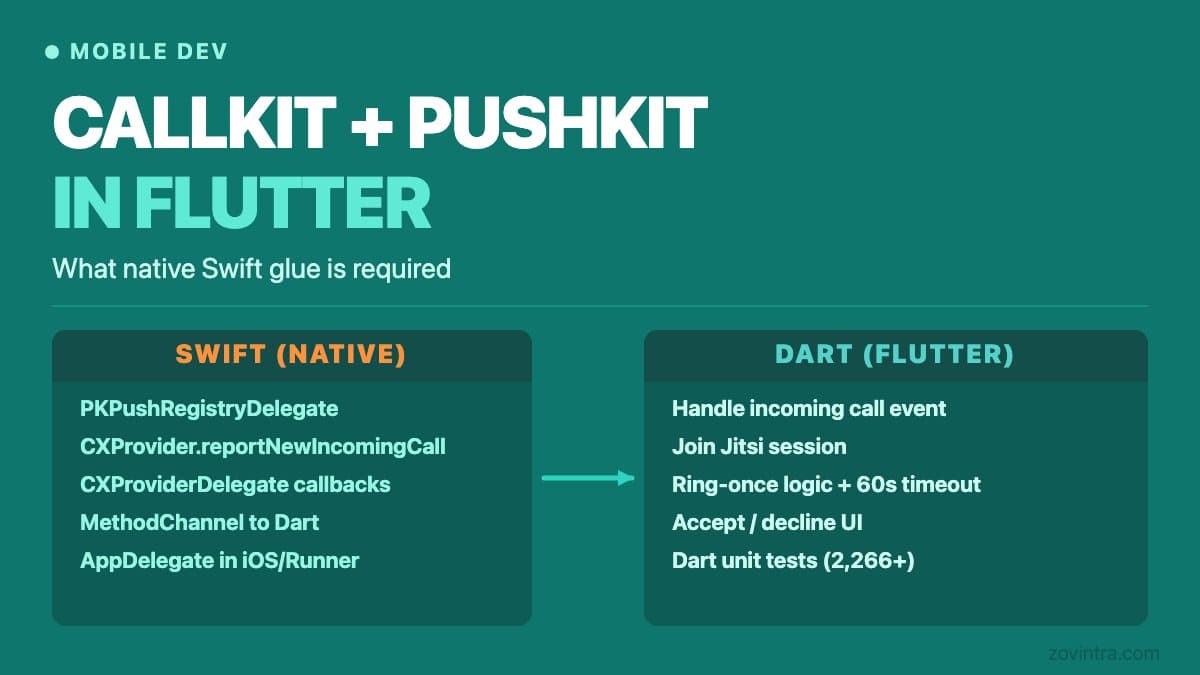
This requirement means the VoIP push handling cannot be deferred to Dart. The Dart runtime may not be running when a PushKit payload arrives on a locked device. Swift must receive the push, call CallKit to show the incoming call screen, and only then communicate with Dart via a platform channel to let the Flutter layer know a call is pending.
What the Swift Layer Must Handle
The minimum native Swift code required for a working VoIP calling feature covers three areas. First, PushKit registration: your AppDelegate (or a delegate class it owns) must conform to PKPushRegistryDelegate, call registry.desiredPushTypes = [.voIP], and deliver the device token to your backend. This token is distinct from your FCM or standard APNs token and must be stored separately.
Second, incoming call display: when didReceiveIncomingPush is called by PushKit, your delegate must instantiate a CXCallUpdate with the caller's name, UUID, and whether the call supports video, then call CXProvider.reportNewIncomingCall. This is the CallKit call that shows the system incoming-call UI. The UUID you create here must persist until the call ends or is declined.
Third, call lifecycle events: when the user accepts or declines the call using the system UI, CallKit delivers those events via CXProviderDelegate. Your Swift code must pass them to Dart via a method channel so Flutter can join the call session or clean up state.
In the ManOps project (an internal app we have in active development), the Flutter codebase uses a small AppDelegate in Swift for exactly this purpose. The AppDelegate registers for VoIP pushes at launch, receives each push, and reports it to CallKit through the flutter_callkit_incoming plugin, with exactly one completion call per push; the Dart side then handles the call state. The device token type is stored as a field in the database (kind = apns_voip) so the server knows to send VoIP pushes rather than standard data messages for that device. This pattern - separating FCM tokens (kind = fcm) from APNs VoIP tokens (kind = apns_voip) in the database - avoids sending the wrong push type to the wrong device.
What Stays in Dart
Everything above the system call UI layer belongs in Dart. Once the native side calls CallKit and the user accepts, your Dart code handles joining the call (via Jitsi SDK or your own WebRTC wrapper), managing call state, showing the in-app call screen, and handling accept or decline while the app is in the foreground.
Flutter test coverage for the call flow in ManOps runs at the Dart level: push payload parsing, ring-once logic (ensuring a single VoIP push does not trigger multiple simultaneous ring events), accept and decline actions, and 60-second ring timeout cleanup. These tests run reliably in CI. What they cannot test is the lock-screen CallKit UI, Jitsi media quality, or how the OS handles the push on a real device under battery pressure.
The Android Side
Android does not have CallKit or PushKit. Incoming call display on Android typically uses a high-priority FCM data message (see the FCM guide to receiving messages) that triggers a full-screen intent or foreground service with a custom notification. The approach is less tightly controlled by the OS than iOS but requires its own Kotlin platform code for the notification channel configuration and the foreground service.
In ManOps, the Kotlin layer in MainActivity exposes system settings pages (battery and notification settings) to Dart for a call-setup guidance screen; release signing is configured in the Gradle build file. FCM data messages are handled in the background handler in Flutter (firebase_messaging onBackgroundMessage), which is sufficient for most Android call notifications. The challenge on Android is OEM battery optimisation: community-maintained Don't kill my app says several manufacturers, including Xiaomi and Oppo, prefer battery life over app functionality, which can delay or drop background notifications. I have not tested this on specific devices. There is no fully reliable workaround short of directing users to adjust battery settings for your app, which is what the ManOps guidance screen does.
What Has Not Been Verified on a Real Device
To be direct about the limits of what we know: in ManOps, the real-device call test script exists in the documentation but has not been executed by the owner at the time of writing. This means no real PushKit VoIP delivery, no lock-screen answer flow, and no observation of the answer-on-one-device-stops-the-other behaviour has been confirmed on actual hardware. The same applies to DND behaviour on device and whether the APNs VoIP environment variable reaches the Vercel serverless function correctly over HTTP/2.
This is a real limit. The Dart tests pass. The Swift and Kotlin code compiles. But calling features involve OS scheduling, carrier infrastructure, and hardware behaviour that simulators do not replicate. If you are building a mobile app with calling features, budget time for real-device testing before release. Simulator-only testing is not sufficient validation for this feature category.
iOS Version and CocoaPods Requirement
CallKit is available from iOS 10. In ManOps the iOS platform floor is set to 15.1 in the Podfile, primarily because the Jitsi SDK requires it. More importantly, ManOps uses CocoaPods rather than Swift Package Manager because the Jitsi SDK does not currently publish a SwiftPM package. This means the project must be opened from the .xcworkspace file, not the .xcodeproj file. Opening the wrong file is a common source of confusing build errors when new developers set up the project.
Minimum Checklist Before Submitting a Calling App
- PushKit VoIP token registration is separate from your FCM or standard APNs token, and both are stored with their type in your database.
- Swift AppDelegate calls CXProvider.reportNewIncomingCall synchronously inside didReceiveIncomingPush, not after an async Dart round trip.
- The UUID passed to CallKit at ring time is the same UUID used to end or decline the call later.
- Your backend sends VoIP pushes via APNs over HTTP/2 (port 443, or 2197 as an alternative) using the voip push type, with the apns-topic header set to your bundle ID with the .voip suffix.
- You have tested on a real device: lock-screen answer, decline from notification, and what happens when a push arrives while a different call is active.
- Your app declares the voip background mode (UIBackgroundModes in Info.plist) and the push capability, and you have checked Apple's current requirements for VoIP apps before submission.
The calling feature category on mobile has more invisible failure modes than almost any other. The gap between a demo that works on a simulator and a feature that works reliably for real users is larger here than in most app development work. If you are planning a Flutter app that includes calling or VoIP features, reach out before you start the native integration rather than after.
Common questions
Can Flutter show the iOS incoming call screen for a VoIP push?
Not in Dart alone. CallKit and PushKit are native iOS frameworks and Flutter has no built-in bridge to them, so you need a small piece of Swift in your app's AppDelegate to receive the push and report the call to CallKit.
Why must PushKit VoIP pushes use CallKit?
For apps built with the iOS 13 SDK or later, PushKit requires you to use CallKit when handling VoIP calls, and if you cannot support CallKit you cannot use PushKit for these pushes. The app must report each incoming call to CallKit's CXProvider as soon as the push arrives.
When should I get help before building calling features in a Flutter app?
Budget time for real-device testing, since simulators do not replicate OS scheduling, carrier infrastructure or hardware behaviour. If you are planning a Flutter app with calling or VoIP features, reach out to Zovintra before you start the native integration rather than after.
Sources
- Responding to VoIP Notifications from PushKit - Apple Developer Documentation, accessed 19 Oct 2026
- Sending notification requests to APNs - Apple Developer Documentation, accessed 19 Oct 2026
- CallKit - Apple Developer Documentation, accessed 19 Oct 2026
- Receive messages in an Android app (FCM) - Firebase documentation, accessed 19 Oct 2026
- Don't kill my app! - dontkillmyapp.com, accessed 19 Oct 2026