Vercel cron jobs are the easiest way to add scheduled tasks to a Next.js project. You define a schedule in `vercel.json`, point it at an API route, and Vercel calls that route on your schedule. The problem is that 'easy to set up' and 'reliable in production' are not the same thing. Crons on Vercel have specific failure modes that are invisible unless you instrument them: missed runs, duplicate executions, function timeouts, and authorization gaps.
How Vercel Cron Jobs Work
A Vercel cron job is an HTTP request. At the scheduled time, Vercel makes a GET request to the path you specify in `vercel.json` on your project's production deployment URL. Your route must finish within Vercel's function duration limit. If you set a `CRON_SECRET` environment variable, Vercel sends it as an `Authorization: Bearer` header so your route can verify the request is legitimate.
This is a simpler model than a traditional cron daemon, but it has implications. Vercel does not retry a cron invocation that fails, so a route that crashes and returns a 500 is logged and then simply waits for the next scheduled run. Creating a new deployment does not interrupt cron jobs that are already running.
We run cron jobs across our own Vercel projects: this website runs a daily IndexNow submission and a trending-posts refresh, and our internal dashboard runs analytics retention and Search Console sync. Managing them has taught us which failure modes matter most.
Problem 1: Silent Failures With No Alert
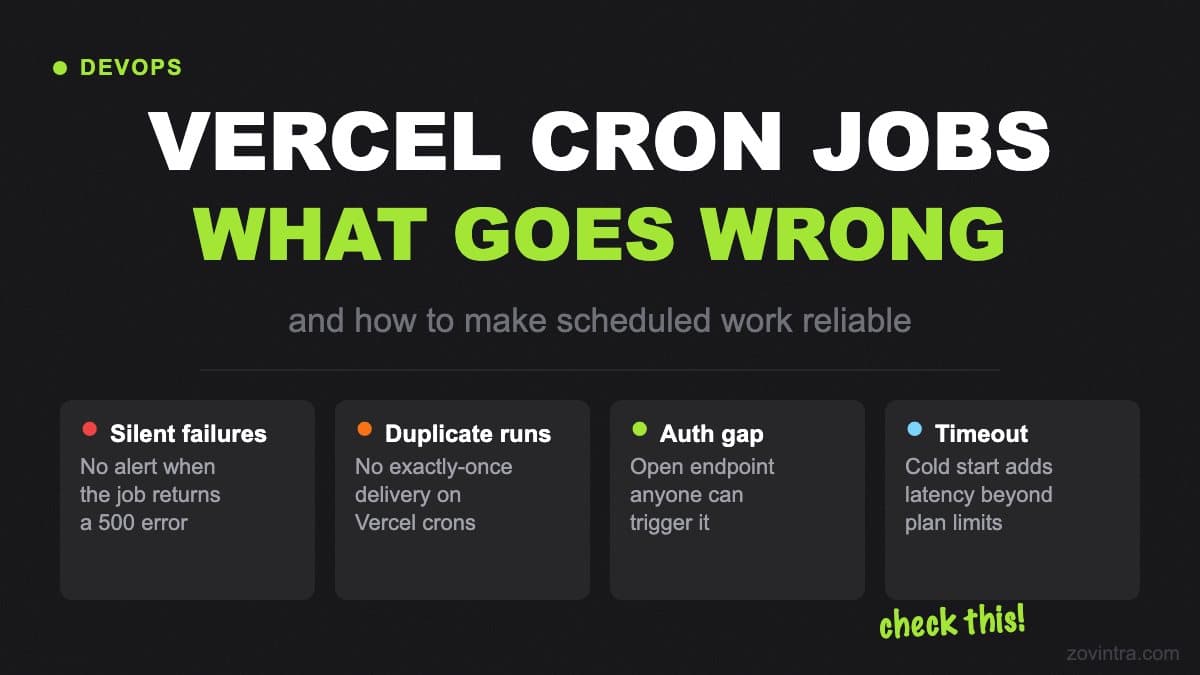
The most damaging Vercel cron failure mode is the silent one. The job fires, your function runs, something inside it throws an unhandled error, and you get a 500. Vercel logs it and does not retry. Nothing else happens - no alert unless you build one. Vercel's documentation also notes that delivery is best effort: an occasional transient network error can stop a scheduled request reaching your function, and in that case no runtime log is created for that run at all.
The fix has two parts. First, add explicit logging at the start and end of every cron handler: a timestamp and a label. That gives you a search filter in Vercel's log explorer. Second, write a heartbeat - a short write to your database with the last-successful-run timestamp. Add a check elsewhere in your app (on an admin page, or as a separate health endpoint) that alerts if this timestamp is older than two cron intervals. That way a silent failure becomes visible within one missed run.
If you use Supabase, a single row in a `cron_health` table works well. Insert or upsert a row with `job_name` and `last_run_at` at the end of each cron handler. A simple query can tell you whether any job is overdue.
Problem 2: Duplicate Executions
Vercel does not guarantee exactly-once delivery. Its documentation says cron delivery is best effort and that it can occasionally invoke the same scheduled run more than once, and that a job running longer than its interval can overlap with the next run. If your cron job sends emails, charges users, or moves data, a duplicate run can cause real problems.
The correct pattern is idempotency, and Vercel's guidance is the same: design operations so running twice has the same effect as running once, and so each run can reprocess any work outstanding since the last successful run. For a job that sends a digest email, check whether the email has already been sent for this period before sending. For a job that syncs data, use upsert instead of insert and track the last-processed timestamp. This also covers missed runs.
If true idempotency is not possible, use a lock. Vercel suggests a mechanism such as a Redis distributed lock so only one instance runs at a time. A short-lived record in your database with a unique key for the current run window (for example the ISO date for a daily job) can serve the same purpose. If the record already exists, the second invocation exits immediately without doing work.
Problem 3: The Authorization Gap
If you set a `CRON_SECRET` environment variable, Vercel automatically sends it as an `Authorization` header when it invokes your cron job, and your route should compare the two and return 401 if they do not match. The problem is that this check is easy to skip - especially in an AI-generated route or one written in a hurry.
An unprotected cron endpoint is an unprotected API endpoint. Anyone who knows the URL can trigger your scheduled job at will. If your job sends emails, deletes old records, or syncs external data, this is a real exposure. One test: load your cron URL directly in a browser without the Authorization header. You should get a 401, not a 200.
The verification pattern:
- Read `Authorization` header from the incoming request
- Compare to `Bearer ${process.env.CRON_SECRET}` (a constant-time comparison is a sensible hardening step), and reject the request if CRON_SECRET is not set
- Return 401 with no body if they do not match
- Log the unauthorized attempt (it may indicate a probing attack)
Problem 4: Function Timeouts
A cron handler that does meaningful work - querying a database, calling an external API, processing a queue - can run long enough to hit Vercel's function duration limit. Cron jobs have the same duration limits as Vercel Functions. Per Vercel's current documentation, with fluid compute (enabled by default) the default and maximum is 300 seconds on Hobby, and Pro can be configured up to 800 seconds. Limits change, so check the duration documentation for your plan.
Work that cannot complete within the limit needs a different approach. Vercel's own guidance is to split cron jobs into smaller units or distribute the workload across regular HTTP requests. You can also offload the heavy work to a queue and have the cron job only enqueue work rather than process it.
Set `maxDuration` deliberately on cron routes so a runaway job is stopped rather than overlapping the next run, and keep a margin between your typical run time and the limit.
Problem 5: Plan Limits on Cron Frequency
Vercel's cron limits depend on your plan. According to Vercel's usage and pricing page, the Hobby plan can only run cron jobs once per day, and Vercel may invoke a Hobby job at any point within the specified hour (a `0 1 * * *` job can fire anywhere between 1:00 and 1:59 am). Pro and Enterprise allow once-per-minute schedules with per-minute precision. These limits can change when Vercel updates its plans.
A cron expression like `*/5 * * * *` (every 5 minutes) is not allowed on Hobby: Vercel documents that expressions running more than once a day will fail the deployment with an error rather than being silently ignored. After deploying, check the Cron Jobs page in your project settings to confirm that the jobs are listed and enabled, and note that all schedules run in UTC.
What a Reliable Cron Handler Looks Like
A production-ready cron handler on Vercel should:
- Verify the CRON_SECRET header first and return 401 on failure
- Log the start time with the job name
- Check an idempotency key before doing any work
- Do the minimum work that fits within the timeout
- Write a last-run timestamp on success
- Log the end time and outcome
- Return 200 only on true success, not on 'nothing went wrong that I noticed'
These patterns are not Vercel-specific - they apply to any scheduled job in a serverless environment. The difference with Vercel is that the infrastructure makes it easy to skip them.
When to Move Beyond Vercel Crons
Vercel cron jobs are right for simple, low-stakes scheduled tasks: nightly cleanups, weekly digests, hourly syncs. They are not right for high-frequency jobs, jobs that need guaranteed delivery, or jobs where a missed or doubled execution causes data problems.
For higher-reliability requirements, a dedicated job scheduler - such as a queue with delay (Upstash QStash, AWS SQS, BullMQ with Redis) - gives you delivery guarantees, built-in retries, dead-letter queues, and observability that serverless crons do not. The Vercel cron is the right starting point, but not always the right ending point.
If your app relies on scheduled jobs for anything business-critical and you are not sure whether your cron setup is reliable, that is the kind of thing a support and hosting review covers. Talk to us about what we check. You can also see how we handle Vercel environment variable hygiene to keep your cron secrets safe.
Common questions
Why did my Vercel cron job not run or fail silently?
Per Vercel's documentation, delivery is best effort, Vercel does not retry a failed cron invocation, and a transient network error can mean no runtime log is created at all. Add start and end logging and a last-successful-run heartbeat so silent failures become visible.
How do I stop a Vercel cron job running twice?
Design the job to be idempotent so running twice has the same effect as running once. For a digest email, check whether it was already sent for the period. If that is not possible, use a lock, such as a unique record for the current run window.
When should I move beyond Vercel cron jobs?
Vercel crons suit simple, low-stakes tasks like nightly cleanups. For jobs needing guaranteed delivery or where a missed or doubled run causes data problems, use a queue with retries. Zovintra's support and hosting review covers whether your cron setup is reliable.
Sources
- Cron Jobs - Vercel Docs, 2026-09-16
- Managing Cron Jobs - Vercel Docs, 2026-08-11
- Usage & Pricing for Cron Jobs - Vercel Docs, 2026-07-15
- Configuring Maximum Duration for Vercel Functions - Vercel Docs, 2026-08-24