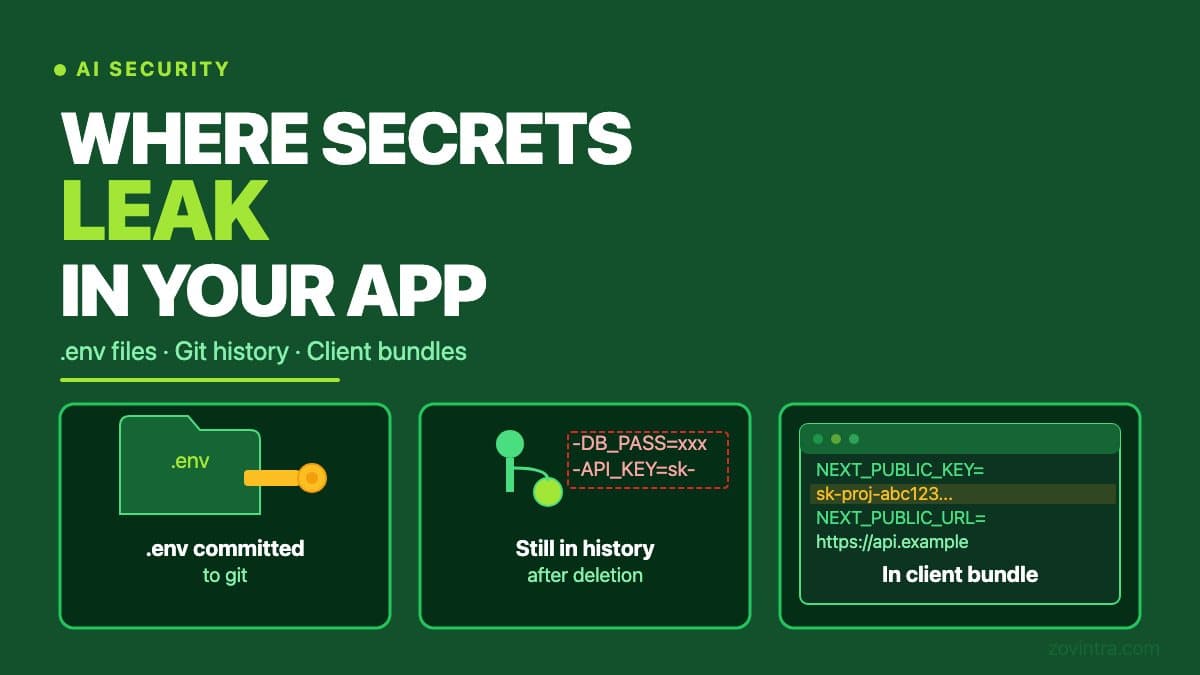
API keys, database passwords, and service role credentials are called secrets because they are supposed to stay secret. In vibe-coded apps - apps built primarily through AI coding tools - three routes account for most secret exposures: the .env file committed to a public repository, credentials buried in git history, and keys included in the JavaScript bundle shipped to the browser. Each route has a different risk profile and a different fix. Knowing which one you have matters.
Route 1: The .env File Committed to the Repository
A .env file is where you store environment-specific configuration: database URLs, API keys, authentication secrets. It is designed to sit on a developer's local machine and in the deployment platform, not in the repository. Adding it to a repository - particularly a public one - exposes every secret it contains to anyone who can read the repo.
AI coding tools can generate .env files as part of project scaffolding. If the tool generates a .env.example file and a real .env file in the same step, a developer who runs 'git add .' without checking will commit both. The .env file is supposed to be in .gitignore, but the gitignore is only protective if it was set up before the first commit. A .env file added to git before the gitignore was configured will be tracked even after the gitignore is updated.
To check whether your project has committed a .env file: run `git ls-files | grep .env` in your repository. If any result appears that is not the .env.example file, the file has been committed and its contents are in the git history.
GitHub's secret scanning runs automatically for free on public repositories, and when it detects a partner secret it notifies the provider so they can act, such as revoking the credential. For organisation-owned private repositories it needs GitHub Secret Protection to be enabled. Detection is not guaranteed, so do not assume a leaked key was caught: rotate it anyway.
Route 2: Credentials in Git History
A secret that was committed to git and then deleted from the working tree is still in the git history. Anyone who clones the repository - or who had a clone before the deletion - has the secret. Deleting a file from the current branch does not remove it from the repository's history.
This is one of the most common sources of confusion after a secret exposure. A developer commits a .env file, realises the mistake, deletes the file, and believes the problem is solved. The file is gone from the current state of the repository. It is still present in every commit from before the deletion. On a public repository, those commits are publicly readable.
GitHub's guide to removing sensitive data says the first step is to revoke or rotate the secret, and that rewriting history with git-filter-repo needs a force push and leaves other people's clones uncleaned until they re-clone. The simpler and more reliable response is to rotate the secret immediately - generate a new key and revoke the old one - and treat the old key as compromised.
To search git history for a specific pattern, run: `git log --all -S 'YOUR_KEY_OR_PATTERN' --oneline`. Replace YOUR_KEY_OR_PATTERN with the first few characters of the secret, or a pattern that would appear near it in the file. If the command returns any commits, the pattern appears in the history of that commit.
Route 3: Keys in the Client-Side JavaScript Bundle
JavaScript that runs in the browser is visible to anyone who visits your site. Whatever is compiled into the JavaScript bundle is readable by your users, your competitors, and anyone who inspects the page source. If an API key is included in the bundle, it is public.
This is different from the repository exposure routes above. A key in the client bundle does not require repository access to discover. It requires only loading your website and opening the developer tools.
In Next.js, environment variables that begin with NEXT_PUBLIC_ are inlined into the client bundle at build time. Variables without that prefix are only available on the server. AI coding tools sometimes generate code that places a server-only secret in a NEXT_PUBLIC_ variable because the prompt was about making a feature work, not about where the secret should live. The variable name tells Next.js to bundle it for the client, and the key ships with every page load.
In Vite-based apps, variables prefixed with VITE_ are included in client-side code and visible to anyone who inspects the app, and Vite says not to put API keys in them. The same pattern applies. The post on API keys for AI features covers the server-vs-client split in more depth for the specific case of AI API keys.
To check for this: open your app in a browser, open developer tools, go to Sources (Chrome) or Debugger (Firefox), and search within the JavaScript bundle files for 'secret', 'key', 'password', or the first few characters of any known secret. If you find a match, the value is in the bundle.
Specific Risks by Secret Type
- Supabase service role key: bypasses row-level security entirely. Anyone with this key can read, write, and delete any row in your database without authentication. This is the highest-severity secret in a Supabase-backed app.
- OpenAI or Anthropic API key: can be used to run API calls billed to your account. Treat an exposed key as found: attackers scan for keys, and a leaked one can start generating API costs quickly.
- Stripe secret key: allows creating charges, reading customer data, and issuing refunds. Stripe recommends auditing API request logs to spot misused keys, and says to rotate an exposed key immediately even if you are not sure anyone saw it.
- Database connection string with password: direct database access, bypassing your application entirely.
- JWT signing secret: can be used to forge authentication tokens and impersonate any user.
What to Do When You Find an Exposed Secret
The priority order is: rotate first, investigate second, prevent third. Rotation - generating a new key and revoking the old one - cuts off the exposure immediately. Investigation tells you whether the key was used while it was exposed. Prevention stops the same leak from happening again.
- Go to the service that issued the key (Supabase, OpenAI, Stripe, etc.) and revoke the old key. Generate a new one.
- Update every location where the old key was used - environment variables in Vercel, local .env files, CI secrets - with the new key.
- Check the usage logs for the old key. Many API providers show recent usage for a key; check what yours offers. Look for requests that do not match your deployment's IP range.
- If the key was in git history: decide whether to rewrite history (disruptive) or accept that the old key is gone and the new one is clean.
- Add the relevant patterns to your .gitignore if they are not already there. Consider adding a pre-commit hook that rejects commits containing strings that match secret patterns.
The free code review tool scans your repository files for common secret patterns, including hardcoded credentials in test fixtures, database seeds that contain real API keys, and configuration files committed with their default secrets intact. It does not scan git history - use `git log -S` as shown above to check history separately.
For an app heading toward launch, the steps above are a starting point. A complete review covers secret management, access control, and dependency risks together. If you want to understand the full picture before your app has real users, contact us to discuss a pre-launch review. The cost of addressing these issues before launch is a fraction of the cost of addressing a breach after it.
For the environment-level separation that prevents agents and reviewers from accidentally reaching production secrets, the post Keep Staging and Production Apart covers the deployment configuration in detail.
Common questions
I committed my .env file to GitHub. What should I do?
Rotate first: revoke the old key at the issuing service, generate a new one, and update Vercel, local and CI settings. Deleting the file does not remove it from git history, so treat the old key as compromised and check its usage logs.
How do I check whether my API keys are exposed in my website's JavaScript?
Open your app, open developer tools, and search the JavaScript bundle in Sources or Debugger for words like secret, key or password, or the first characters of a known secret. In Next.js, NEXT_PUBLIC_ variables are inlined into the client bundle; Vite does the same with VITE_.
Can someone review my vibe-coded app for leaked secrets before launch?
Zovintra's free code review tool scans repository files for common secret patterns but not git history, so check history separately with git log -S. A complete pre-launch review covers secret management, access control and dependency risks together.
Sources
- About secret scanning - GitHub Docs, accessed 19 Oct 2026
- Removing sensitive data from a repository - GitHub Docs, accessed 19 Oct 2026
- Best practices for managing secret API keys - Stripe documentation, accessed 19 Oct 2026
- How to use environment variables in Next.js - Next.js documentation, last updated 2026-08-25
- Env Variables and Modes - Vite documentation, accessed 19 Oct 2026