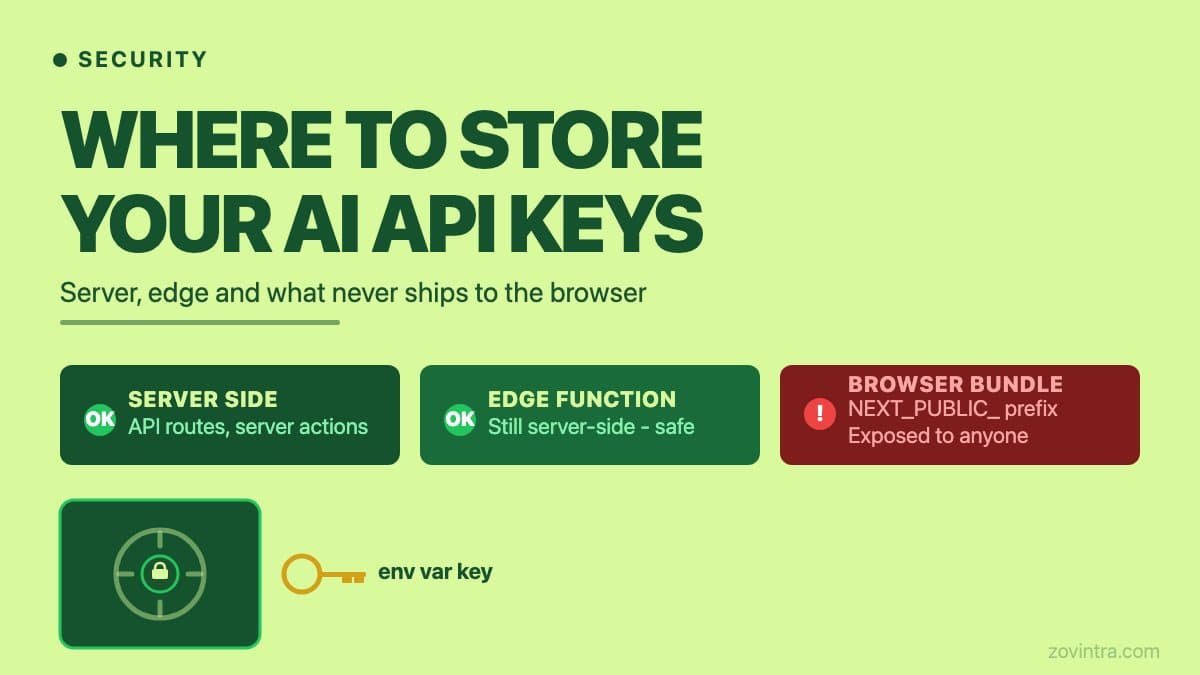
Store API keys for AI services on the server only - never in your client bundle. In a Next.js project, that means using environment variables without the NEXT_PUBLIC_ prefix, accessed inside API routes, server actions, or server components. The key never leaves your infrastructure. If a key reaches the browser, anyone can extract it from the network tab or the JavaScript bundle, use it with no rate limit on their end, and run up your bill or access your data before you notice.
Why an API Key in the Browser Is a Different Class of Problem
A leaked database password is bad but usually requires network access to your server to exploit. An exposed AI API key is usable from anywhere in the world the moment someone copies it. They do not need to reach your server. They make calls directly to the provider using your credentials, your quota, and your billing account. The first sign that it has been found is usually a spike in your usage dashboard or an unexpected charge.
Automated scanners look for patterns that match known API key formats, so assume that a key shipped in a public JavaScript bundle will eventually be found. A key that ships in a Lovable or Bolt deployment going live today could be found before your first real user even logs in. This is one of the most common patterns in secrets that leak in vibe-coded apps.
The Right Architecture: A Server-Side Proxy
The correct pattern is to route every AI call through a server-side endpoint you control. The browser sends a request to your server - an API route in Next.js, a Vercel function, or an Express endpoint - which reads the key from an environment variable that only your server can access, attaches it to the outgoing request, and forwards it to the model provider. The response comes back through your server to the browser. At no point does the browser see the key.
This also gives you a place to add rate limiting, logging, input validation, and spend caps - none of which are possible if you make the call directly from the client. Without a server-side proxy, you also have no reliable way to enforce rate limits or prevent abuse after launch.
We use this pattern in our own Gemini integration inside the Zovintra website health-check tool. The key is held server-side as an environment variable, and calls are capped and validated. We have tested that feature and do not claim AI-written reports are a proven strength; the architecture is the point here. It is the only acceptable architecture for a production AI feature.
How Environment Variables Work in Next.js
Next.js loads environment variables from .env* files into process.env, and per its docs variables are only available on the server by default. The NEXT_PUBLIC_ prefix is the escape hatch: Next.js inlines those values into the JavaScript bundle at build time. It is designed for things like your analytics tracking ID or your public site URL, not for secret keys.
The rule is simple: no AI key should ever have NEXT_PUBLIC_ in front of it. If you inherited a project and you are not sure, open .env.local and search for NEXT_PUBLIC_ followed by the name of any AI provider - OPENAI, ANTHROPIC, GEMINI, COHERE. If you find one, rotate the key immediately before investigating anything else.
- Keep the key in .env.local locally and in your hosting platform's environment settings for production. Vercel encrypts environment variables at rest and can mark values as write-only Secrets. The default create-next-app template adds all .env files to .gitignore - keep it that way.
- Never pass the key as a React prop, store it in component state, or export it from a module used in client components.
- Rotate immediately if you suspect the key was exposed, even briefly. Most providers let you create a replacement key in their console.
- Add the key name to your .gitignore and pre-commit checks so a future contributor cannot accidentally commit it.
Edge Functions: A Subtlety Worth Knowing
Vercel Edge functions and Next.js middleware run closer to the user than traditional Node.js serverless functions, but they still run on Vercel's infrastructure - not in the browser. Environment variables work the same way in both runtimes. The distinction that matters is not edge versus serverless; it is server versus client. Any server-side runtime, including Vercel Edge, can safely hold your key. The Vercel documentation on environment variables covers how to set and access them, including a 5KB per-variable limit in the edge runtime.
What to Do If a Key Is Already Exposed
If you have found an exposed key - in a git commit, a public environment file, or a client bundle - the steps are: rotate the key first, then investigate how long it was exposed, then check your usage logs for anomalous calls. In that order. Rotating takes seconds and stops the bleeding. Investigating takes longer but gives you the facts you need to decide whether to notify users.
After rotating, check your provider's usage dashboard for calls you did not make. Many providers show per-key usage, but check yours. Look for unusual request volumes, unusual endpoints, or requests from IP addresses outside your expected geography. Export or screenshot what you find before you delete the old key, in case its usage history disappears with it.
The Audit Test You Can Run Right Now
Open your browser's developer tools, go to the Network tab, trigger your AI feature, and inspect the outgoing requests. If any request goes directly from your browser to an AI provider domain - api.openai.com, api.anthropic.com, generativelanguage.googleapis.com - your key is exposed. Every request should go to a domain you own first, not to the model provider directly.
Do the same for your JavaScript bundle. Open the Sources panel in developer tools and search for the string that starts your key (sk- for OpenAI, similar for other providers). If it appears in a client-side file, you have a problem regardless of whether it also appears in a config file.
Vercel and Next.js make the correct pattern straightforward once you know what to look for. A quick note on third-party AI SDKs: libraries like the Vercel AI SDK provide hooks and streaming utilities for both client and server use - but the key rule still applies. If the SDK is initialised with your API key inside a client component, the key is exposed regardless of which wrapper you used. The safe pattern is always to initialise in a server action or API route, not in a component file. Read the library's documentation section on server-only usage before you start. The harder problem is the codebase that already shipped with the wrong pattern, where the key may have been exposed for weeks. Our free code review tool checks for this automatically - it flags NEXT_PUBLIC_ on sensitive-looking variables and scans for known key patterns in client-reachable files. Run it on your repo and you will have a specific answer in minutes.
Common questions
Where should I store API keys for AI features in Next.js?
Store them on the server only, as environment variables without the NEXT_PUBLIC_ prefix, accessed inside API routes, server actions or server components. Per the Next.js docs, variables are only available on the server by default, while NEXT_PUBLIC_ values are inlined into the browser bundle at build time.
What should I do if my AI API key is exposed?
Rotate the key first, then investigate how long it was exposed, then check your usage logs for anomalous calls, in that order. Rotating takes seconds and stops the bleeding. Export or screenshot your usage history before deleting the old key.
How can I check whether my app is leaking an AI API key?
Open your browser's Network tab and trigger the AI feature; any request going straight to a provider domain means the key is exposed. Zovintra's free code review also flags NEXT_PUBLIC_ on sensitive-looking variables and scans for known key patterns in client-reachable files.
Sources
- How to use environment variables in Next.js - Next.js documentation, last updated 2026-08-25
- Environment variables - Vercel documentation, last updated 2026-09-17