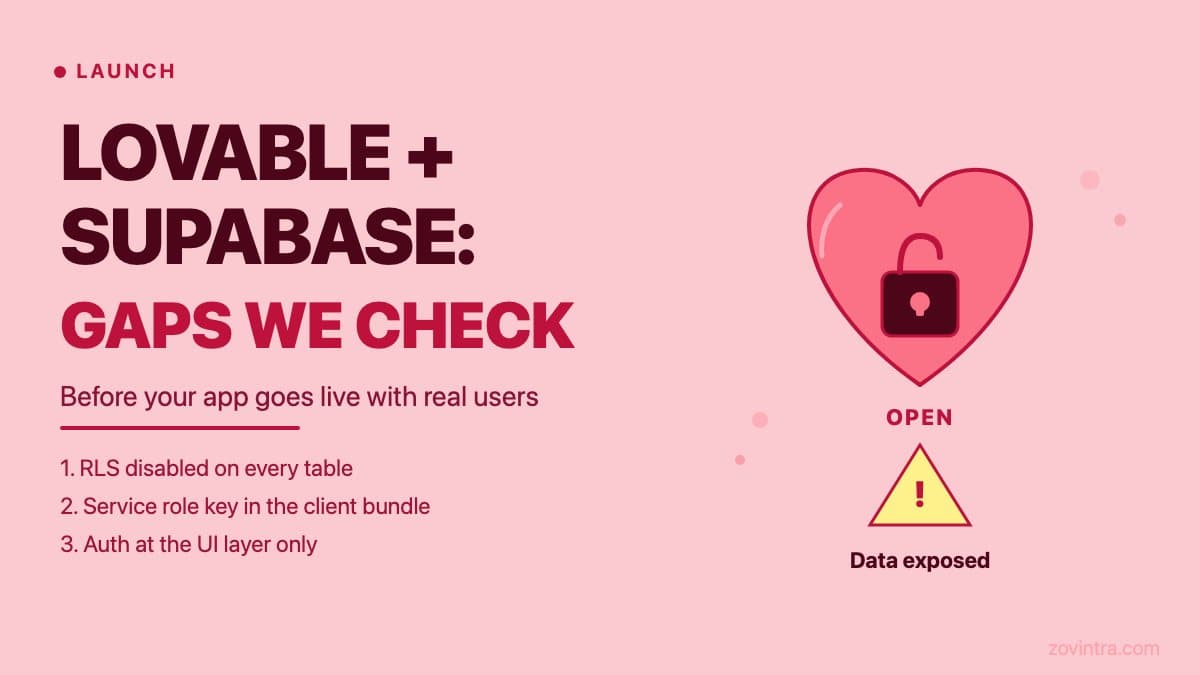
Lovable builds apps faster than most developers can scaffold a project. The Supabase integration it produces is functional: tables exist, data flows, authentication works. But 'functional' and 'safe for real users' are not the same thing. When we review a Lovable app before production launch, there are five places worth checking first, because they are where data most often ends up exposed.
Why Lovable Apps Need a Security Pass Before Launch
Lovable generates code optimised for speed and functional correctness. The AI behind it is focused on making the product work. Security configuration - particularly at the Supabase level - requires deliberate choices about who should be allowed to read which rows, who can write, and what happens when a request arrives with no authentication token at all. These choices are not automatic.
The result is predictable: the app ships with the Supabase defaults, which are designed for development and exploration, not production with real user data. The UpGuard study on exposed Supabase databases (our write-up) found that 16,326 Supabase databases had publicly readable tables out of roughly 300,000 candidate domains. UpGuard did not measure how many of those projects were AI-generated, but missing RLS is a pattern AI-built apps often share.
If your Lovable app holds anything beyond dummy data - user accounts, form submissions, payment history, private messages - a security review before launch is not optional. The free code review tool is a starting point. The gaps below explain what it looks for.
Gap 1: Row-Level Security Is Off by Default
According to UpGuard, tables created programmatically through the API do not get RLS by default, and an AI builder that creates tables that way can leave RLS off. When RLS is off, any request that reaches the table - whether through your app or directly through the Supabase REST API - can read every row. This means anyone with your project's anon key, which is safe to share in principle, can call the Supabase endpoint and receive all user data in return.
Lovable's own docs say misconfigured RLS rules are a common cause of data leaks, and its quick scan flags tables without per-record access control. RLS coverage depends on the prompt, the version of Lovable in use, and whether the generated code includes the SQL to enable RLS and create policies. The only reliable check is to open the Supabase dashboard, go to the Authentication section, select Policies, and verify that each table shows RLS as enabled with at least one policy in place.
The post Supabase Tables Created by an AI Agent Often Have No Row-Level Security covers the technical detail. For Lovable specifically: open the Table Editor in your Supabase project and look for the RLS badge on each table. A table with no badge, or a badge that reads 'No policies', is readable by anyone with the anon key.
Gap 2: The Service Role Key in the Client Bundle
Supabase gives every project two keys: the anon key and the service role key. The anon key is designed to be used in client-side code. The service role key bypasses RLS and has admin-level access to your database. It must never appear in client-side code.
In any AI-built project that is iterated quickly with prompts like 'make this work for admin users', the service role key can end up in a file that gets compiled into the JavaScript bundle served to the browser. Every visitor to your site can then extract it from the developer tools and make direct database calls with admin privileges.
The post Service Role Key Leaked in Your Frontend Bundle covers how to check for this and what to do in the first hour after you find it. For a Lovable app, search your project for the string 'service_role' in any file under the src or app directory. If it appears there, it is in the client bundle.
Gap 3: Auth Checks at the Application Layer, Not the Database Layer
Lovable apps typically enforce authorisation in JavaScript - for example, by checking whether the current user's ID matches the record's owner_id before displaying data. This is the right pattern at the UI level. But if the same check is not enforced at the database level through an RLS policy, a direct API call - bypassing the UI entirely - can still retrieve the data.
The test is simple: take a record that belongs to user A. While logged in as user B, make a direct request to the Supabase REST API for that record, using user B's authentication token. If you receive the record, the authorisation is enforced only at the UI layer, not the database layer.
A correct RLS policy would deny that request at the database level and return an empty result, regardless of how the request was made. An RLS policy like `USING (auth.uid() = user_id)` on a table ensures that each user can only read rows where their authenticated user ID matches the row's owner. AI builders do not always generate these policies, so check for them.
Gap 4: Storage Buckets Without Access Policies
If your Lovable app uses Supabase Storage - for file uploads, profile photos, or document attachments - the storage buckets have their own access model, separate from RLS on database tables. Supabase says buckets are private by default, but generated code can create public buckets for simplicity, particularly when the prompt is about letting users upload files.
A public bucket bypasses access controls for retrieving and serving files, so anyone with a file's URL can open it. File URLs in Supabase Storage follow a predictable structure. In the Supabase dashboard, go to Storage and check each bucket's access level. If any bucket shows as 'Public', verify that the files in it should genuinely be publicly readable.
Gap 5: No Rate Limiting on Auth Endpoints
Supabase Auth includes built-in rate limits, for example 30 sign-up and sign-in requests per 5 minutes per IP address by default, and they can be adjusted. AI-built apps rarely add application-level rate limiting on top. This matters if your app's sign-in form does not use CAPTCHA or another challenge: a script can attempt thousands of password guesses against a known email address without the app noticing.
The Authentication > Rate Limits page in the Supabase dashboard shows the current limits for sign-ins, emails and SMS. If you are using the defaults, check these values and consider whether they are appropriate for an app with real users.
A Checklist Before You Share the Link
- Open Supabase dashboard, Authentication, Policies. Verify RLS is enabled on every table that holds user data, with at least one SELECT policy in place.
- Search your project source for 'service_role'. It must not appear in any file under src/, app/, or components/.
- Test horizontal access: log in as user A, request user B's record directly via the Supabase REST API. Expect an empty result, not the record.
- Open Supabase Storage. Check each bucket's access level. Public buckets should only exist for content that is genuinely intended to be public.
- Check Supabase Auth rate limits under Authentication > Rate Limits. Reduce the allowed sign-in attempts if they are set higher than your use case requires.
If you want a broader check that covers your Lovable project's code and configuration, the free code review scans for the patterns above as well as common secret exposure and dependency risks. For a thorough review before launch, contact us to discuss what a pre-launch security pass covers and what it costs.
The post When You Outgrow AI Builders is worth reading if you are also thinking about what Lovable cannot handle as your product scales. Security gaps are one part of that conversation, but architecture and maintainability are the other parts.
Common questions
Is a Lovable app safe to launch with real users?
Not without a security pass. The app ships with Supabase defaults designed for development, and the five places worth checking first are row-level security, the service role key, database-level authorisation, storage buckets and auth rate limiting.
How do I check whether my Supabase data is publicly readable?
Open the Supabase dashboard, go to Authentication, then Policies, and verify each table holding user data shows RLS enabled with at least one policy. A table with no badge, or a badge reading 'No policies', is readable by anyone with the anon key.
Who can do a pre-launch security review of my Lovable app?
The free code review scans for these patterns plus common secret exposure and dependency risks. For a thorough review before launch, you can contact Zovintra to discuss what a pre-launch security pass covers and what it costs.
Sources
- Everything, Everywhere: Systemic Data Exposure in Supabase Apps - UpGuard, 14 Oct 2026
- Row Level Security - Supabase Docs, accessed 19 Oct 2026
- Security - Lovable Docs, accessed 19 Oct 2026
- Storage Buckets Fundamentals - Supabase Docs, accessed 19 Oct 2026
- Auth Rate Limits - Supabase Docs, accessed 19 Oct 2026