The first hour of a production incident is when panic does the most damage. Without a plan, engineers make parallel changes that conflict, communication stalls, and the real cause gets buried under rushed fixes. A small team - even two people - can avoid the worst of this with a clear sequence: who does what, in what order, and when to stop and communicate rather than keep fixing.
Why Small Teams Struggle With Incidents
Large engineering organisations have incident commanders, dedicated on-call rotas, and established runbooks. A startup with four engineers has none of that. When production breaks at 11 pm, whoever notices it first becomes the default incident lead, everyone else piles in with their own idea of what is wrong, and the team spends twenty minutes disagreeing in Slack while the issue continues.
The solution is not to build a full incident management system. It is to agree on three things before the incident happens: one person is in charge, there is a single channel for all communication, and no one makes production changes without saying so first. This mirrors Google's SRE guidance: an incident commander coordinates, and the operations group should be the only one modifying the system during an incident.
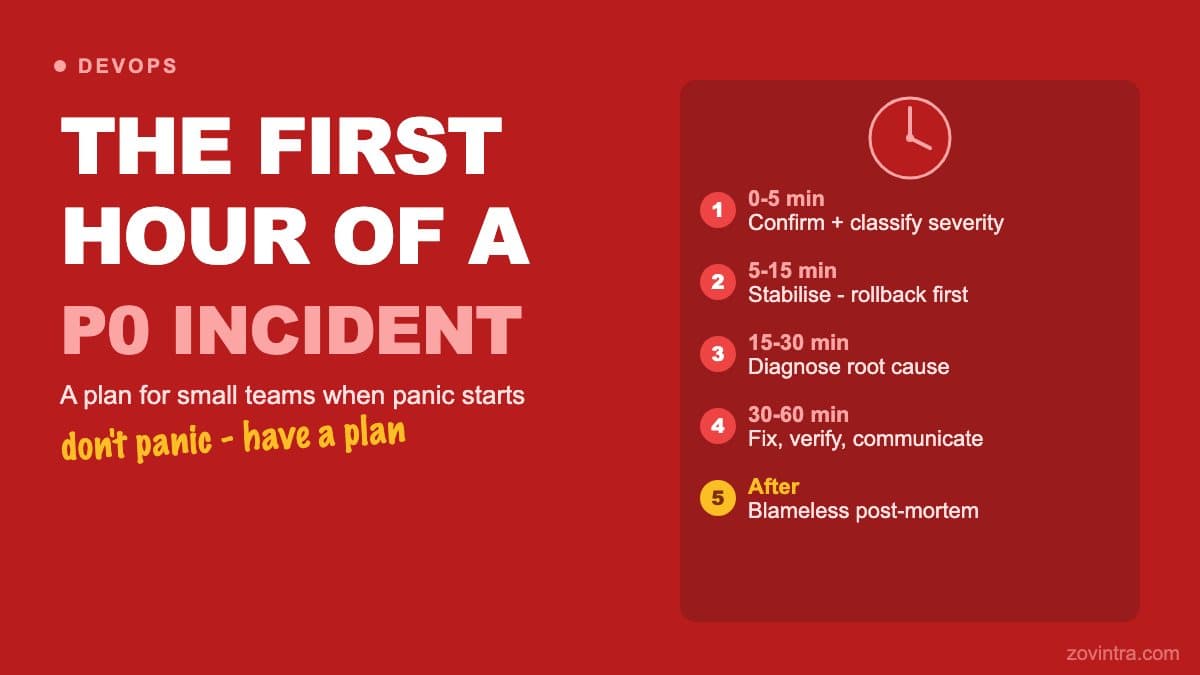
Minutes 0-5: Confirm and Classify
The first five minutes are for confirming there is an actual problem and classifying its severity. Do not skip this step. A monitoring alert that has been misconfigured for weeks, or a spike in error rates caused by a bot crawl, is not a P0 incident. Treating every alert as critical trains the team to ignore alerts.
- Verify the problem is real: check the monitoring dashboard, not just the alert. Look at error rates, latency, and active user counts.
- Classify severity: P0 means production is down or data is being corrupted. P1 means a major feature is broken for real users. P2 is degraded performance or a minor feature broken. Most alerts are P2 or lower. (Other teams use SEV levels, for example PagerDuty's SEV-1 to SEV-5, which advises that if you are unsure between two levels you treat it as the higher one.)
- Assign an incident lead: the first person to confirm the incident owns it until they hand off. Everyone else is support.
- Open a dedicated incident channel in Slack or your team chat. All communication about this incident goes there, and the Google SRE book also stresses keeping a living incident document that the commander maintains.
Minutes 5-15: Stabilise Before You Diagnose
The most common mistake in incident response is jumping straight to root-cause analysis while the incident is still active. Users are waiting. Your first priority is to reduce the blast radius and restore partial service, even if you do not understand why it broke.
- Roll back the most recent deployment first. If something changed in the last 24 hours and production is broken, that is the most likely cause. A rollback is usually quick and eliminates one hypothesis immediately.
- Check whether a restart resolves the symptom. This is not a fix, but if it restores service, it buys time to diagnose properly.
- If data integrity is at risk (a database is being modified incorrectly, a process is running that should not be), stop that process immediately. Preventing further damage takes priority over keeping the service running.
- Communicate to affected users. A simple status page update or a short message to your support channel - 'We are investigating an issue with [feature]' - is enough. Silence is worse.
If a database exposure is involved, the response sequence changes. The first 24 hours after a database is exposed covers that scenario specifically.
Minutes 15-30: Diagnose the Cause
Once the immediate bleeding is stopped, the incident lead can start proper diagnosis. This is where having one person in charge matters most. Everyone else on the team is a resource, not a parallel investigator.
- Start with logs from around the time the incident began. A timestamp correlation between the first error and a specific event (a deploy, a cron job, a traffic spike) is often enough to identify the cause.
- Check recent changes: deployments, database migrations, environment variable updates, third-party API changes.
- Ask one specific question per hypothesis. 'Is the database reachable?' Not 'What could be wrong with the infrastructure?'
- Write down what you check and what you find. Memory in high-stress situations is unreliable. Notes also feed the post-mortem.
Minutes 30-60: Fix, Verify, Communicate
A fix that is deployed without a verification step is not complete. Production environments behave differently from local or staging environments. After deploying a fix, check the actual metrics: error rates, response times, and affected user counts. Do not declare the incident resolved until the numbers confirm recovery.
- Deploy the fix to staging first if the fix is non-trivial and staging is available. If it is not available, deploy to production and monitor immediately.
- Verify the fix by checking metrics, not just by refreshing the page yourself.
- Communicate resolution: update the status page, send a brief message to the incident channel ('Issue resolved at [time], root cause was [X], full post-mortem to follow'), and notify affected users if the incident was visible.
- Assign a post-mortem owner before closing the incident. Without an owner, post-mortems do not happen.
The Role of the Incident Lead
The incident lead's primary job is coordination, not heroic debugging. The lead's work is mostly communication and delegation - status updates, directing team members, logging findings - with investigation handled by whoever has the most relevant context. They keep the team from stepping on each other's work. One person makes the call to rollback, one person makes the call to deploy a fix. Anything that needs more than one voice is a decision that should be made quickly and explicitly, not deferred.
What to Prepare Before the Next Incident
The right time to build your incident playbook is before you need it. A minimum viable playbook for a small team has four things: a severity classification guide, a list of who is the default incident lead on each day of the week, a link to the monitoring dashboard, and a rollback runbook for your deployment platform. That is it. Four things written down is infinitely better than four things everyone thinks they remember.
P0 and P1 incidents should also trigger a quick acknowledgement to your client or users, even before the cause is known. A short message - 'We are aware of an issue and investigating' - is professional. Long silence is not.
After the Incident: The Post-Mortem
A blameless post-mortem written within a few days of resolution is the most valuable thing a small team can do after an incident (PagerDuty's process schedules the review within 3 calendar days for its most severe incidents and names an owner at the end of the call). It does not need to be long. Five sections are enough: what happened, when it happened, what we did, what the root cause was, and what changes will prevent recurrence. The 'no blame' rule is essential: if engineers are afraid of post-mortems, they will not investigate honestly, and the same failures will recur.
If your team does not have defined support and escalation procedures, the cost of an unplanned incident multiplies quickly. We offer support and hosting arrangements - talk to us if structured support would help your team.
Common questions
What should a startup do in the first hour of a production incident?
Spend minutes 0-5 confirming the problem and classifying severity, then stabilise before diagnosing: roll back the latest deployment if something changed recently, and tell affected users. Then diagnose from logs and recent changes, fix, verify with metrics, and communicate resolution.
Should I roll back or debug first when production breaks?
Stabilise before you diagnose. If something changed in the last 24 hours and production is broken, rolling back the most recent deployment is usually quick and eliminates one hypothesis immediately. Investigate the root cause once service is restored or the blast radius is reduced.
When should a small team get structured support for incidents?
If your team has no defined support and escalation procedures, the cost of an unplanned incident multiplies quickly. Zovintra offers support and hosting arrangements, so it is worth talking to them if structured support would help your team.
Sources
- Managing Incidents - Site Reliability Engineering - Google, SRE book
- Post-Mortem Process - PagerDuty Incident Response docs, accessed 19 Oct 2026
- Severity Levels - PagerDuty Incident Response docs, accessed 19 Oct 2026