Writing 2,266 automated tests for a Flutter app while simultaneously building the app is possible for a small team. It requires a clear decision about what each test layer is for, which layers give the most return for their cost, and - critically - which gaps you accept and why. This article documents the approach we took building the Flutter app for ManOps, our internal operations platform, and what we would do differently for a client product.
Why Testing a Flutter App Is Different
Flutter's testing documentation describes three layers: unit tests (a single function, method or class), widget tests (a single widget) and integration tests (a complete app or a large part of it). The SDK includes the `integration_test` package, though it cannot interact with native platform UI such as permission dialogs or notifications. For those, Flutter's docs point to the Patrol package.
The challenge is that Flutter apps are event-driven UIs backed by state management, network calls, and native platform integrations. Tests that only cover business logic miss the most common failure modes: a widget that renders incorrectly after a state change, a navigation route that breaks when a parameter is null, a platform channel call that fails silently on one OS version.
Our Test Distribution
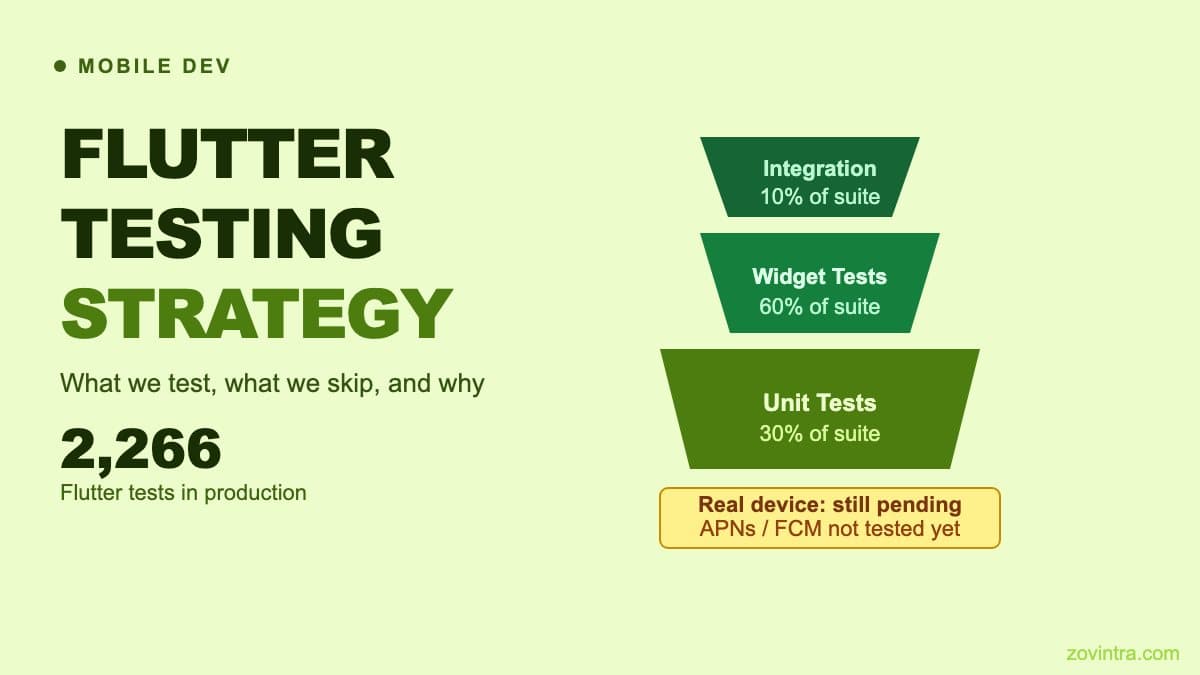
As of 9 October 2026, the ManOps Flutter app has 2,266 automated tests across 146 test files. The mix across unit, widget, integration, and specialised tests reflects which layers proved most useful as the app grew, not a fixed target we designed from the start.
Widget tests run much faster than integration tests and catch a broader range of regressions. A widget test can verify that a task list renders correctly after a state update, that a form shows the right validation error, or that a navigation callback fires with the expected arguments.
What We Test: Unit Tests
Unit tests in a Flutter app cover pure business logic: date formatting, filtering functions, validation rules, data model transformations. These are the cheapest tests to write and the easiest to maintain. If a function takes inputs and returns outputs with no side effects, it should have a unit test.
In ManOps, unit tests cover the logic behind features such as calendar date handling, availability slot calculation, task filters and drag-and-drop placement, and call push payload handling. Payload parsing is worth testing at this level because a bad parse means silent notification failures, and it is cheap to test with malformed inputs before anything reaches a real device.
What We Test: Widget Tests
Widget tests are where most of the investment is. A good widget test pumps a widget with a known state, performs an interaction or triggers a rebuild, and asserts the resulting tree. This is not just a visual check - it verifies that the widget responds correctly to state changes.
ManOps widget tests are organised per feature - tasks, calendar, chat, calls, availability, check-ins and others - because those are the screens users interact with most and where regressions are most visible. Where it matters, tests exercise empty, loaded and interaction states for a screen.
Where we use Riverpod providers, many tests override them with deterministic fake data. This keeps the tests fast (no real network calls) and ensures the test is testing the widget's behaviour, not the provider's.
What We Test: Specialised Layers
The ManOps test suite includes a dedicated security test file and an accessibility audit test. The security tests verify things like: deep links cannot let an id rewrite the navigation target, call push payloads are data-only and malformed fields never throw, link handling uses a scheme allow-list, sign-out wipes chat drafts, the app has no print or HTTP logging and no compiled-in secrets, and the Android and iOS configuration is HTTPS-only. The accessibility audit runs Flutter's accessibility guideline checks (labelled tap targets, iOS tap-target size and text contrast) against key screens.
These tests are not comprehensive audits. A security test that runs in the simulator does not verify lock-screen behaviour, biometric authentication, or how the app behaves when the device is jailbroken. The accessibility test does not replace testing with a real screen reader. They are a baseline: a set of checks that runs on every CI run and flags obvious regressions.
What We Deliberately Skip
Honest test documentation should include what is not covered. For ManOps, real-device testing is the most significant gap as of October 2026. On every change to the native app, the GitHub Actions workflow runs formatting, `flutter analyze` and `flutter test` on a Linux runner and builds a debug Android app; a Windows job runs the tests and an end-to-end flow; the iOS and macOS build is a manually triggered job on a macOS runner. The CI suite does not verify:
- Lock-screen call ringing via APNs VoIP and CallKit on a real iPhone
- FCM data message delivery on a real Android device with battery optimisation active
- The Jitsi media call quality on actual hardware
- OEM battery management behaviour on non-Pixel Android devices
- App behaviour after an OS upgrade on a physical device
We are aware of this gap. The device test script exists in the repository but has not been executed. For a product that will ship to real users, real-device testing for the call flow is non-negotiable before release.
The CI Gate
The test suite only has value if it runs on every change. In ManOps, the full flutter test suite (2,266 tests as of 9 October 2026) runs in GitHub Actions on every pull request and on every push to main that touches the native app. The pipeline also runs `flutter analyze` (the static analysis equivalent of a type-check) and builds a debug Android app to verify it compiles. Make the check required in your branch protection rules so a failing test blocks the merge.
Setting up a reliable Flutter CI pipeline has a few non-obvious requirements. We cover those details in CI gates for small teams with GitHub Actions.
What to Test First When Starting From Zero
If you are starting a Flutter project without any tests, the highest-return place to start is widget tests for your navigation and state management. A broken route that shows a blank screen instead of an error, or a state update that does not rebuild the UI, is the kind of regression that is invisible in a manual test pass and catches real users immediately.
Second priority: unit tests for any code that handles data your users cannot afford to lose or that involves financial calculations. A rounding error in an invoice total or a date offset in a scheduling feature is the kind of bug that creates real business problems.
Integration tests are expensive to write and maintain. For a small team, the return is not high enough to justify comprehensive integration test coverage until the product is approaching production stability. Add them selectively for the two or three most critical user journeys.
If you are planning a Flutter app and want to talk through the testing strategy for your specific product, get in touch with the mobile team.
Common questions
What kinds of tests should a Flutter app have?
Flutter's docs describe three layers: unit tests for a function or class, widget tests for a single widget, and integration tests for a whole app or a large part of it. For a small team starting from zero, widget tests for navigation and state management give the highest return.
Do automated tests replace real-device testing for a Flutter app?
No. As of October 2026 the ManOps CI suite does not verify lock-screen call ringing, FCM delivery with battery optimisation, call quality on hardware, or OEM battery behaviour. For a product shipping to real users, real-device testing for the call flow is non-negotiable before release.
When should I get help planning Flutter testing?
If you are planning a Flutter app and want to talk through the testing strategy for your specific product, you can get in touch with Zovintra's mobile team. Zovintra built ManOps with 2,266 automated tests as of 9 October 2026.
Sources
- Testing Flutter apps - Flutter Documentation, accessed 19 Oct 2026
- meetsGuideline function - Flutter API docs, accessed 19 Oct 2026