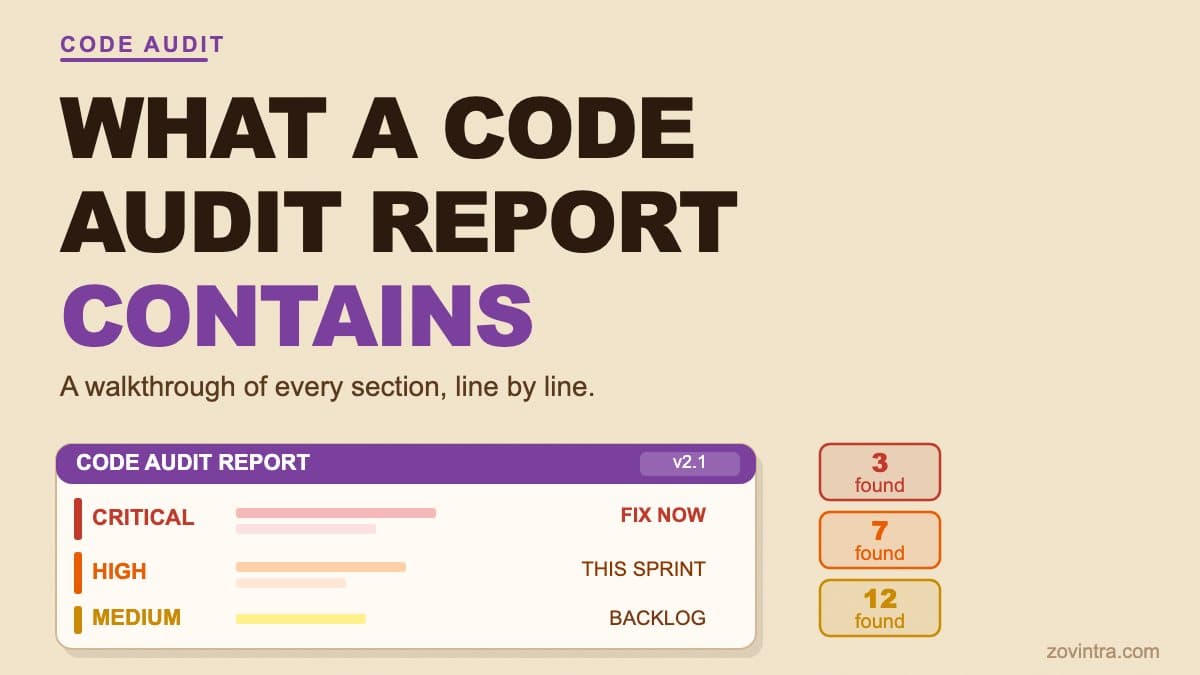
A code audit report lists specific findings in your codebase. Each finding includes a severity level (critical, high, medium, or low), the exact file and line where the problem lives, a plain-language explanation of the risk, and a recommended action for your developer. The goal is to give a non-technical founder a clear picture of what is at stake, and to give a developer a precise map of what to fix.
What the Report Structure Looks Like
Most code audit reports open with an executive summary: the total finding count, a breakdown by severity level, and a one-line risk verdict. This is written for someone who will not read every finding. A founder reviewing the report before a fundraise, a CTO handing it to a contractor, or an operations manager deciding whether to delay launch will all start here and may go no further.
The detail sits in the finding list. Each finding in our free code review is a self-contained record with consistent fields, so a developer can act on any finding without needing to ask for more context.
- ID: a short reference (CR-001, CR-002) so a developer can point to a specific finding in a ticket or pull request without quoting the full description
- Severity: critical, high, medium, low, or informational
- Category: the type of problem - exposed credential, missing access control, outdated dependency with a known CVE, unsafe configuration, and similar
- File and line: exactly where the problem exists in the codebase at the time of the scan
- Description: what the code does and why that creates a risk in plain language
- Evidence: the relevant code snippet or configuration value, sanitised to remove real secrets
- Recommended action: what a developer should do, written for someone who knows the technology
As a founder, you do not need to understand the evidence section. Read the description to understand what can go wrong if the finding is left unfixed, and the recommended action so you can have an informed conversation with whoever will fix it.
A Sample Finding, Line by Line
Here is a sanitised example of a critical finding from the type of scan our free code review tool runs, based on a pattern we see regularly in apps built with AI coding tools. The specific file name and value are invented for illustration; the finding class is real.
“CR-004 | Severity: Critical | Category: Exposed credential | File: src/lib/supabaseClient.js, line 3 | Description: The Supabase service role key is hardcoded directly in this client-side module. This key bypasses all row-level security policies on your database. Any visitor to your site can read the key by opening their browser developer tools, then use it to read, write, or delete every row in every table without restriction. | Recommended action: Remove the key from this file immediately. Rotate the key in your Supabase project settings under API keys. Move any server-side logic that requires the service role key into a Next.js API route or a Supabase edge function where the key is never sent to the browser.”
Example finding from a code review of an AI-built app (sanitised)What Critical Severity Actually Means
Critical does not mean "technically possible under specific conditions." It means a competent attacker can exploit this right now, without guessing, brute-forcing, or waiting for a specific user action. In the example above, the key is visible to anyone who opens Chrome DevTools and looks at the Sources or Network tab. The severity rating reflects the effort required to exploit it, not the likelihood that someone is actively looking.
Founders sometimes reason that "no one knows about this yet," so a critical finding can wait. That reasoning fails the moment the app is publicly indexed, shared on Product Hunt, mentioned in a newsletter, or added to an app directory. Exposure is not a question of if; it is a question of when the first person who knows where to look arrives.
Why the File Location Matters
Pointing to a specific file and line removes the ambiguity that slows remediation. Your developer does not need to search, interpret vague guidance, or wonder which version of the code the report refers to. They can open the file, confirm the finding in under a minute, and move straight to the fix. When we review AI-built codebases, the time between identifying a critical issue and a developer acting on it is significantly shorter when the report provides an exact location - something a general description like "check your auth setup" does not give you.
Why the Recommended Action Stops Short of a Fix
A code audit report gives direction, not a paste-in solution. The right fix for an exposed service role key, which bypasses every row-level security policy, depends on what that key is currently used for in your app, which backend environment you are deploying to, and whether moving logic server-side requires structural changes to your API. A report that provides a generic code snippet to copy-paste may solve the credential exposure while introducing a different problem. The fix belongs to a developer who understands the specific context. If you do not have one, the recommended actions in the report tell you what skills to look for when you hire.
How to Read Severity Levels
Severity levels are the most useful lens for prioritising the findings in a report. Here is a practical reading of each:
- Critical: fix this before any real user touches the app. A critical finding means data is exposed or credentials are accessible with no precondition required.
- High: fix this before launch, or within your current sprint if you are already live. High findings are serious but may require a specific user action or configuration state to exploit.
- Medium: address this within the next two to four weeks. Medium findings carry real risk but have a narrower blast radius or a harder exploitation path than high findings.
- Low and Informational: schedule these for a normal sprint. Outdated dependencies with no current CVE, missing security headers, and similar items belong on a backlog, not a crisis list.
Do not skip a critical finding because it seems technical. The most dangerous findings in an AI-built app are often among the simplest to resolve. Rotating a leaked key is a dashboard task under Settings, API Keys, and moving a config value to a server environment variable is usually a short job. Recovering from a data breach - notifying affected users, managing press coverage, satisfying any data protection obligations - is far slower and costlier than either fix.
What an Automated Scan Does Not Cover
Automated code review catches exposed secrets, unsafe authentication configurations (including common Supabase and Firebase misconfigurations), outdated dependencies with known CVEs, and a class of input-handling problems identified through static analysis. These are the categories that appear most often in AI-built codebases and the ones that are fastest to flag systematically.
What an automated scan cannot catch is business-logic access control. If your app lets a logged-in user view another user's invoices because the database query is missing a user ID filter, that is invisible to a scanner that cannot understand your data model. The query is valid code - the scanner sees no error. Only a human reviewer who understands what the application is supposed to do can flag it. We note this limit explicitly in every automated report we produce, because an absence of automated findings in that category does not mean the risk is absent. This is one reason the code review method page separates what our tool checks automatically from what a human review covers.
What to Do After You Receive the Report
If you have not had a code audit and you are not sure whether you need one, the post When Your Startup Needs a Code Audit covers the situations that most often call for one. The short answer: if real users are in your app and you built it with an AI tool, the answer is almost always yes.
To see what a report looks like for your own codebase, run the free scan on your repository. The scan covers secrets, dependency risks, and common authentication misconfigurations. If the results come back critical, or if you would rather have a developer walk through the findings with you, request a technical review and we will help you understand and prioritise what it found.
Common questions
What does a code audit report include?
A code audit report lists findings with a severity (critical, high, medium or low), the exact file and line, a plain-language explanation of the risk, and a recommended action. It usually opens with an executive summary showing total findings and a risk verdict.
What does a critical finding mean, and can it wait?
Critical means a competent attacker can exploit it now without guessing or waiting for a user action, such as a service role key visible in browser developer tools. Fix critical findings before any real user touches the app; waiting because nobody knows yet is risky.
When should I get a developer to walk through my audit results?
If the scan comes back critical, or you would rather have a developer explain and prioritise the findings, request a technical review. Zovintra can help you understand what the report found. Automated scans also cannot catch business-logic access control problems.
Sources
- Understanding API keys (Supabase docs) - Supabase, accessed 19 Oct 2026