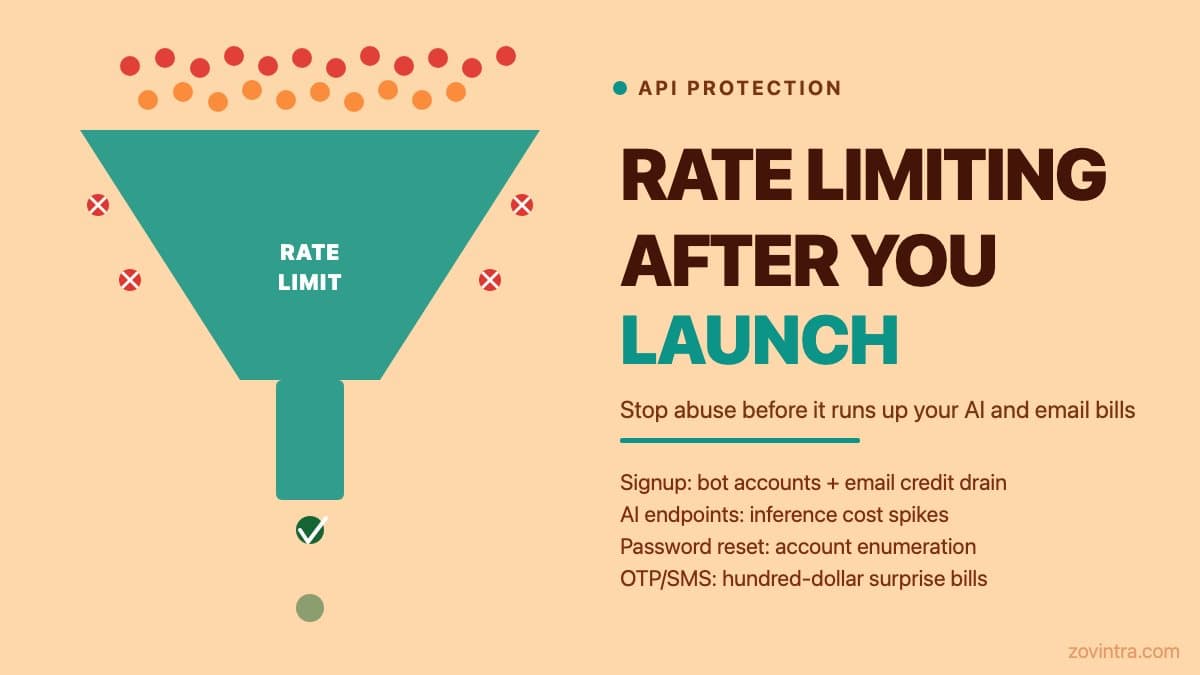
Every public-facing endpoint on a live app can receive unwanted automated traffic once it is discoverable. For an AI-built app with no rate limiting, the consequences range from annoying (junk accounts, spam signups) to expensive (LLM inference bills run up by automated callers) to damaging (legitimate users hit errors because a bot has consumed your API quota). Rate limiting is not a nice-to-have for production apps - it is the minimum protection that makes every other security and cost control meaningful.
What actually gets abused, and what it costs
The endpoints that attract abuse first are the ones reachable without authentication. Signup and registration endpoints are the most common. Bots create thousands of fake accounts to use for spam, credential stuffing against other services, or to probe what happens after account creation. If your signup endpoint calls a third-party email service to send a welcome email, each fake signup costs you an email credit. If you offer a free trial after signup, each fake account is a trial consumed.
AI inference endpoints are the highest-cost abuse target for apps that wrap an LLM. If you have a public-facing endpoint that calls OpenAI, Anthropic, or a similar service, and it is not rate-limited, a single automated caller can generate hundreds of requests a minute. Costs depend on the model and usage, but unnoticed abuse can run up a large bill. OWASP's API4 guidance describes a comparable case where an unthrottled forgot-password call made a back end request tens of thousands of text messages from a per-message SMS provider, costing thousands of dollars within minutes. A billing alert on its own only fires after the damage is already done.
Password reset and OTP endpoints are targeted because they can be used to enumerate valid account email addresses. If your password reset endpoint responds differently to registered versus unregistered email addresses, an automated caller can build a list of your users' emails by calling it in bulk. The OWASP API Security Top 10 (2023) lists Unrestricted Resource Consumption (API4) and Broken Object Level Authorization (API1) among its top API risks. API4 is the one directly about unthrottled endpoints, and it specifically suggests throttling repeated operations such as OTP checks and password recovery per client or user.
The simplest rate limit: per-IP on Vercel
If your app is deployed on Vercel, the Vercel WAF rate limiting feature is available on all plans and lets you set a request limit per time window from the dashboard, with no code changes, keyed by IP among other options. A basic rule limiting any single IP to, for example, 20 requests per minute to your `/api/signup` route is configured under Firewall > Configure > New Rule. Per Vercel, the Hobby plan allows one rate limit rule per project, and counters are tracked per region, so traffic spread across regions can exceed the limit you set. It will not stop a distributed attack from many IPs, but it limits single-caller abuse.
For Next.js API routes, you can add application-level rate limiting using a library like `upstash/ratelimit` with a Redis store, or using a simple in-memory limiter for low-traffic apps. A Redis-backed limiter is more robust because serverless function instances do not share memory, and Upstash offers fixed window, sliding window and token bucket algorithms. A sliding window of 10 requests per 60 seconds per IP on your auth endpoints is a reasonable starting point.
The important thing is that the limit is per endpoint and calibrated to legitimate user behaviour. Your `/api/ai-chat` endpoint, which a human might call three times in a session, needs a much tighter limit than your `/api/posts` read endpoint, which a user might call 50 times in a single page load. A global rate limit per IP that does not distinguish between endpoints will either fail to protect expensive endpoints or break legitimate use of cheap ones.
Protecting the endpoints that cost you money
AI inference, email sending, and SMS are the three endpoint categories where uncontrolled abuse most directly translates to a bill. Each has a specific protection approach:
- AI inference: rate limit at the application level by user ID (not just IP, since multiple users can share an IP), set a per-user daily token or request budget in your database, and set a hard spending alert at your LLM provider at 2x your expected daily cost, as OWASP advises configuring spending limits for all service providers and falling back to billing alerts where limits are not offered
- Email sending (Supabase Auth already enforces a 60-second wait per user on signup, recovery and OTP requests by default): limit password reset and signup confirmation emails to one per email address per 10 minutes. Store the 'last sent' timestamp for each address in your database or cache and check it before calling your email provider. This also prevents email bombing (where someone submits another user's email to your reset form repeatedly)
- SMS OTP: limit OTP sends to three per phone number per hour. SMS providers typically charge per message, so an attacker calling your OTP endpoint thousands of times can run up a large bill before you notice it in your dashboard
- File upload endpoints: if your app accepts user file uploads, set a maximum file size at the application level, not just at the storage layer. Also limit the number of uploads per user per hour. Storage costs and downstream processing costs (image resizing, virus scanning) are directly proportional to upload volume
Signup abuse and account enumeration
Signup abuse has a pattern that is easy to spot after the fact and hard to reverse: a large number of accounts with fake or disposable email addresses, often created in a short window. Prevention is more practical than cleanup. The two most effective controls are:
- Email verification before account activation: require new users to click a link in a confirmation email before their account can log in. This does not stop determined bots with real email addresses, but it eliminates the majority of fake-address signups
- Consistent response times on auth endpoints: if your password reset endpoint responds faster for unregistered emails than for registered ones (because it skips database lookups for unknown emails), an attacker can time responses to enumerate accounts. Return the same 'if this address is registered, you will receive an email' message in both cases, and ensure your backend takes a consistent amount of time to respond regardless of whether the email exists
CAPTCHA is a third option. For a high-value endpoint (account creation that unlocks a free trial), CAPTCHA is worth adding. For general API protection, rate limiting is more reliable.
When to go beyond basic rate limiting
The controls above cover the common cases for a new app with moderate traffic. They do not cover coordinated distributed attacks, credential stuffing at scale, or sophisticated scrapers that stay below per-IP limits by rotating IPs. If you start seeing patterns that suggest coordinated abuse - unusual traffic spikes from multiple IP ranges, data that looks like systematic enumeration, or billing spikes that are not explained by organic usage - the next step is a dedicated Web Application Firewall (WAF) service or a bot management layer.
Managed bot-management services exist for apps that move significant traffic. They cost money and add configuration complexity - they are not the right starting point for a new app, but they are the right next step when basic rate limits are being consistently bypassed.
The deploy and launch guide covers the full checklist for getting an app production-ready, with rate limiting as one item alongside auth, environment variables, and database security. The cost of running an AI feature unthrottled is covered in more depth in AI feature running costs. If you want to check your current endpoint configuration before it causes a problem, the free code review covers secrets, dependencies, and Supabase and Firebase configuration - it does not check for missing rate limiting, so review your endpoints by hand. A technical review can add a full manual assessment of your specific endpoints.
Common questions
Which endpoints do bots abuse first on a new app?
Endpoints reachable without authentication: signup, password reset and OTP, and any public endpoint that calls an AI model. Fake signups cost email credits and consume trials, and an unthrottled AI endpoint can run up a large bill.
How do I add rate limiting to a Next.js app on Vercel?
Vercel WAF rate limiting is available on all plans and can be set from the dashboard with no code changes, keyed by IP among other options. Per Vercel, counters are tracked per region. For app-level limits, a Redis-backed limiter such as Upstash suits serverless.
When do I need more than basic rate limiting?
When you see signs of coordinated abuse: traffic spikes from multiple IP ranges, systematic enumeration, or billing spikes that organic usage does not explain. The next step is a WAF service or bot management layer, and a technical review can add a manual assessment of your endpoints.
Sources
- API4:2023 Unrestricted Resource Consumption - OWASP API Security Project, 2023
- API1:2023 Broken Object Level Authorization - OWASP API Security Project, 2023
- WAF Rate Limiting - Vercel Docs, updated 28 Aug 2026
- Ratelimit algorithms - Upstash Docs, accessed 19 Oct 2026
- Auth Rate Limits - Supabase Docs, accessed 19 Oct 2026