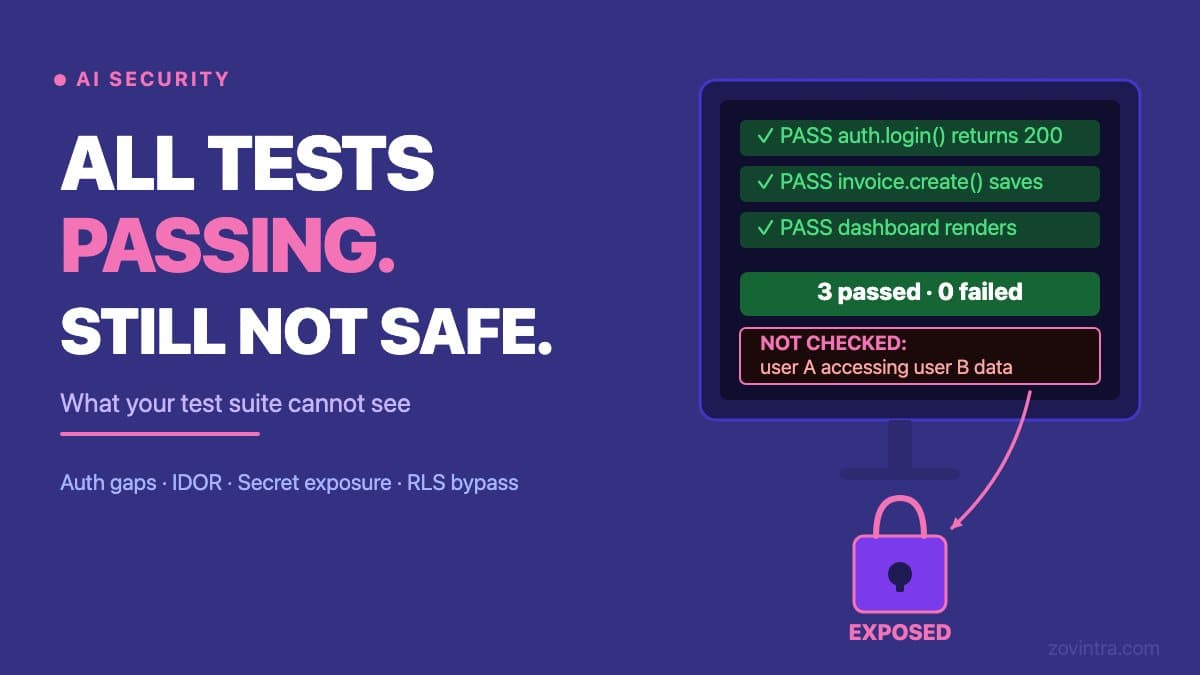
Tests verify that your code behaves as intended. Security review checks whether your code can be made to behave in ways it was never meant to. These are different questions, and a green test suite does not answer the second one. If your app was built with an AI coding tool, the gap between those two questions is likely wider than you expect, because the same tool wrote both the code and the tests.
What a Passing Test Suite Actually Tells You
A unit test checks that a specific function returns the correct output for a given input. An integration test checks that two parts of the system communicate as expected. An end-to-end test checks that a user flow - sign up, log in, complete an action - finishes without an error. When all of those pass, you have evidence that the features you built do what you designed them to do.
That is genuinely useful. Bugs caught by tests are cheaper to fix than bugs caught by users. The problem is what a passing test suite does not tell you. It does not tell you what happens when a user makes a request the spec never anticipated. It does not tell you whether another user's data is reachable by guessing an ID in the URL. It does not tell you whether your API returns data to a caller with no authentication token at all.
Why AI Coding Tools Widen This Gap
AI coding tools write code and tests together. When a model generates a route handler and then generates a test for it, the test is correct for the code that was written. If the code omits an authorisation check, the test will not include an assertion about authorisation. The test will pass. The CI gate will turn green. No alarm will sound.
A human developer following a security-aware process would ask, "what should happen if I call this route without a token?" and write a test for that negative case. AI tools optimise for making the happy path work. Security is about making the unhappy paths fail correctly, and those paths rarely appear in an AI-generated test file.
This is not a flaw in any particular tool. It reflects the nature of the task: generating code that satisfies a specification is not the same as generating code that resists abuse. The broader pattern of why AI-built apps fail in production covers this in more depth, but the test gap is one of the most common specific causes we encounter when reviewing code.
Five Categories Tests Routinely Miss
These are not obscure edge cases. They are the categories worth checking first in any review of an AI-generated app.
- Unauthenticated access. Does the route return data if you call it with no token? AI-generated tests almost always log in first and never test the unauthenticated case.
- Horizontal privilege escalation. User A requests /api/invoices/101. What happens when user A requests /api/invoices/102, which belongs to user B? Tests almost never include a second user account that attempts to access the first user's data.
- Database-level access. If your Supabase RLS policies are missing or misconfigured, a direct call to the Supabase REST API with only the anon key may return every row in a table: Supabase documents that a table in an exposed schema without RLS is readable and writable by any role with a grant on it. Application tests do not cover this because they go through your backend, not the database layer directly.
- Secrets in the client bundle. Tests run against your code in a development environment. They do not inspect the compiled JavaScript bundle that reaches a user's browser. An AI tool that placed an API key in a file the build process includes in the client bundle will pass every test while leaking the key.
- Postgres functions that skip ownership checks. AI tools can generate SQL functions with SECURITY DEFINER, meaning the function runs with the privileges of the user that owns it rather than the caller. A test that calls the function through a logged-in user passes. A different user calling the same function also passes, because the ownership check was bypassed at the database level.
The fifth category is specific enough to be worth reading in full. The post Postgres Functions That Skip Ownership Checks covers the SECURITY DEFINER pattern, how to identify it, and the risks of fixing it without understanding the downstream effects.
The OWASP Framing: Tests Check What You Built, Not What You Left Out
The OWASP Top 10 list of the most critical web application security risks placed Broken Access Control at position A01 in its 2021 edition, moving up from fifth place. OWASP A01:2021 reports that 94 percent of the applications tested had some form of broken access control, and describes the category as failing to enforce restrictions on what users are allowed to do.
Access control vulnerabilities are not caught by functional tests because functional tests do not attempt to break the access rules. They test the rule-following path, not the rule-breaking path. A test that logs in as a valid user and fetches valid data is not testing access control. A test that logs in as user A and attempts to fetch user B's data is testing access control. The second type of test is almost never in an AI-generated test suite.
The OWASP Application Security Verification Standard (ASVS) provides a detailed checklist of security requirements. It defines three levels; Level 1 is the least demanding and a sensible first target, and Level 2 is recommended for most applications that handle sensitive data. AI-generated test suites rarely exercise requirements like these.
What You Can Check Before Spending Money on a Full Review
There are several manual checks you can do yourself before commissioning a formal review. None of them require security expertise. They require only a willingness to try things your normal user would not try.
- Open your browser's developer tools and make a direct request to one of your API endpoints with the authentication token removed. What comes back?
- Log in as one test user and copy the URL or ID of a record that belongs to a different test user. Replace the ID in a direct API request. What comes back?
- Search your compiled JavaScript bundle (in your browser's Sources tab or by running your production build locally) for the words 'secret', 'key', 'token', or 'password'. If you find any, the value is visible to every visitor.
- Send a request to your Supabase REST endpoint using only the public anon (publishable) key, with no user logged in, and see which tables return rows. The dashboard Table Editor is not a valid test because it runs with admin access. With RLS enabled and no policies, the API returns no rows; a table without RLS returns everything.
If any of these checks return data they should not, you have a real exposure. The free code review tool automates a broader version of this process and covers your repository for common secret patterns and configuration mistakes that tests do not catch.
What to Do If Your Tests Are Passing but You Are Not Sure
If your app was built primarily with an AI coding tool and you have not had a security-specific review, the honest position is that you do not know whether it is safe. Passing tests tell you it works. They do not tell you it is safe.
The path forward is not to throw away your tests - they remain valuable for catching regressions. The path forward is to add a second layer of review that specifically targets the categories your tests cannot see. That means looking at each route for missing auth checks, testing each data endpoint with a second account, and inspecting the database access layer separately from the application layer.
The security checklist for an AI-built app covers the 12 checks we recommend before real users arrive. If you have already launched and want to understand the current state of your codebase, run the free code review or contact us to discuss a technical review.
Common questions
Why does my AI-built app pass tests but still have security holes?
Tests verify that code behaves as intended, not whether it can be made to misbehave. AI tools write the code and the tests together, so if the code omits an authorisation check, the test includes no assertion about it, passes, and CI turns green.
What security problems do passing tests usually miss?
Tests routinely miss unauthenticated access, horizontal privilege escalation (user A reading user B's records by changing an ID), and database-level gaps such as missing Supabase RLS policies. Functional tests follow the rule-following path and rarely try to break access rules.
When should I get a security review of my AI-built app?
If your app was built mainly with an AI coding tool and has had no security-specific review, you do not know whether it is safe. Run the free code review for a broader automated check, or contact Zovintra to discuss a technical review.
Sources
- A01:2021 Broken Access Control - OWASP Top 10, 2021
- OWASP Application Security Verification Standard - OWASP, accessed 19 Oct 2026
- ASVS levels (OWASP Developer Guide) - OWASP, accessed 19 Oct 2026
- Row Level Security - Supabase docs, accessed 19 Oct 2026
- CREATE FUNCTION (SECURITY DEFINER) - PostgreSQL documentation, accessed 19 Oct 2026