AI providers retire model versions on a published schedule - Anthropic, for one, states it gives at least 60 days' notice for publicly released models. When a model your app depends on is retired, every call to that API either fails or silently falls back to a different model with different behaviour, different token costs and potentially different output quality. Small teams without dedicated ML engineers are the most exposed, because they are least likely to be monitoring vendor deprecation pages. This article lays out a practical migration process that does not require specialist staff.
What Model Retirement Actually Means for Your App
A model retirement means the API endpoint for a specific model version stops accepting requests after a given date. If your code calls the API with a pinned model string - for example, a specific Claude or GPT version ID - requests will fail after the retirement date; Anthropic states that requests to retired models fail. If your code uses a floating alias such as 'latest' or a general model family name, the provider may automatically point that alias at a newer model, which can change prompt behaviour without any error at all. Both outcomes are bad. Failure is visible. Silent drift is worse.
A third scenario occurs when pricing changes. Replacement models frequently carry different per-token prices. If your app runs high-volume inference, a model upgrade that doubles the cost per token can be a significant budget event, especially if you are not already tracking and capping AI API spend.
Retirements Happening Now (as of October 2026)
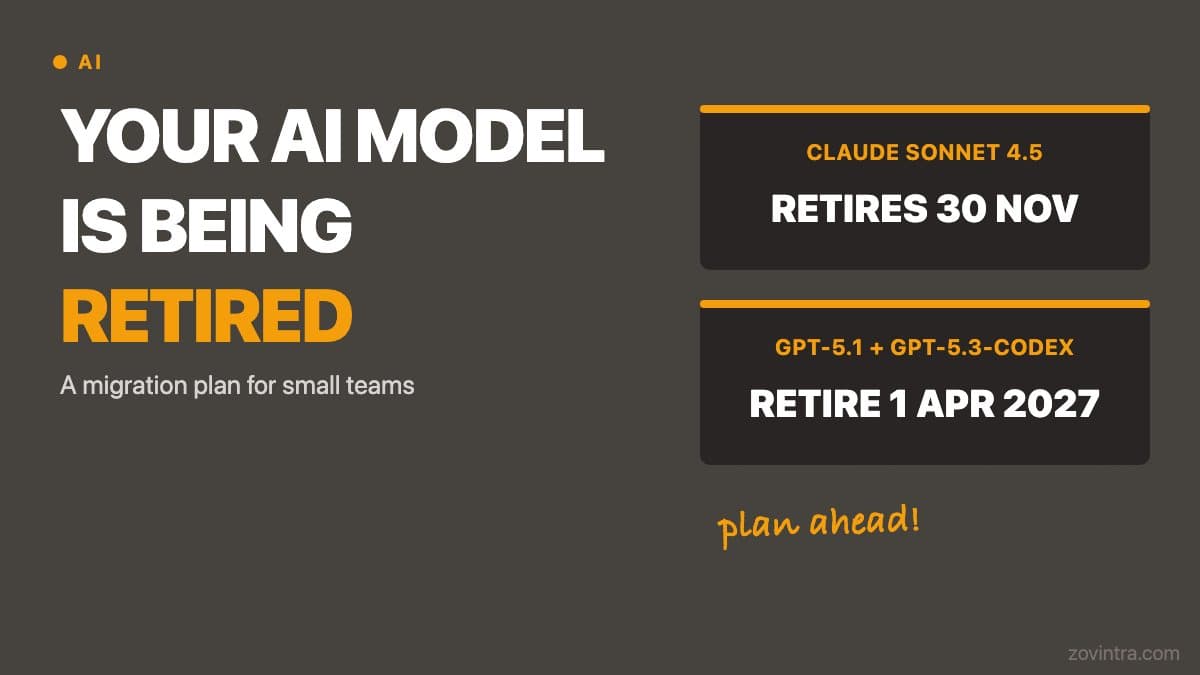
Two retirements are approaching as of 19 October 2026. Anthropic's deprecation page lists claude-sonnet-4-5-20250929 as deprecated on 30 September 2026 with retirement on 30 November 2026, and recommends claude-sonnet-5-5 as the replacement. OpenAI's deprecations page lists gpt-5.1 and gpt-5.3-codex with a shutdown date of 1 April 2027. Provider timelines can change, so re-check both pages before you plan around these dates.
Both Anthropic and OpenAI publish model deprecation pages. The Anthropic and OpenAI deprecation pages linked above are the primary sources to bookmark and check before any planned migration, not third-party summaries including this one.
The Four Things That Break on Retirement
- API calls with the retired model ID return errors. Any user-facing feature that calls the API - a chatbot, a summarisation step, an AI-assisted form - stops working until the model string is updated and redeployed.
- Prompt behaviour changes on the replacement model. Output format, verbosity, refusal patterns and reasoning style differ between versions. Even if you update the model ID in a day, your prompts may produce different results and need retuning.
- Cost changes with the replacement model. Newer models are often more capable and more expensive per token. A feature that was cheap on the old model may be significantly more expensive after migration.
- Evals and safety checks need re-running. Any automated test suite that validates AI output quality - checking for hallucinations, format compliance or policy violations - needs to be run on the new model before you go live, because its failure modes differ from the old one.
A Six-Step Migration Plan
Small teams can follow this sequence without dedicated ML engineering resources. Each step has a concrete output.
- Audit your codebase for hardcoded model strings. Search for every place a model version ID appears: environment variables, config files, API call sites. A simple grep for the current model name is enough. Document each location with the feature it serves.
- Move all model IDs to a single environment variable or config file. No model string should appear in more than one place in code. If it does, changing the version requires a multi-file edit under pressure - which is how typos reach production.
- Create a test script that calls each AI-powered feature with a fixed prompt and captures the raw output. Run it on the current model and save the result. This becomes your baseline for comparing the replacement model's behaviour.
- Run the same test script against the replacement model in a staging or preview environment. Compare outputs manually or with a diff tool. Adjust prompts where output quality or format has changed.
- Update token cost projections. Pull the replacement model's pricing from the vendor page and multiply by your current monthly token volumes. If the cost delta is significant, model the impact before setting a go-live date.
- Set a calendar reminder at least 45 days before the retirement date, not on the retirement date. 45 days gives time to test, adjust prompts and redeploy without a weekend emergency.
Version Pinning: the Practice That Makes Migration Routine
The teams that handle model retirements without incident have one thing in common: they pin specific model version IDs rather than using floating aliases. A floating alias is convenient until the day the alias silently points at a new model and your production app starts behaving differently. A pinned version gives you control over exactly when a change happens and time to test before it does.
Pinning also helps with the fallback provider planning that becomes important when a provider has an outage or rate-limits your account. If your code already has the model ID in a single config location, switching to a backup provider's equivalent model is a one-line change.
Model deprecations are recurring events, not one-off emergencies. The vendors that sell AI APIs treat model versioning like software versioning: old versions are supported for a defined period, then retired. Treating this as a normal part of AI infrastructure maintenance rather than a crisis each time it happens requires a small amount of upfront process and a reliable monitoring habit. If you want help reviewing how your AI features are structured and whether they would survive a model retirement without breaking, book a scoped AI feature review and we can map the exposure.
Setting Up an Early Warning System
The simplest monitoring approach for a small team is a recurring calendar entry to check vendor deprecation pages once a month. This takes five minutes and catches announcements before they become urgent. A slightly more robust approach is subscribing to the vendor's status page and developer changelog, which most providers publish as an RSS feed or email newsletter. When a retirement announcement appears, run the six-step plan above with the actual timeline in front of you.
Some teams go further and set up a lightweight automated check: a script that calls the model API with a test prompt and alerts a Slack channel if the response changes significantly. This catches silent alias drift - cases where a floating alias moves to a new model without an explicit retirement announcement. Whether that level of monitoring is worth the setup cost depends on how business-critical your AI features are. For a summarisation tool used internally, monthly manual checks are probably sufficient. For a customer-facing product where the AI output is the core feature, automated monitoring is worth the hour it takes to build.
Common questions
What happens to my app when an AI model is retired?
Requests to a retired model fail, and a floating alias may silently point at a newer model with different behaviour. Prompts may need retuning, costs can change and evals need re-running on the replacement. Failure is visible; silent drift is worse.
How much notice do AI providers give before retiring a model?
Anthropic states it gives at least 60 days' notice for publicly released models. Provider timelines can change, so re-check the Anthropic and OpenAI deprecation pages before you plan around any date, and set a reminder at least 45 days before retirement.
Can someone check whether my AI features would survive a model retirement?
Zovintra offers a scoped AI feature review that maps the exposure. Pinning model versions in a single config location and keeping a baseline test script that captures current outputs makes any migration far easier.
Sources
- Model deprecations - Anthropic, accessed 19 Oct 2026
- Deprecations - OpenAI, accessed 19 Oct 2026