Two things go wrong with AI API integrations in small products. The first is an unexpected bill - a retry loop, a traffic spike, or a generous context window eats through your budget before you notice. The second is a model update that silently changes how your feature behaves. Both are preventable with controls you can put in place before you ship.
Why AI API Spend Is Hard to Predict
Unlike a database query that takes roughly the same resources each time, an LLM API call scales with the number of tokens in the request and response. A user who pastes a long document into a summarisation feature may generate a call that costs ten times what your average case does. Multiply that by a retry on failure, a second call for validation, and a traffic burst, and the bill can be orders of magnitude above what your test data suggested.
Most API providers offer spending limits or alerts, but the defaults are either very high or turned off. You need to set them explicitly, and you need to build server-side controls as well - because a provider alert that fires after the fact does not prevent the spend.
The Controls That Actually Work
1. Set a hard spend cap at the provider level
All three major providers offer some form of monthly cap: OpenAI hard spend limits at organisation or project level, Anthropic spend limits you can set below your tier's cap in the Console, and a project-level monthly spend cap in Google AI Studio for the Gemini API, which Google labels experimental. Set a limit before you deploy. The limit should be the maximum you are willing to spend in a billing period under worst-case load, not your expected spend - so it catches runaway behaviour without cutting off normal traffic.
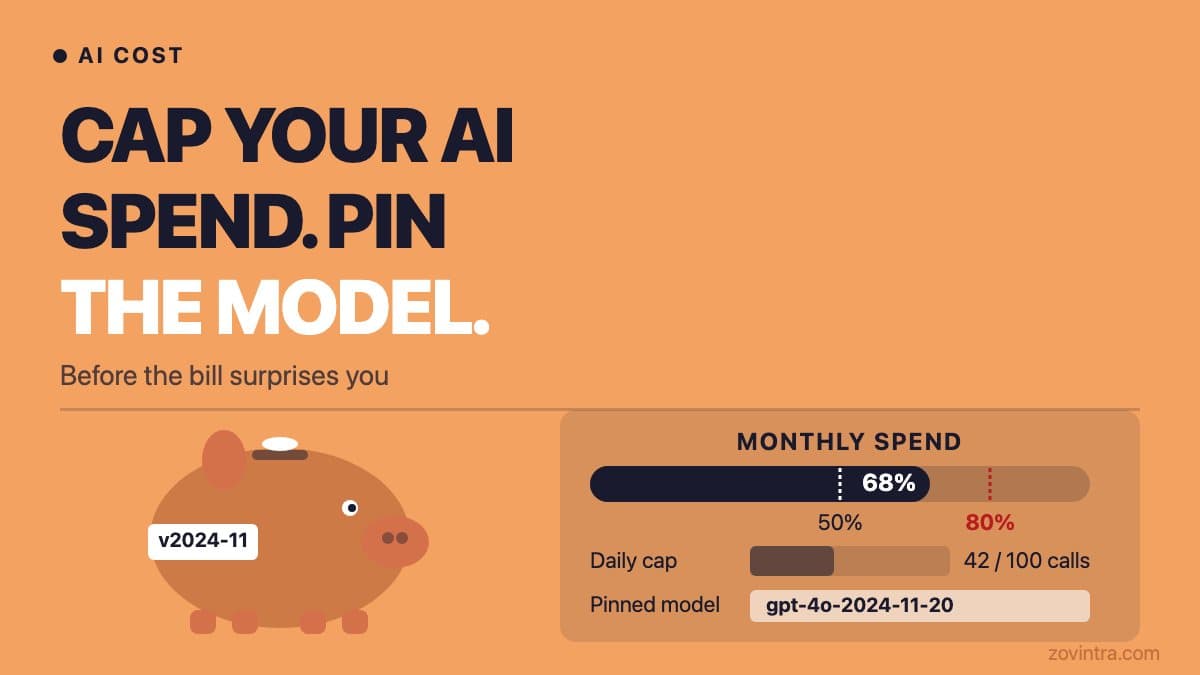
Where the provider supports alerts, set thresholds at 50% and 80% of the limit so you have time to investigate before the cap hits (OpenAI documents alerts as notifications that do not stop traffic). A hard cap means the API returns an error rather than processing more requests - OpenAI returns HTTP 429 and Anthropic returns 429 or 400 depending on which limit you hit - so make sure your product handles that error gracefully. Enforcement is not instant: OpenAI says recorded spend can slightly overshoot, and Google cites roughly a 10 minute latency, so leave headroom.
2. Add a server-side daily cap
Provider-level limits operate on a monthly cycle, and Anthropic's spend cap resets at 00:00 UTC on the first day of the next month. A traffic spike on day one of the month could exhaust the entire allowance before you see the alert. A server-side daily counter - incremented on each API call and checked before making one - lets you spread the risk. When the daily limit is reached, the feature falls back to a non-AI path or returns a clear message.
In our own Zovintra website health check, we run the AI summary call through a server-side daily cap (`GEMINI_DAILY_CAP` environment variable). If the cap is reached, the health check completes normally using the fixed-template summary - the user gets a complete result, not an error. That fallback is designed up front, not bolted on after a billing surprise.
3. Cap the input length
Token cost scales with input length. Before sending any content to the API, truncate or summarise it server-side to a maximum length. Do not trust the client to send a sensible amount. Set a `max_tokens` parameter on the request for the output as well - unbounded output is a cost and a latency risk.
4. Validate and constrain the output
If you are paying for model output, make sure you are getting what you need and not more. Schema-constrained output (JSON mode or structured output where the API supports it) limits the response to the fields you asked for. Validate the response against your schema before accepting it - a response that fails validation should not retry automatically more than once, to prevent retry loops from multiplying cost.
Pinning Model Versions
Many providers offer aliases that point to a current version, and when the provider moves the alias your feature's behaviour can change without any action on your part. That can be benign, or it can change output formats or length in ways that break your validation. Check how your provider handles this: Anthropic states that each model ID is a pinned version and its weights do not change, while convenience aliases for older models resolve to the most recent dated snapshot.
Pin to a specific model version string rather than an alias, for example claude-sonnet-5-5, and check the provider's docs for which of their identifiers are fixed. Pinning does not stop retirement: every model ID has its own retirement schedule. When a new version releases that you want to adopt, test it against your eval suite first, then update the pinned version deliberately. This is the same discipline as pinning a library version in your package.json.
For more on keeping AI features working as models change, the lifecycle questions in model retirement planning cover what to do when a pinned version reaches its deprecation date.
What Happens When You Do Not Do This
The most common failure is a retry loop. A feature sends a request, the response fails validation, the feature retries, the retry also fails, and the loop continues until the request times out - or until the next morning when someone notices the billing dashboard. If you have ten users and the loop ran for two hours each, that can be a significant and entirely preventable bill.
The second failure is subtler. You ship a feature, users adopt it, and then the underlying model is updated. The output changes in a way that breaks your downstream logic - maybe a field is now formatted differently, or the summary is longer than your UI can handle. Without a pinned version, you have no signal that anything changed. You discover the problem from user complaints.
Understanding the true running cost before you commit is also important - we covered the mechanics in how to estimate AI feature running costs.
A Practical Checklist
- Set a monthly spend cap at the provider level, with alerts at 50% and 80% where supported.
- Implement a server-side daily request or spend counter with a graceful fallback.
- Truncate input to a maximum token length before sending it to the API.
- Set max_tokens on every request.
- Pin to a specific model version identifier - avoid alias names that can move in production.
- Validate output against a schema; limit retries to one automatic retry.
- Add token usage logging per request so you can see which users or actions are expensive.
- Test behaviour against your eval suite before adopting a new model version.
Logging: The Control You Cannot Retrofit
Token usage logging should be part of your initial implementation, not an afterthought. When a cost spike happens, the first question is always: which requests caused it? Without per-request logging of input tokens, output tokens, and the model version used, you have to reconstruct the answer from provider dashboards that aggregate by day - not by user, endpoint, or feature.
Log at minimum: the request timestamp, the model version, input token count, output token count, and a tag identifying which feature or user type triggered the call. Store this in your own database rather than relying solely on provider reporting. It takes an hour to add and saves many hours when you need to diagnose an unexpected charge or demonstrate to a stakeholder that a feature is within budget.
If your team is adding an AI feature and wants a second set of eyes on the cost and version controls before launch, a scoped review can catch the gaps that are easy to miss. Book a session and we will go through the controls that matter for your setup.
Common questions
How do I stop an AI API bill from running away?
Set a hard monthly spend cap at the provider level, sized to your worst-case load rather than expected spend. Add a server-side daily counter with a fallback path, cap input length, set max_tokens on every request, and allow at most one automatic retry.
Should I pin an AI model version or use the alias?
Pin to a specific model version string, because aliases can move and change your feature's output format or length without any action on your part. Pinning does not stop retirement, so test new versions against your eval suite before updating deliberately.
When should I get someone to review my AI feature's cost controls?
Ask for a second set of eyes before launch, when you are adding an AI feature and want the cost and model-version controls checked. A scoped review can catch easy-to-miss gaps, and Zovintra offers a session covering the controls that matter for your setup.
Sources
- Spend limits - OpenAI documentation, accessed 19 Oct 2026
- Rate limits (spend limits section) - Anthropic documentation, accessed 19 Oct 2026
- Billing - Google AI for Developers, accessed 19 Oct 2026
- Model IDs and versioning - Anthropic documentation, accessed 19 Oct 2026