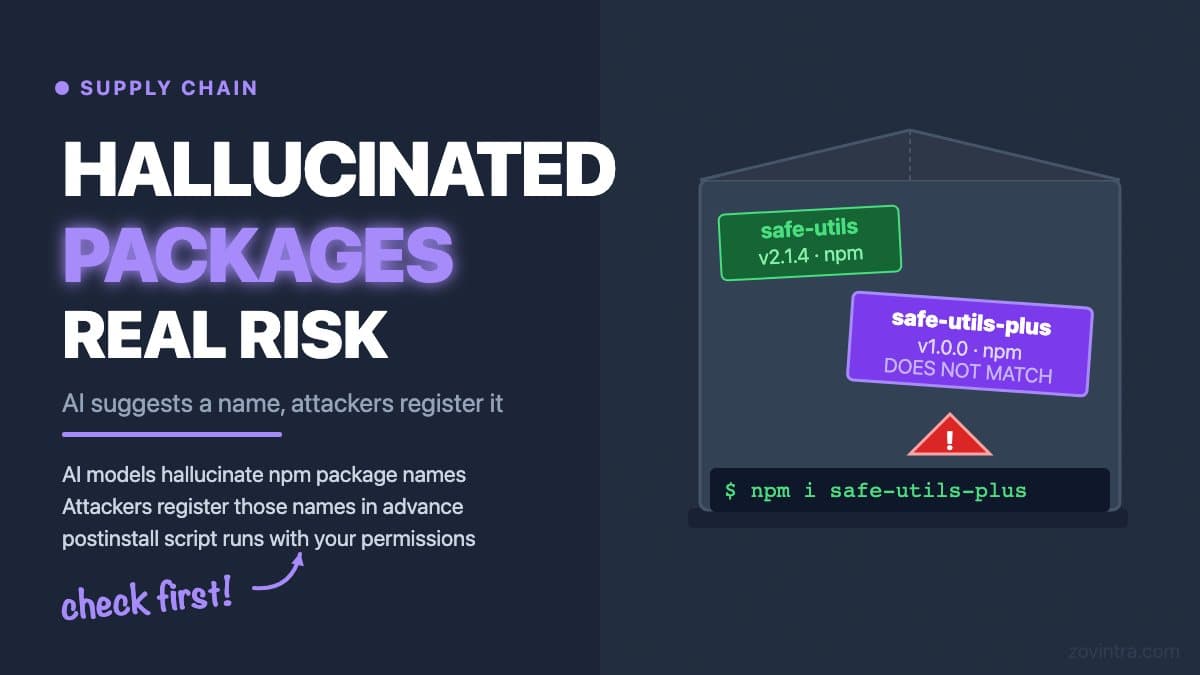
AI coding assistants sometimes suggest package names that do not exist. When a developer runs `npm install` on a hallucinated package name, one of two things happens: the install fails with a 404 error, or - in the scenario researchers have named 'slopsquatting' - a real package with that exact name is found, because an attacker registered it. The installed package contains malicious code. The risk is real but requires specific conditions to materialise. This post explains what slopsquatting is, what the current research shows about how widespread it is, and what checks are practical for a small team using AI coding tools day-to-day.
What slopsquatting is and where the term comes from
Typosquatting on npm has existed for years: an attacker registers a package name one character off from a popular one (for example `lodash` vs `1odash`) hoping developers will mistype it. Slopsquatting is the AI-era variant: the attacker identifies package names that AI coding tools frequently hallucinate and registers those names on npm before a developer installs one. The USENIX Security 2025 paper behind the research, "We Have a Package for You!", found that code-generating models hallucinate package names at meaningful rates: it generated 576,000 code samples in Python and JavaScript and reported averages of at least 5.2% hallucinated packages for commercial models and 21.7% for open-source models. (The paper itself does not use the word 'slopsquatting'; the term came into use afterwards.)
A Cloud Security Alliance (CSA) research note from April 2026 says the threat has moved from theoretical to confirmed, citing malicious packages that exploited AI-hallucinated names, including one that reportedly reached over 30,000 downloads. That is the CSA's account of incidents; I have not independently verified each one. How often this has caused real-world harm is still hard to measure, because supply chain attacks are often discovered late and victim organisations may not attribute the cause.
How the attack actually works
The sequence for a successful slopsquatting attack is: (1) an attacker monitors packages that AI tools frequently suggest but that do not exist on npm; (2) the attacker publishes a package with one of those names, containing a postinstall script that exfiltrates environment variables, tokens, or files; (3) a developer asks an AI coding tool to add a feature, receives a suggestion that includes the malicious package name, runs `npm install`, and the postinstall script runs with the same permissions as the developer's current shell.
The postinstall hook is the mechanism that makes npm packages dangerous compared to, for example, a static file. When you install a package with `npm install`, npm runs lifecycle scripts such as `postinstall` defined in that package's `package.json`. That script executes with your shell's permissions - it can read files, send network requests, and write to your filesystem. In a development environment, this could expose local SSH keys, cloud credentials stored in .env files, or tokens in your home directory. In a CI environment, it can expose the CI system's access tokens.
Field Effect's February 2026 research documented at least 19 typosquatted npm packages that deployed a malicious MCP server, a reminder that look-alike package names are an active attack route. For hallucinated names specifically, niche utility names and recent API surfaces are where hallucination is likely to be most frequent, and where attackers can register names without competition.
The overlap with typosquatting
Slopsquatting and typosquatting are often discussed together, but they are different failure modes. Typosquatting exploits human error in typing. Slopsquatting exploits AI model error in generation. A developer who carefully types a package name is not protected against slopsquatting if the package name itself was wrong when the AI suggested it. Conversely, a developer who copies and pastes from the AI output exactly is not protected against typosquatting if they misread the pasted text.
Typosquatting is better documented and more clearly evidenced as a real attack vector. Typosquatting has a longer public record. Slopsquatting is newer, and the evidence of real-world exploitation is still being built. Treating both as real risks and checking against both is the conservative position - it is also the practical one, because the mitigation for both is the same.
Practical checks for a small team
You do not need a formal supply chain security programme to reduce this risk meaningfully. The following checks cover the most practical exposure surface for a team using AI coding tools:
- Before running `npm install` on any package an AI assistant suggested, search for it on npmjs.com manually. Confirm it exists, has a publish date and download history consistent with a real project, and has a GitHub repository linked. A package with zero downloads, a one-line description, and a publish date from last week is a signal to investigate further
- Check the package's postinstall script: look at the package.json in the npm registry listing. If there is a postinstall script and the package is not a build tool or native module, that is worth reading before you install
- Run `npm audit` after installing new packages. It will not catch malicious new packages (those are not in the vulnerability database), but it catches known-vulnerable versions of legitimate packages
- Use OSV-Scanner or a similar dependency vulnerability tool in CI. This adds a check on every dependency, not just newly installed ones
- Review your package-lock.json or yarn.lock before committing after an AI-assisted coding session. The diff should include only the packages you expected to add - if there are unexpected additions, investigate
- If a package name sounds odd or very specific to a use case you have not heard of, verify it against the documentation for the library or API it claims to wrap
What our code review tool checks for
Our free code review tool runs dependency checks using the OSV (Open Source Vulnerabilities) database, the same database OSV-Scanner uses to match your dependencies to known vulnerabilities. A database of known issues cannot flag a newly published malicious package before it has been identified, but it does catch known vulnerable versions of legitimate packages.
The slopsquatting check is harder to automate at scale because it requires identifying packages that were hallucinated and then registered, not packages with known vulnerabilities. The practical protection for that specific attack is the human check: verify each new package manually before installing. The automated tools cover the rest of the dependency risk surface.
How much risk is this in practice?
The honest answer is: meaningful but uncertain. The USENIX research showed that AI models hallucinate package names at rates that create real exposure, and the CSA note reports malicious packages already exploiting the pattern. A supply chain attack via a single hallucinated package is sufficient to cause serious harm. The appropriate response is not to stop using AI coding tools. The appropriate response is to verify packages before you install them and to audit your existing dependencies.
The AI-built app security checklist includes dependency auditing alongside the other checks that matter before you launch. The free code review runs an automated OSV scan of your repository's dependencies - a useful baseline even if it does not catch every possible attack vector. For a full dependency and supply chain review alongside the other security checks, request a technical review from the same page.
Common questions
What is slopsquatting?
Slopsquatting is the AI-era variant of typosquatting: an attacker identifies package names that AI coding tools frequently hallucinate and registers them on npm before a developer installs one. The installed package can contain malicious code, such as a postinstall script that exfiltrates environment variables or tokens.
How do I check that an AI-suggested npm package is safe?
Search for it on npmjs.com first and confirm it exists, has a publish date and download history consistent with a real project, and links to a GitHub repository. Read any postinstall script, run npm audit, and review your lockfile diff for unexpected additions.
Should I get my dependencies reviewed if I use AI coding tools?
The free code review runs an automated OSV scan of your repository's dependencies, a useful baseline that cannot flag a newly published malicious package. For a full dependency and supply chain review alongside the other security checks, you can request a technical review from Zovintra.
Sources
- We Have a Package for You! A Comprehensive Analysis of Package Hallucinations by Code Generating LLMs - USENIX Security 2025
- Slopsquatting: AI Code Hallucinations Fuel Supply Chain Attacks - Cloud Security Alliance Labs, 19 Apr 2026
- Typosquatting campaign (Sandworm Mode) - Field Effect, 25 Feb 2026
- Scripts (npm docs) - npm, accessed 19 Oct 2026
- OSV-Scanner - Google, accessed 19 Oct 2026