This post is not legal or tax advice. GST rules are updated periodically and your specific obligations depend on your turnover, registration status and the nature of your supply. Verify requirements against the current CBIC guidelines and consult a qualified tax professional for your situation.
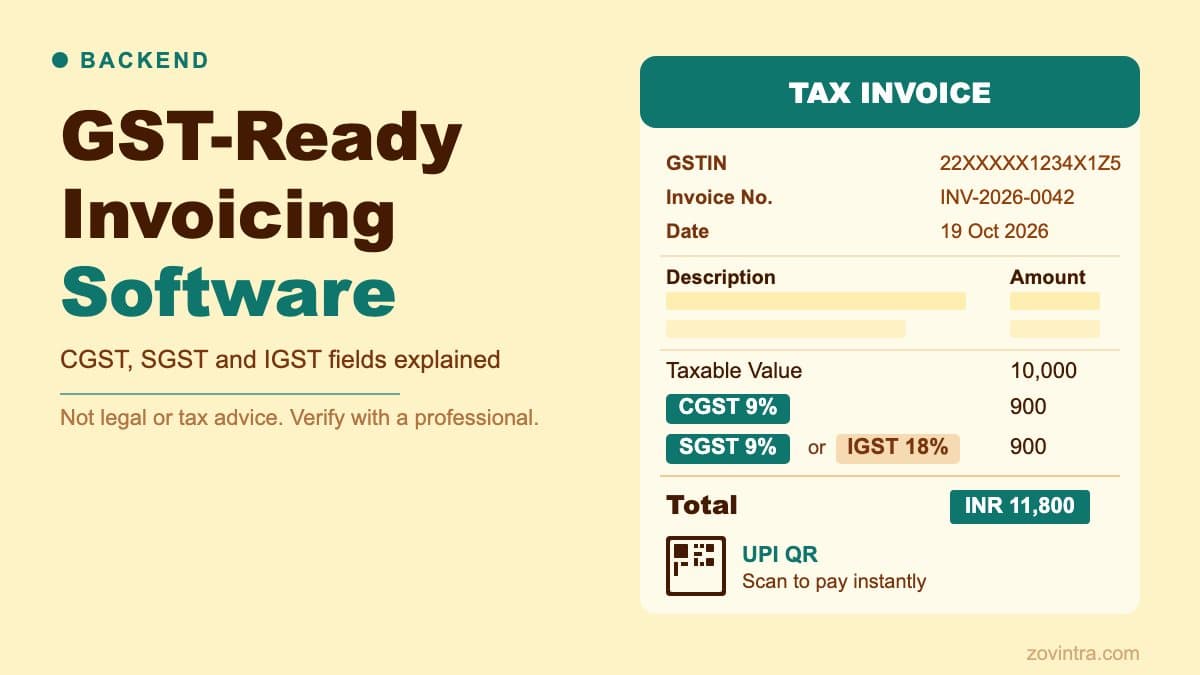
A GST-compliant tax invoice in India must carry, among other particulars, the supplier's name, address and GSTIN, a unique consecutive invoice number, the recipient's GSTIN where the recipient is registered, and a correct split of tax into central, State, integrated or Union territory tax, as set out in Rule 46 of the CGST Rules. The CBIC notes that the tax invoice is the essential document for the recipient to claim input tax credit, so software that stores only a total tax figure cannot produce a usable invoice. We built these requirements into Mandizo, a GST-ready invoice generator for Indian small businesses, and this post describes what the software needs to handle correctly.
The CGST, SGST and IGST Split
Under India's GST framework, the applicable tax and its split depend on the place of supply relative to the supplier's registration state:
- Intra-state supply (supplier and recipient in the same state): the tax splits equally between CGST (Central GST) and SGST (State GST). An 18% GST invoice shows 9% CGST and 9% SGST.
- Inter-state supply (supplier and recipient in different states): the full tax rate applies as IGST (Integrated GST). The same 18% rate shows as 18% IGST with no split.
- Supply within a Union territory: the UTGST Act levies Union territory tax on all intra-State supplies in the territories it covers (as enacted: Andaman and Nicobar Islands, Lakshadweep, Dadra and Nagar Haveli, Daman and Diu, Chandigarh and other territory; the list has changed since, so confirm which territories apply). Union territories with their own legislature are outside that Act. Rule 46 lists Union territory tax as its own tax type, so your software needs to show it where the supply calls for it, in place of SGST. Confirm the treatment for your case with a tax professional.
Software that does not know the supplier's state and the place of supply cannot compute this split automatically. It is a required input, not something that can be derived from the line items alone. Rule 46 itself requires the place of supply, with the name of the State, for inter-State supplies.
Mandatory Fields in a GST Tax Invoice
Rule 46 of the CGST Rules, 2017 sets out the particulars of a tax invoice. The current rule text (as amended up to Notification 20/2024-Central Tax) requires:
- Supplier name, address and GSTIN
- A consecutive serial number not exceeding sixteen characters, in one or multiple series, using letters, numerals, hyphen or slash, and unique for a financial year
- Date of issue
- Recipient name, address and GSTIN or UIN, if the recipient is registered
- For an unregistered recipient: name, address and delivery address with State name and code when the taxable supply is Rs 50,000 or more, and the same details if the recipient asks for them on smaller supplies
- Harmonised System of Nomenclature code for goods or services (clause (g)), at the number of digits the CBIC notifies for your turnover (see below)
- Description of goods or services
- Quantity and unit (or Unique Quantity Code) for goods
- Total value of supply, and the taxable value after discount or abatement
- Rate and amount of tax (central, State, integrated, Union territory tax or cess)
- Place of supply with the name of the State, for inter-State supplies
- Delivery address, where it differs from the place of supply
- Whether tax is payable on reverse charge
- Signature or digital signature of the supplier or authorised representative
- A QR code carrying the Invoice Reference Number (IRN) where the invoice is issued under the e-invoicing system, or a declaration that e-invoicing is not required where your turnover is above the notified limit but you are not required to issue it that way (clauses (r) and (s))
Not every field applies in every case, and exports carry extra requirements: Rule 46 requires an endorsement that the supply is meant for export (or for an SEZ), the recipient's name and address, the delivery address and the country of destination. The CBIC also notes that an invoice or bill of supply need not be issued where the value of the supply is under Rs 200, subject to conditions, and that suppliers dealing only in exempt supplies or under the composition scheme issue a bill of supply instead of a tax invoice. The GST portal and the CGST Rules are the authoritative sources. From 1 November 2024 the second proviso of Rule 46 was omitted (Notification 20/2024-Central Tax, dated 8 October 2024); it had allowed a monthly consolidated invoice for certain reverse-charge supplies from unregistered suppliers.
HSN and SAC digits
The number of HSN or SAC digits depends on turnover. Per the Ministry of Finance press release on Notification 78/2020-Central Tax, from 1 April 2021 a taxpayer with turnover above Rs 5 crore in the preceding financial year must show a 6-digit HSN or SAC on invoices for taxable supplies, while a taxpayer with turnover up to Rs 5 crore must show a 4-digit HSN code on B2B invoices. Software should let the user set which tier applies rather than hard-coding one.
E-invoicing thresholds
Separately, e-invoicing applies by turnover. Notification 10/2023-Central Tax, dated 10 May 2023, lowered the limit so that e-invoicing applies to taxpayers whose aggregate turnover exceeds Rs 5 crore, from 1 August 2023. The GST e-invoice portal's mandate page lists Rs 5 crore (Notification 10/2023) as the latest threshold in its table, lists B2B, B2G, export and SEZ supplies as covered and says B2C invoices are not. The same page notes that from 1 April 2025 taxpayers with aggregate turnover of Rs 10 crore or more must report e-invoices within 30 days of the invoice date. If you are near the limit, check the GST portal's e-invoice overview and the notifications for the current position. Mandizo does not generate IRNs or report to an Invoice Registration Portal, so a business above the threshold needs a separate e-invoicing route.
How Mandizo Handles the Tax Split
On Mandizo, the supplier sets their state once as part of their business profile. When an invoice is created, the editor compares the supplier state against the place of supply entered for that invoice. If they match, the tax applies as CGST plus SGST at equal rates. If they differ, the full rate applies as IGST. The tax lines in the PDF reflect this split explicitly: a line for CGST, a line for SGST or IGST, the rate for each, and the computed amount.
Line items carry HSN or SAC codes as an optional field, with a setting to show or hide the HSN column. We made it optional because many small businesses do not know their codes at the point of first use. Because the digits required depend on the business's turnover (see above), a business that falls under the rule should treat the field as required in practice.
Invoice Numbering
Rule 46 requires a consecutive serial number of at most sixteen characters, unique for a financial year. In software terms this means the counter must be atomic: two requests creating invoices at the same moment must not get the same number, and a number once issued should not be reused.
On Mandizo, invoice numbering is handled by a PostgreSQL function that claims the next number atomically. The counter increments in the database, not in the application layer, so concurrent requests cannot produce duplicates.
Foreign Currency and Exports
Many small Indian businesses invoice in foreign currency for export services. GST values are determined in rupees. Under Rule 34, the exchange rate used to determine the value of taxable services is the rate determined under generally accepted accounting principles for the date of the time of supply, and for goods it is the rate notified by the CBIC under section 14 of the Customs Act. Rule 34 governs how value is determined; it does not by itself add an exchange-rate field to the invoice, so check with your tax adviser whether to print the rate you used. Exports also carry the export endorsement and country of destination described above.
On Mandizo, invoices can be created in multiple currencies, and the tax line logic follows the supplier and place-of-supply states. Mandizo does not look up or apply official exchange rates, so the rupee value and the rate used should be confirmed by whoever prepares the books.
UPI QR Codes on GST Invoices
Mandizo includes a UPI QR code on the invoice so the recipient can pay directly from it. This is a display feature: the QR encodes a UPI payment deep link with the payee's VPA (Virtual Payment Address), the payee name and the invoice amount, and is generated in the browser. Scanning it opens the payer's UPI app with the fields pre-filled. There is no payment gateway, no webhook and no automated settlement confirmation. The supplier receives payment through their UPI account in the normal way and marks the invoice as paid manually.
Adding a UPI QR does not affect GST compliance. It is a payment convenience feature layered on top of a compliant invoice, not a replacement for any required field. See the dedicated post on UPI QR invoices for implementation detail.
What Invoicing Software Often Gets Wrong
- Storing a single 'tax amount' field rather than separate CGST, SGST and IGST amounts makes it impossible to produce a compliant breakdown.
- Not capturing the place of supply means the IGST vs CGST/SGST split cannot be computed correctly.
- Invoice numbers that exceed sixteen characters, reset in a way that repeats within a financial year, or are not unique do not meet the Rule 46 serial number requirement.
- Dropping fields that have no data from the printed invoice is fine for display, but the underlying data model should still store those fields (for example HSN or SAC) as nullable rather than absent.
Building or Evaluating Invoicing Software
If you are evaluating invoicing software or building your own, the checklist above covers the structural requirements. Rule 46 and the related notifications are the primary sources to check; Rule 46 has been amended several times, most recently (in the copy we reviewed) by Notification 20/2024, so confirm the current text on cbic-gst.gov.in or gst.gov.in before you rely on any threshold.
If you need a custom invoicing product built to your specific workflow, we can help. Mandizo is one example; every business has different requirements around templates, approval flows and integrations.
Common questions
What fields must a GST tax invoice have in India?
Under Rule 46 of the CGST Rules, among other particulars: supplier name, address and GSTIN, a consecutive invoice number of up to sixteen characters unique for a financial year, date of issue, recipient details, HSN or SAC code, and tax by type. This is not legal or tax advice.
When is IGST charged instead of CGST and SGST?
For an intra-state supply the tax splits equally between CGST and SGST, so 18% shows as 9% plus 9%. For an inter-state supply the full rate applies as IGST. Software needs the supplier's state and the place of supply to compute this. Confirm your case with a tax professional.
When should I build custom invoicing software instead of using a ready tool?
Where your workflow has specific needs around templates, approval flows or integrations, a custom product can fit better. Zovintra can build one, and Mandizo is one example. Note that Mandizo does not generate IRNs or report to an Invoice Registration Portal, so e-invoicing needs a separate route.
Sources
- CGST Rules, Rule 46 (tax invoice), as amended up to Notification 20/2024 - Chhattisgarh GST (cggst.com) consolidated copy, accessed 19 Oct 2026
- Notification 20/2024-Central Tax - CBIC via GST Council, 8 Oct 2024, accessed 19 Oct 2026
- Notification 10/2023-Central Tax (e-invoicing, Rs 5 crore) - GST Council, 10 May 2023, accessed 19 Oct 2026
- GST e-invoice mandate page - GST e-invoice portal, accessed 19 Oct 2026
- e-Invoice overview - GST portal tutorial, accessed 19 Oct 2026
- Union Territory Goods and Services Tax Act, 2017 - Gazette text via PRS India, 2017, accessed 19 Oct 2026
- CGST Rules 2017 (June 2021 GST Council copy), Rule 34 (rate of exchange) - GST Council, accessed 19 Oct 2026
- GST: Tax Invoice and other such instruments - CBIC / GST Council flyer, accessed 19 Oct 2026
- Press release on 6-digit and 4-digit HSN/SAC (Notification 78/2020-Central Tax) - Ministry of Finance via GST Council, 2021, accessed 19 Oct 2026