Apple says App Review typically reviews at least 50% of submissions in under 24 hours and 90% in under 48 hours, but an incomplete submission can be delayed or fail. A rejection restarts that clock and delays your launch. Most first-time submission rejections are preventable with a structured pre-submission checklist.
Why Rejections Happen More Often Than They Should
Apple's App Store Review Guidelines and Google Play's Developer Policy Centre are both long, frequently updated documents. Most founders read them once, focus on their primary use case, and miss the requirements in sections that seem irrelevant until they are not. A fitness app that adds a payment feature without reviewing In-App Purchase guidelines will be rejected. A productivity app that requests microphone access for a feature it does not clearly explain will be rejected.
Both stores keep updating their requirements for privacy disclosures and user data handling, and Apple's guidelines now include rules on sharing personal data with third-party AI. Requirements that did not exist when you built the app may apply to your current version.
App Store Checklist (iOS)
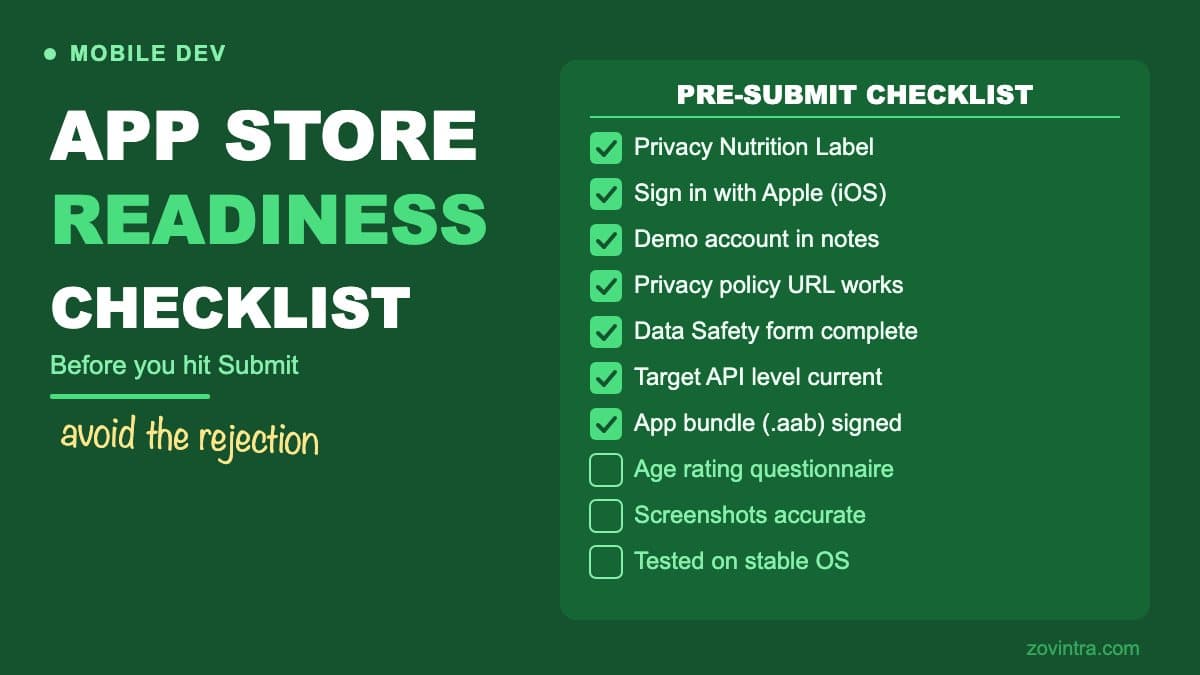
- App privacy details (the privacy nutrition label): Apple requires you to declare in App Store Connect the data you and your third-party partners (including SDKs) collect before you can submit new apps and updates. Missing or inaccurate entries are a common rejection reason.
- In-App Purchases: if your app unlocks features or content such as subscriptions, it must use Apple's in-app purchase system (guideline 3.1.1). Rules on external purchase links differ by storefront - they are permitted in US storefront apps, and elsewhere need an entitlement - so verify the current policy for the regions you ship to.
- Login services: under guideline 4.8, if your app uses a third-party or social login such as Google or Facebook for the primary account, it must also offer an equivalent login option that limits data collection to name and email, lets users keep their email private, and does not collect app interactions for advertising without consent. Sign in with Apple meets these requirements; apps that only use their own account system are exempt.
- App Tracking Transparency (ATT): guideline 5.1.2 says you must get explicit permission through the ATT APIs to track users' activity. Submitting with tracking in use and no ATT prompt is a rejection risk.
- Accurate metadata: screenshots should show the app in use, not merely title art, a login page or a splash screen. App descriptions must accurately represent functionality, and Apple lets app names run to 30 characters at most. Keyword stuffing in the name or subtitle will get flagged.
- Demo account: if your app has account-based features, provide an active demo account or a fully featured demo mode in the review notes. Reviewers cannot test the app if they cannot get past the login screen.
- Test on a range of devices: test on a small-screen iPhone and a current iPad if your app supports both form factors, so layout problems do not surface in review.
- Age rating: answer the age rating questions in App Store Connect honestly so your app aligns with parental controls. An incorrect age rating can lead to rejection or removal.
Play Store Checklist (Android)
- Target API level: since 31 August 2026, new apps and updates must target Android 16 (API level 36) or higher to be submitted to Google Play (Wear OS and Automotive OS and TV/XR have lower targets), and existing apps that target Android 14 or lower are only available to users on devices up to their target level. Google's page mentions a possible extension to 1 November 2026; confirm the current dates before planning.
- Data safety section: every published app must complete the Data safety form, covering what data your app and its third-party SDKs collect and share, the purposes, and whether you offer a way to request data deletion. A privacy policy is required to complete the form.
- Permissions justification: only request permissions your app actively uses. Declare the use case for each permission. Apps that request SMS, call log, or location permissions without a clear use case will face additional review.
- 64-bit support: if your app uses native code, every native 32-bit architecture you support needs its 64-bit counterpart. Pure Java/Kotlin apps are fine only if all libraries and SDKs are too, so verify your dependencies.
- Play Billing for digital goods: same principle as iOS - Google's Payments policy requires its billing system for in-app digital features and content unless a documented exception or an enrolled alternative-billing programme applies.
- Use the Android App Bundle (.aab) format for release builds: Google recommends it for apps published to Google Play, and apps created after August 2021 are expected to use bundles.
- Content rating questionnaire: complete the IARC questionnaire accurately. An incorrect rating is a policy violation.
- Review your app against the Families Policy if your app is aimed at or accessible to children under 13.
What Both Stores Check
- Privacy policy: a working, accurate privacy policy URL is required. Apple requires a link in App Store Connect and within the app, and Google requires one to complete the Data safety form. A broken link or a policy that does not match your actual data practices risks rejection.
- AI features and third-party AI: Apple's guidelines require you to clearly disclose where personal data is shared with third parties, including third-party AI, and obtain explicit permission first. Apps with user-generated or AI-generated content also need filtering, reporting and blocking mechanisms (guideline 1.2). Check Google Play's current policy on AI-generated content separately.
- Terms of service: a working terms of service link should accompany the privacy policy for any app handling user accounts or payments.
- No placeholder content: every feature shown in screenshots and described in the app listing must be functional in the submitted build.
- Test on the current stable OS release: do not submit a build that has only been tested on a beta OS.
The Submission Process Itself
For iOS, build with a Distribution certificate and a provisioning profile that covers your bundle identifier, archive in Xcode, upload via App Store Connect or the Transporter tool, then submit for review. Ensure you have completed the tax and banking information in App Store Connect - Apple will not pay until this is done, and some store features are restricted until it is complete.
For Android, build a signed App Bundle with your release signing setup, upload to the Play Console internal testing track first, promote to production after confirming the build works. Keep your upload key and its password in a secure location. With Play App Signing a lost upload key can be reset through Google, but it adds delay, so do not rely on that.
Both stores allow staged or phased rollouts: releasing to a percentage of users before a full launch. Use this for any significant update, because catching a crash that affects a small share of users during a phased rollout is much better than catching it after full rollout.
What a Rejection Email Actually Tells You
Apple's rejection notices cite specific guideline sections. Read the guideline section in full, not just the summary in the email. The issue is often narrower than it appears: a rejection under section 5.1 (Privacy) might be about a single undeclared data type, not your entire privacy implementation.
Google's rejections are sometimes less specific. If the rejection reason is unclear, the Play Console support team can be contacted for clarification before you re-submit. Re-submitting without understanding the root cause tends to result in another rejection.
Before You Build the Submission
The checklist above covers the final submission gate. But there are decisions made much earlier in the build process - which permissions to request, how to structure payments, how to handle user data - that determine whether you will have a smooth submission. Getting those decisions right at the start is cheaper than unpicking them during a launch week.
How long the overall process takes also depends on how early you involve app store requirements in the design and engineering stages. How long it takes to build a mobile app covers the full timeline including the submission buffer you should plan for.
If you are approaching a submission with an app that has not been reviewed against these requirements and want a structured pre-submission check, talk to us about your mobile app. Catching issues before you submit is significantly less stressful than managing a rejection during a planned launch.
Common questions
How long does App Store review take?
Apple says App Review typically reviews at least 50% of submissions in under 24 hours and 90% in under 48 hours. An incomplete submission can be delayed or fail, and a rejection restarts that clock and delays your launch.
What are the most common reasons an app gets rejected from the App Store?
Missing or inaccurate privacy details are a common rejection reason, as are adding payments without following In-App Purchase guidelines and requesting permissions such as microphone access without a clear explanation. Read the cited guideline section in full, since the issue is often narrower than it appears.
Can someone check my app against store requirements before I submit?
A structured pre-submission check catches issues before a rejection disrupts a planned launch. If your app has not been reviewed against these requirements, you can talk to Zovintra about your mobile app and the submission process.
Sources
- App Store Review Guidelines - Apple Developer, accessed 19 Oct 2026
- App Review - Apple Developer, accessed 19 Oct 2026
- App privacy details on the App Store - Apple Developer, accessed 19 Oct 2026
- Target API level requirements for Google Play apps - Android Developers, 2026-10-16
- Provide information for Google Play's Data safety section - Google Play Console Help, accessed 19 Oct 2026
- Support 64-bit architectures - Android Developers, accessed 19 Oct 2026
- Payments policy - Google Play Console Help, accessed 19 Oct 2026